Avatar Server
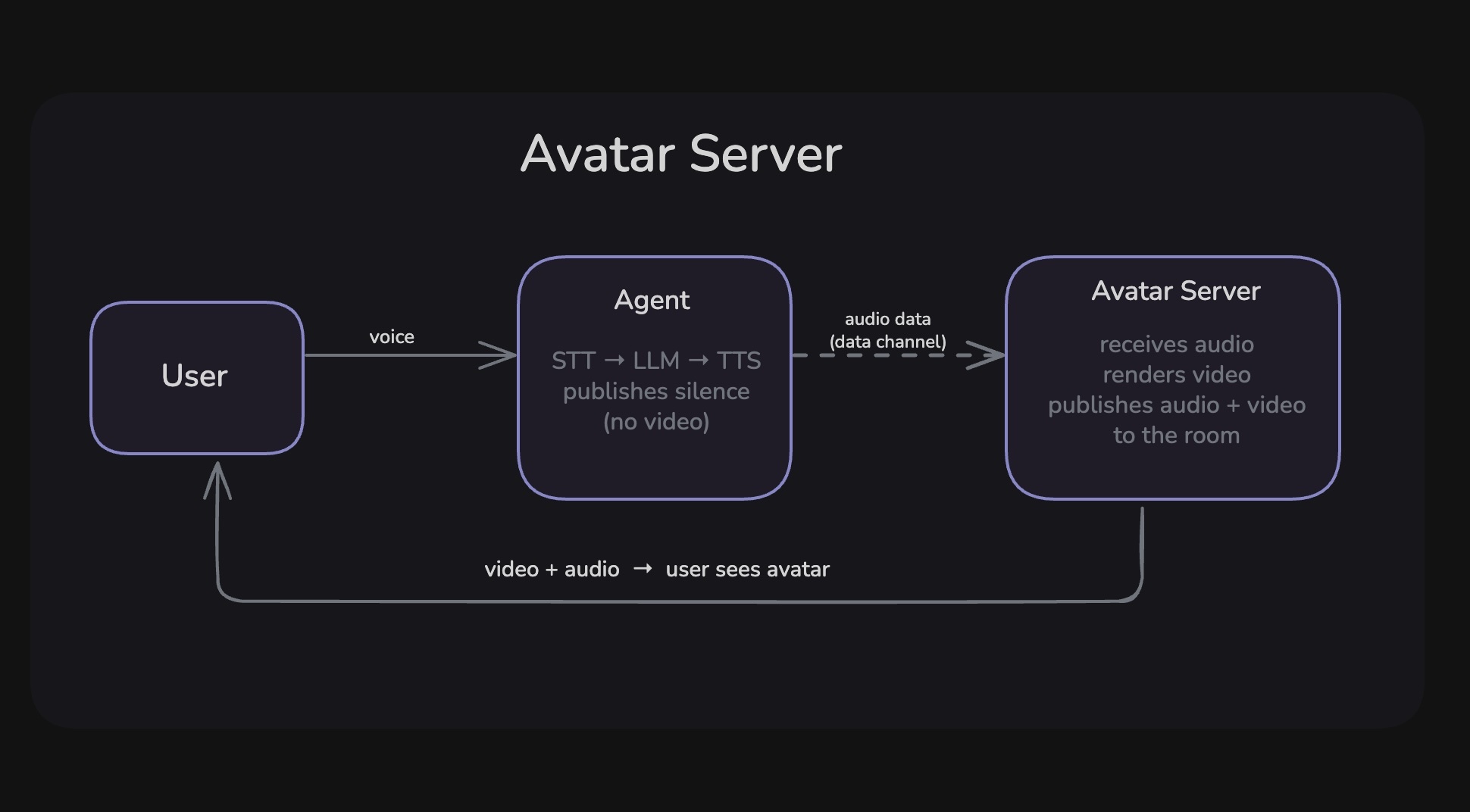
When you add an avatar to your agent, a second participant — the Avatar Server — joins the VideoSDK room alongside the agent. Your agent continues handling the conversation (STT → LLM → TTS) and streams its TTS audio output to the Avatar Server over VideoSDK's built-in data channel. The Avatar Server receives that audio, renders video frames synchronized to the speech, and publishes both audio and video tracks directly back into the room.
The end user only ever sees and hears the Avatar Server's output. The agent participant publishes silence and no video.
How the Audio Gets There — Data Channel
The agent and Avatar Server communicate entirely over VideoSDK's built-in data channels. No external message broker, queue, or WebSocket is needed.
| Message | Direction | Reliability | Purpose |
|---|---|---|---|
| PCM audio chunk | Agent → Avatar Server | Unreliable | Raw TTS audio, chunked at ≤15 KB |
segment_end | Agent → Avatar Server | Reliable | TTS turn has finished |
INTERRUPT | Agent → Avatar Server | Reliable | Stop playback immediately |
stream_ended | Avatar Server → Agent | Reliable | Playback complete acknowledgment |
Audio chunks use unreliable delivery — a dropped packet is better than a delayed one. Control signals use reliable delivery so that a missed interrupt or segment boundary never permanently desyncs state.
Two Ways to Run an Avatar Server
There are two paths depending on whether you want the framework to handle A/V synchronization for you or whether you are building your own rendering backend.
- Local Avatar
- Cloud / Custom Backend
Path 1 - Local Avatar
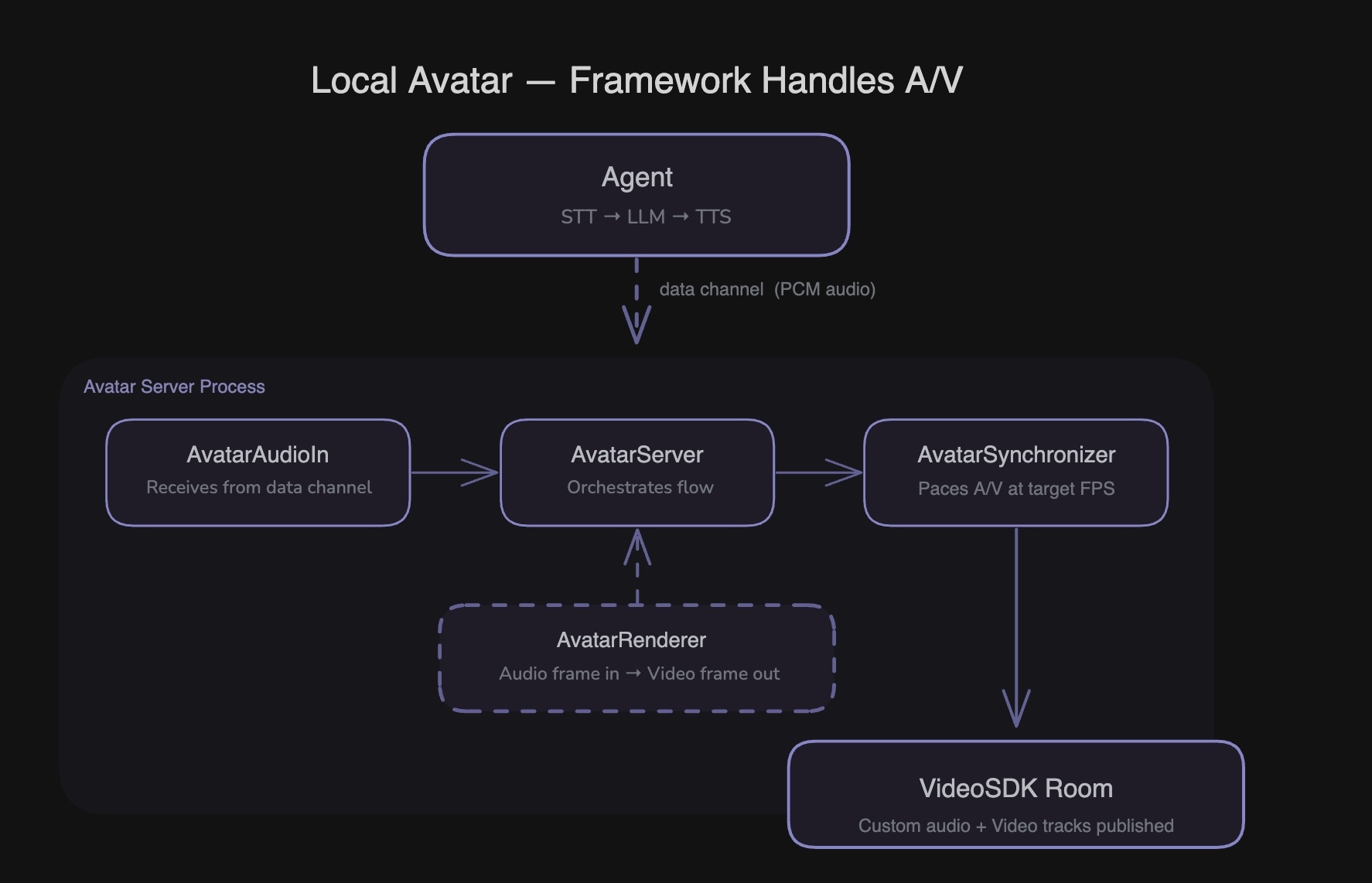
When using a local avatar, the framework's built-in components handle receiving audio from the data channel, orchestrating your renderer, and pacing frames into the room. You only need to implement the visual rendering logic itself.
AvatarAudioIn — runs inside your Avatar Server process. It listens on the data channel, reassembles the PCM stream, handles interrupts (clearing its buffer with a 0.3 s cooldown to drop any in-flight chunks), and exposes a clean async iterator of audio frames and segment markers.
AvatarServer — the orchestrator. It drains AvatarAudioIn, feeds each frame into your AvatarRenderer, forwards the rendered output into AvatarSynchronizer, and sends a stream_ended acknowledgment back to the agent at the end of each TTS turn.
AvatarSynchronizer — paces audio and video frames into their respective custom tracks at the configured FPS. At 30 FPS and 24 kHz, each video frame corresponds to exactly 800 audio samples. It sleeps between frames if the renderer runs faster than real time.
AvatarRenderer — the only thing you implement. For each audio frame you receive, produce one video frame and yield them in order (video first, then audio). The framework wires everything else.
A small dispatcher (POST /launch) runs as a separate HTTP service and spawns one Avatar Server process per room on demand.
Path 2 - Cloud Plugin or Custom Backend
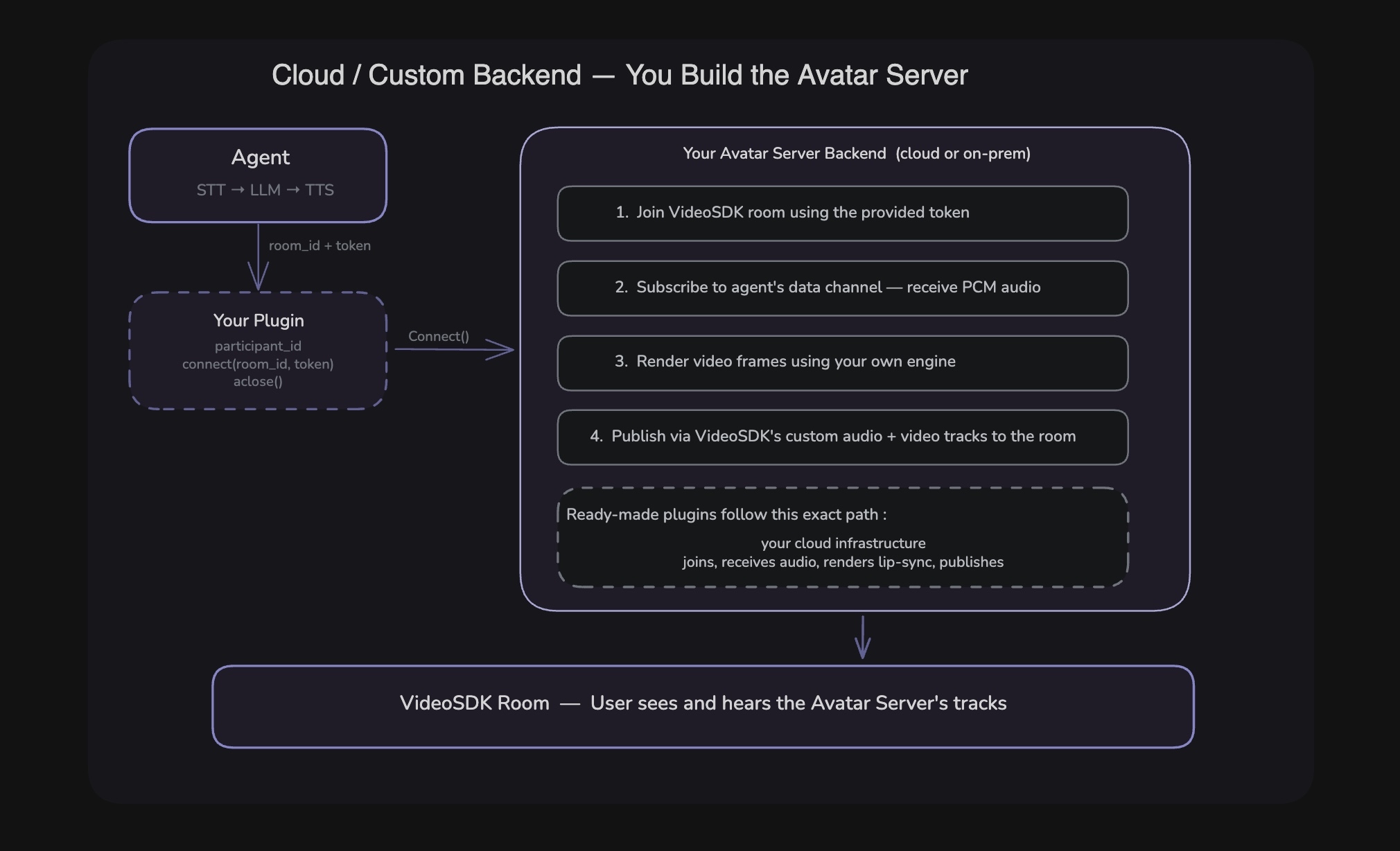
For a custom or cloud-hosted Avatar Server, your backend joins the VideoSDK room directly as the Avatar Server participant. It subscribes to the agent's data channel, receives the raw PCM audio, renders video using its own engine, and publishes custom audio + video tracks back to the room — all without using any of the local framework components.
The framework generates a pre-signed VideoSDK JWT for the Avatar Server and passes it to your plugin's connect() call. Your backend uses that token to join the room and begin receiving.
What your backend needs to do:
- Join the VideoSDK room using the token received from
connect() - Subscribe to the agent's data channel
- Receive incoming PCM audio chunks (unreliable) and control messages (reliable)
- Render video frames using your own engine in sync with the audio
- Publish custom audio and video tracks as the Avatar Server participant
Your plugin on the agent side needs only three things:
class MyProviderAvatarConnection:

    def __init__(self, provider_url: str):
        self.provider_url = provider_url

    @property
    def participant_id(self) -> str:
        return "my_provider_avatar"

    async def connect(self, room_id: str, token: str) -> None:
        # framework passes a pre-signed VideoSDK JWT
        # tell your backend to join and start rendering
        async with httpx.AsyncClient() as client:
            await client.post(
                f"{self.provider_url}/v1/avatar/start",
                json={"room_id": room_id, "token": token},
            )

    async def aclose(self) -> None:
        pass
This pattern is the foundation for any cloud-hosted avatar provider — their backend joins the room, receives audio from the data channel, renders video, and publishes it back, all on their own infrastructure.
Comparison
| Local Avatar | Cloud / Custom Backend | |
|---|---|---|
| Who runs the Avatar Server | You, on your own machine or server | Your backend or a cloud provider |
| Audio received via | Framework's AvatarAudioIn (data channel) | Your own data channel subscriber |
| A/V synchronization | Framework's AvatarSynchronizer | Your own engine or provider's |
| What you implement | AvatarRenderer (one class) | Full backend service |
| Best for | Custom visuals, full control, prototyping | Production lip-sync, managed infrastructure |
| Examples | Circular glow, waveform visualizer | Any cloud avatar provider |
Key Components
| Component | Description |
|---|---|
AvatarAudioOut | Agent-side component that dispatches the Avatar Server and streams TTS audio in chunks over the data channel |
AvatarAudioIn | Service-side component that receives data channel messages and provides an async iterator of audio frames |
AvatarServer | Service-side orchestrator that connects AvatarAudioIn → renderer → synchronizer → media tracks |
AvatarSynchronizer | Handles timing and pacing of audio + video frames based on configured FPS |
AvatarRenderer | Abstract base class — implement this to define avatar visuals and rendering logic |
AvatarSettings | Configuration object for resolution, FPS, and audio sample rate |
generate_avatar_credentials | Utility to sign a VideoSDK JWT for authenticating the Avatar Server participant |
See Also
Got a Question?  Ask us on discord

