Context Window
Context Window provides automatic conversation history management for the Pipeline. Instead of manually trimming messages, you configure a ContextWindow with token and item budgets — it automatically compresses old turns into summaries and truncates excess items before each LLM call, ensuring your agent maintains long-term memory without exceeding context limits.
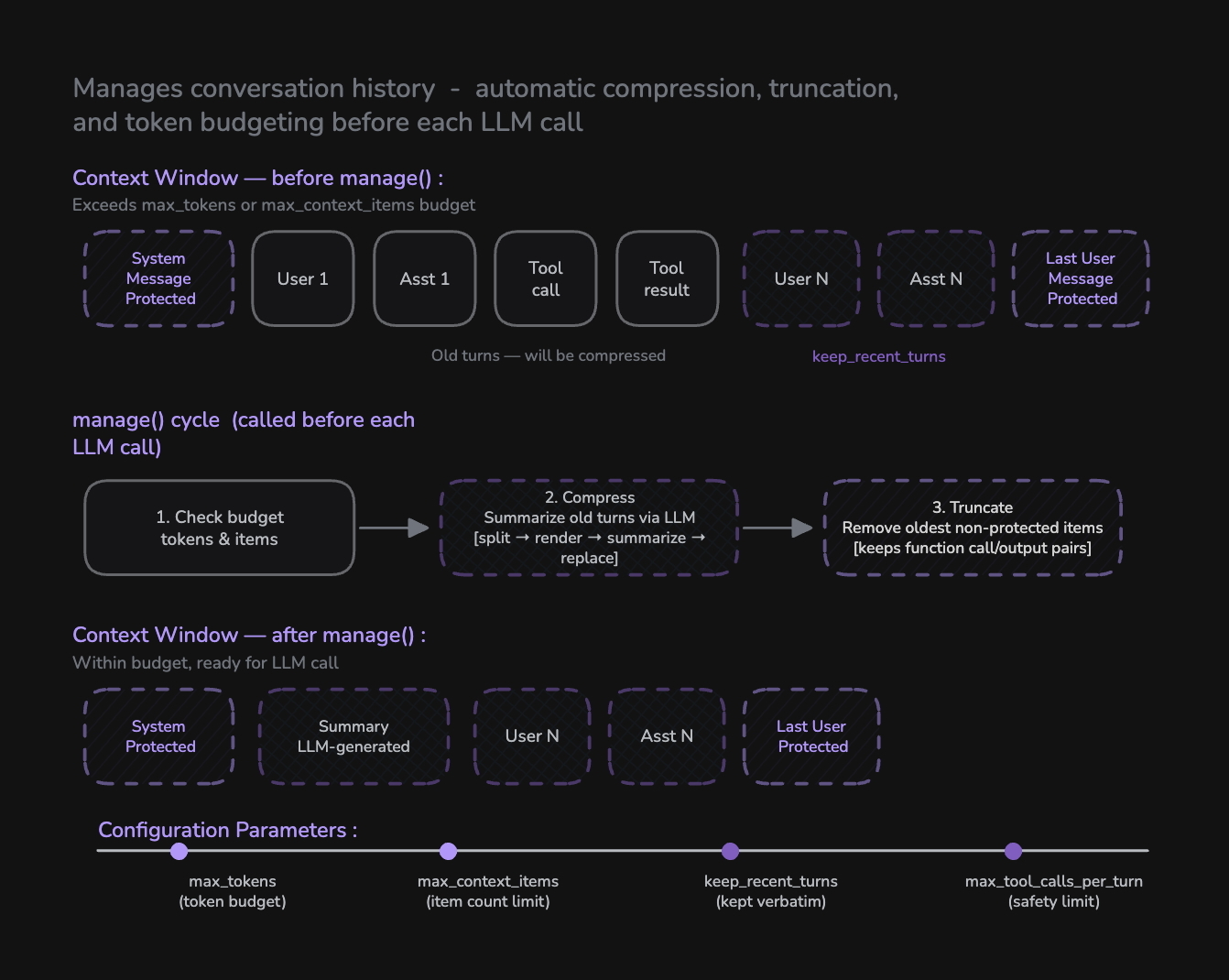
Context Window replaces manual context management. All token budgeting, history compression, and truncation is now handled automatically through a single configuration object.
How Context Window Works
Context Window is configured on a Pipeline instance via the context_window parameter. It runs a two-step management cycle before every LLM call:
| Step | Action | Purpose |
|---|---|---|
| 1. Compress | Summarize old conversation turns via LLM | Preserve long-term memory without keeping every message |
| 2. Truncate | Remove oldest non-protected items | Enforce hard token and item count limits |
Three item types are always protected and never removed:
| Protected Item | Reason |
|---|---|
| System message | Agent instructions must persist |
| Summary message | Compressed history is the agent's long-term memory |
| Last user message | LLMs require conversation to end with a user turn |
from videosdk.agents import Agent, Pipeline, AgentSession, JobContext, RoomOptions, WorkerJob, ContextWindow
from videosdk.agents.plugins import DeepgramSTT, OpenAILLM, CartesiaTTS, SileroVAD, TurnDetector

pipeline = Pipeline(
    stt=DeepgramSTT(),
    llm=OpenAILLM(),
    tts=CartesiaTTS(),
    vad=SileroVAD(),
    turn_detector=TurnDetector(),

    # Configure context window management
    context_window=ContextWindow(
        max_tokens=4000,
        max_context_items=20,
        keep_recent_turns=3,
        max_tool_calls_per_turn=10,
    ),
)
Configuration Parameters
max_tokens
Maximum estimated token budget for the entire conversation history. When exceeded, old turns are compressed then truncated.
Type: int | None
Default: None (no token limit)
Example:
context_window=ContextWindow(
    max_tokens=4000,  # ~5 city plans + conversation with 3 tools each
)
max_context_items
Maximum number of items (messages + tool calls + tool results) in the context. Either limit can trigger compression/truncation.
Type: int | None
Default: None (no item limit)
Example:
context_window=ContextWindow(
    max_context_items=20,  # Keep context compact
)
keep_recent_turns
Number of recent user-assistant exchanges kept verbatim during compression. Everything older gets summarized by the LLM.
Type: int
Default: 3
Example:
context_window=ContextWindow(
    keep_recent_turns=5,  # Keep last 5 exchanges word-for-word
)
max_tool_calls_per_turn
Maximum number of tool calls allowed in a single user turn. This is a safety limit to prevent infinite loops where the LLM keeps requesting tools without ever producing a text response.
Type: int
Default: 10
Example:
context_window=ContextWindow(
    max_tool_calls_per_turn=10,  # Allow up to 10 sequential tool calls
)
For multi-city queries like "Plan for Dubai AND Mumbai", each city requires 3 tool calls. Setting this to 10 gives headroom for 2-3 cities plus any redundant LLM calls.
summary_llm
Optional separate LLM for generating summaries. If not set, the agent's main LLM is used automatically. Use a smaller/cheaper model to reduce costs.
Type: LLM | None
Default: None (uses agent's main LLM)
Example:
from videosdk.agents.plugins import OpenAILLM

context_window=ContextWindow(
    max_tokens=4000,
    keep_recent_turns=3,
    summary_llm=OpenAILLM(model="gpt-4o-mini"),  # Cheaper model for summaries
)
The manage() Cycle
The manage() method runs automatically before each LLM call. It performs two steps in order:
Step 1: Compress
When the context exceeds the token or item budget and there are enough old turns to compress (more than keep_recent_turns + 1), compression kicks in:
- Split — Separate items into old turns and recent turns (keeping the last N user exchanges)
- Render — Convert old items into human-readable text for the summarization prompt
- Summarize — Call the LLM (or
summary_llm) to generate a concise summary - Replace — Remove all old items and insert the summary as an assistant message marked
{"summary": True}
What the summary preserves:
- Key facts, names, and numbers
- Decisions made and their reasoning
- Tool/function call results and outcomes
- Commitments or promises the assistant made
- User objectives, preferences, and unresolved tasks
Step 2: Truncate
After compression (or if compression wasn't needed), truncation enforces hard limits:
- Remove the oldest non-protected items one at a time
- Function call/output pairs are removed together to avoid orphaned tool calls
- Continue until both
max_tokensandmax_context_itemsare satisfied - If only protected items remain, stop even if still over budget
How Tool Chaining Works
Context Window integrates seamlessly with tool chaining. Here's the lifecycle of a multi-tool turn:
- User says "Plan for Dubai" → LLM returns
get_weather(Dubai) - Tool executes → result added to context → LLM called again
- LLM returns
get_clothing_advice(22°C)→ execute → call LLM again - LLM returns
get_activity_suggestion(22°C, "jacket")→ execute → call LLM - LLM returns text "Dubai is 22°C, wear a jacket, go hiking!" → spoken by TTS
That's 3 tool calls + 1 text response = 4 rounds, well within max_tool_calls_per_turn=10.
Some LLMs (Anthropic Claude, OpenAI GPT-4o) can return multiple tool calls in a single response. These are collected and executed in parallel using asyncio.gather, then all results are added to context before the next LLM call. Google Gemini sends one tool call at a time (always sequential).
Complete Example
Here's a full example combining Context Window with tool chaining for a production-ready travel assistant:
import aiohttp
from videosdk.agents import Agent, AgentSession, Pipeline, function_tool, JobContext, RoomOptions, WorkerJob, ContextWindow
from videosdk.agents.plugins import DeepgramSTT, CartesiaTTS, OpenAILLM, SileroVAD, TurnDetector
@function_tool
async def get_weather(city: str) -> dict:
"""Get the current weather temperature for a given city."""
city_coords = {
"dubai": (25.2048, 55.2708),
"mumbai": (19.0760, 72.8777),
"new york": (40.7128, -74.0060),
}
coords = city_coords.get(city.lower(), (25.2048, 55.2708))
lat, lon = coords
url = f"https://api.open-meteo.com/v1/forecast?latitude={lat}&longitude={lon}¤t=temperature_2m"
async with aiohttp.ClientSession() as session:
async with session.get(url) as response:
if response.status == 200:
data = await response.json()
temp = data["current"]["temperature_2m"]
return {"city": city, "temperature": temp, "unit": "Celsius"}
else:
return {"city": city, "temperature": 25, "unit": "Celsius", "note": "fallback"}
@function_tool
async def get_clothing_advice(temperature: float) -> dict:
"""Get clothing recommendation based on temperature."""
if temperature > 35:
advice = "Very light breathable clothes, hat, and sunscreen."
elif temperature > 25:
advice = "Light clothes like t-shirt and shorts."
elif temperature > 15:
advice = "Light jacket or sweater with comfortable pants."
elif temperature > 5:
advice = "Warm coat, scarf, and layered clothing."
else:
advice = "Heavy winter coat, gloves, hat, and thermal layers."
return {"temperature": temperature, "clothing_advice": advice}
class TravelAgent(Agent):
def __init__(self):
super().__init__(
instructions=(
"You are a helpful travel assistant. When a user asks what to do in a city:\n"
"1. FIRST call get_weather to get the temperature\n"
"2. THEN call get_clothing_advice with that temperature\n"
"4. Combine results into a natural spoken response (2-3 sentences max)."
),
tools=[get_weather, get_clothing_advice],
)
async def on_enter(self) -> None:
await self.session.say("Hi! I'm your travel assistant. Ask me about any city!")
async def on_exit(self) -> None:
pass
async def start_session(context: JobContext):
agent = TravelAgent()
pipeline = Pipeline(
stt=DeepgramSTT(),
llm=OpenAILLM(),
tts=CartesiaTTS(),
vad=SileroVAD(),
turn_detector=TurnDetector(),
# ── Context Window Configuration ───────────────────────────
#
# max_tokens: Token budget for the conversation.
# With 2 tools per city, each city adds ~150 tokens.
# 4000 tokens fits ~8 city plans + conversation.
#
# max_context_items: Maximum messages + tool calls.
# Either limit can trigger compression/truncation.
#
# keep_recent_turns: Recent exchanges kept verbatim.
# Everything older gets summarized by the LLM.
#
# max_tool_calls_per_turn: Safety limit per turn.
# Prevents infinite tool-call loops.
#
context_window=ContextWindow(
max_tokens=4000,
max_context_items=20,
keep_recent_turns=3,
max_tool_calls_per_turn=10,
),
)
session = AgentSession(agent=agent, pipeline=pipeline)
await session.start(wait_for_participant=True, run_until_shutdown=True)
def make_context() -> JobContext:
room_options = RoomOptions(
room_id="<room_id>",
name="Travel Agent",
playground=True,
)
return JobContext(room_options=room_options)
if __name__ == "__main__":
job = WorkerJob(entrypoint=start_session, jobctx=make_context)
job.start()
Token Estimation
Context Window uses a lightweight heuristic for token counting (~4 characters per token). This is fast enough for real-time budget decisions but is not a replacement for provider-reported usage.
| Item Type | Estimation Method |
|---|---|
| Text message | len(text) // 4 |
| Image content | Fixed 300 tokens |
| Function call | len(name) // 4 + len(arguments) // 4 + 5 |
| Function output | len(name) // 4 + len(output) // 4 + 5 |
| Per-item overhead | 4 tokens |
Parameter Reference
| Parameter | Type | Default | Purpose |
|---|---|---|---|
max_tokens | int | None | None | Token budget for conversation history |
max_context_items | int | None | None | Maximum items (messages + tool calls) |
keep_recent_turns | int | 3 | Recent exchanges kept verbatim |
max_tool_calls_per_turn | int | 10 | Safety limit for tool calls per turn |
summary_llm | LLM | None | None | Optional dedicated LLM for summaries |
Examples - Try Out Yourself
Got a Question?  Ask us on discord

