Overview
The VideoSDK AI Agent SDK provides a powerful framework for building AI agents that can participate in real-time conversations. This guide explains the core components and demonstrates how to create a complete agentic workflow. The SDK serves as a real-time bridge between AI models and your users, facilitating seamless voice and media interactions.
Architecture
The Agent Session orchestrates the entire workflow, combining the Agent with a Pipeline for real-time communication. The unified Pipeline automatically detects the best mode based on the components you provide — whether that's a full cascade STT-LLM-TTS setup, a realtime speech-to-speech model, or a hybrid of both.
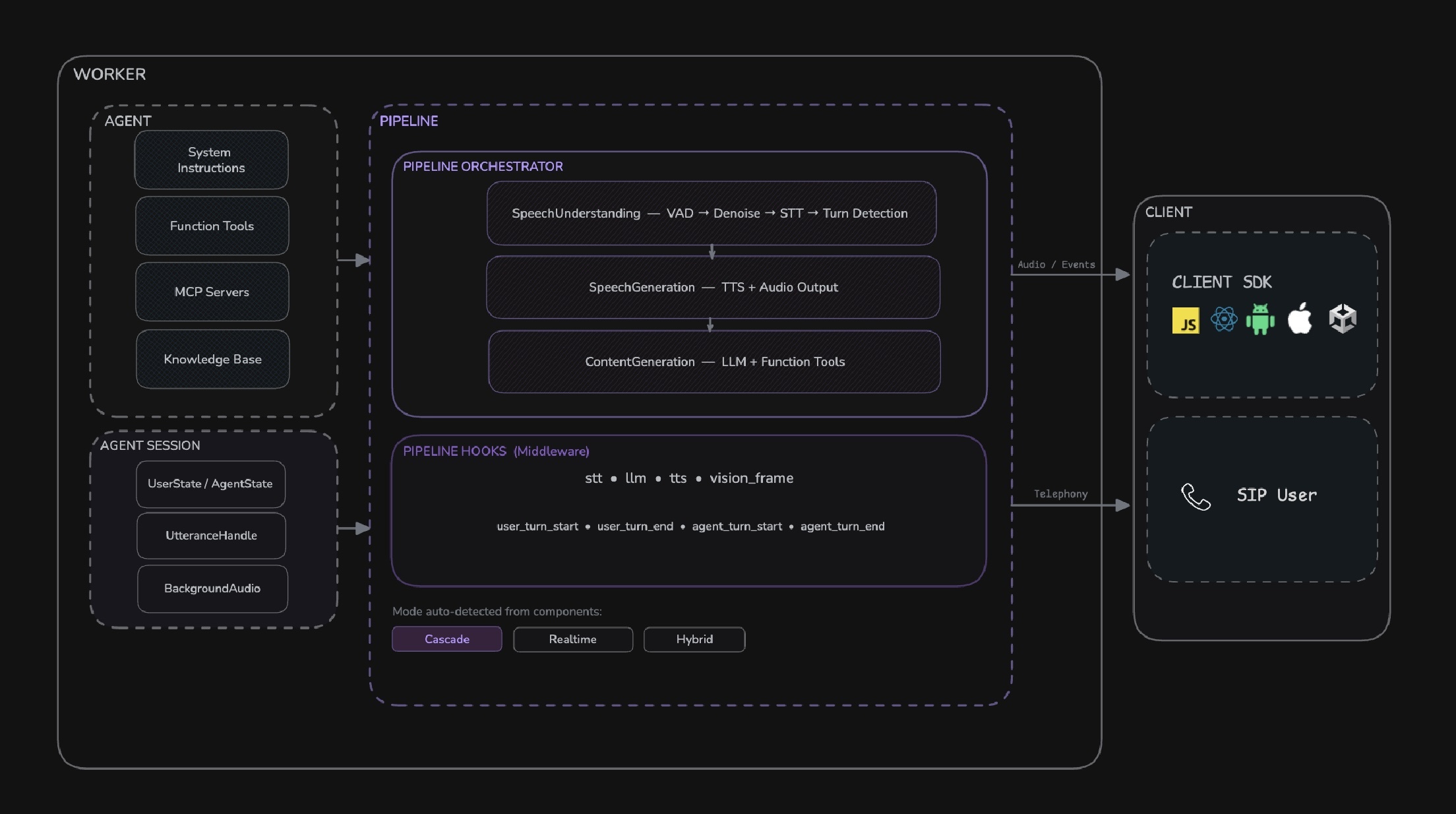
- Agent - This is the base class for defining your agent's identity and behavior. Here, you can configure custom instructions, manage its state, and register function tools.
- Pipeline - This unified component manages the real-time flow of audio and data between the user and the AI models. It auto-detects the optimal mode based on the components you provide:
- Cascade Mode - Provide STT, LLM, TTS, VAD, and Turn Detector for maximum flexibility and control over each processing stage.
- Realtime Mode - Provide a realtime model (e.g., OpenAI Realtime, Google Gemini Live, AWS Nova Sonic) for lowest-latency speech-to-speech processing.
- Hybrid Mode - Combine a realtime model with an external STT (for knowledge base support) or external TTS (for custom voice support).
- Agent Session - This component brings together the agent and pipeline to manage the agent's lifecycle within a VideoSDK meeting.
- Pipeline Hooks - A middleware system for intercepting and processing data at any stage of the pipeline. Use hooks for custom STT/TTS processing, observing or modifying LLM output, lifecycle events, and more.
Supporting Components
These components work behind the scenes to support the core functionality of the AI Agent SDK:
-
Execution & Lifecycle Management
-
JobContext - Provides the execution environment and lifecycle management for AI agents. It encapsulates the context in which an agent job is running.
-
WorkerJob - Manages the execution of jobs and worker processes using Python's multiprocessing, allowing for concurrent agent operations.
-
-
Configuration & Settings
-
RoomOptions - This allows you to configure the behavior of the session, including room settings and other advanced features for the agent's interaction within a meeting.
-
Options - This is used to configure the behavior of the worker, including logging and other execution settings.
-
-
External Integration
- MCP Servers - These enable the integration of external tools through either stdio or HTTP transport.
- MCPServerStdio - Facilitates direct process communication for local Python scripts.
- MCPServerHTTP - Enables HTTP-based communication for remote servers and services.
- MCP Servers - These enable the integration of external tools through either stdio or HTTP transport.
Advanced Features
The AI Agent SDK includes a range of advanced features to build sophisticated conversational agents:
Session Management
Control session timeouts and configure agents to auto-end conversations
Playground Mode
A testing environment to experiment with different agent configurations
Vision Integration
Enable agents to receive and process video input from the meeting
Recording Capabilities
Record agent sessions for analysis and quality assurance
A2A Communication
Allows for seamless collaboration between specialized AI agents
MCP Server Integration
Connect agents to external tools and data sources
Examples - Try Out Yourself
We have examples to get you started. Go ahead, try out, talk to agent and customize according to your needs.
Avatar Integration
Enhance user experience with realistic, lip-synced virtual avatars
Human in the loop
Implement human intervention capabilities in AI agent conversations for better control and oversight
Enhanced Pronounciation
Improve speech quality and pronunciation accuracy for better user experience and communication clarity
PubSub Messaging
Facilitates real-time messaging between agent and client
Got a Question?  Ask us on discord

