Pipeline
The Pipeline is a unified, intelligent component that automatically configures itself based on the components you provide. Instead of choosing between separate pipeline classes, you simply pass the components you need - the Pipeline detects the optimal mode and wires everything together.
The Pipeline replaces the previous CascadePipeline and RealtimePipeline classes. Instead of choosing between separate pipeline types, you now use a single Pipeline that auto-detects the right mode. For custom turn-taking and processing logic previously handled by ConversationalFlow, see Pipeline Hooks.
Core Architecture
The Pipeline auto-detects which mode to use based on the components you provide:
| Mode | Components Provided | Use Case |
|---|---|---|
| Cascade | STT + LLM + TTS + VAD + Turn Detector | Full voice agent with maximum control |
| Realtime (S2S) | Realtime model only (e.g., OpenAI Realtime, Gemini Live) | Lowest latency speech-to-speech |
| Hybrid | Realtime model + external STT or TTS | Knowledge base support, custom voice/STT |
| LLM + TTS | LLM + TTS | Text-in, voice-out |
| STT + LLM | STT + LLM | Voice-in, text-out |
| Partial | Any other combination | Custom setups |
Basic Usage
Cascade Mode
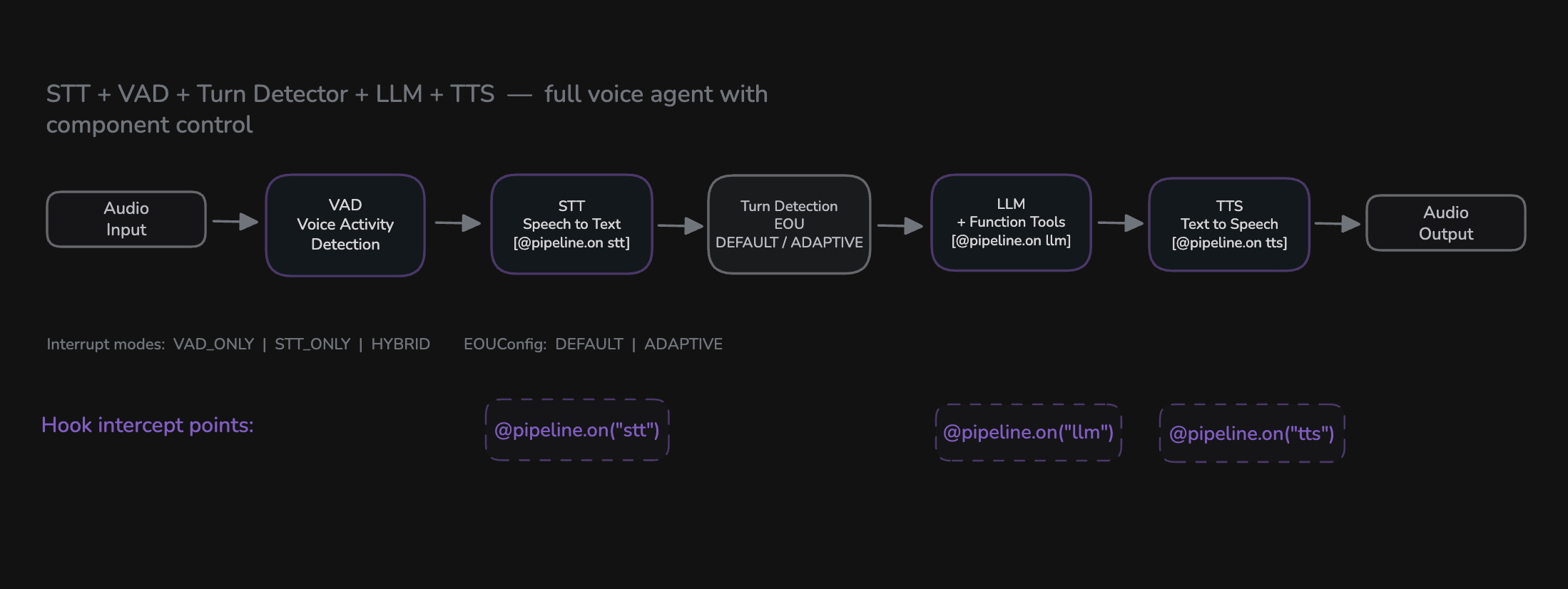
Provide STT, LLM, TTS, VAD, and Turn Detector components to get a full Cascade pipeline with granular control over each stage.
from videosdk.agents import Pipeline, Agent, AgentSession
from videosdk.agents.plugins import DeepgramSTT, OpenAILLM, ElevenLabsTTS, SileroVAD, TurnDetector

class MyAgent(Agent):
    def __init__(self):
        super().__init__(
            instructions="You are a helpful voice assistant."
        )

pipeline = Pipeline(
    stt=DeepgramSTT(),
    llm=OpenAILLM(),
    tts=ElevenLabsTTS(),
    vad=SileroVAD(),
    turn_detector=TurnDetector()
)

# The pipeline auto-detects: FULL_Cascade mode
session = AgentSession(agent=MyAgent(), pipeline=pipeline)
Realtime Mode
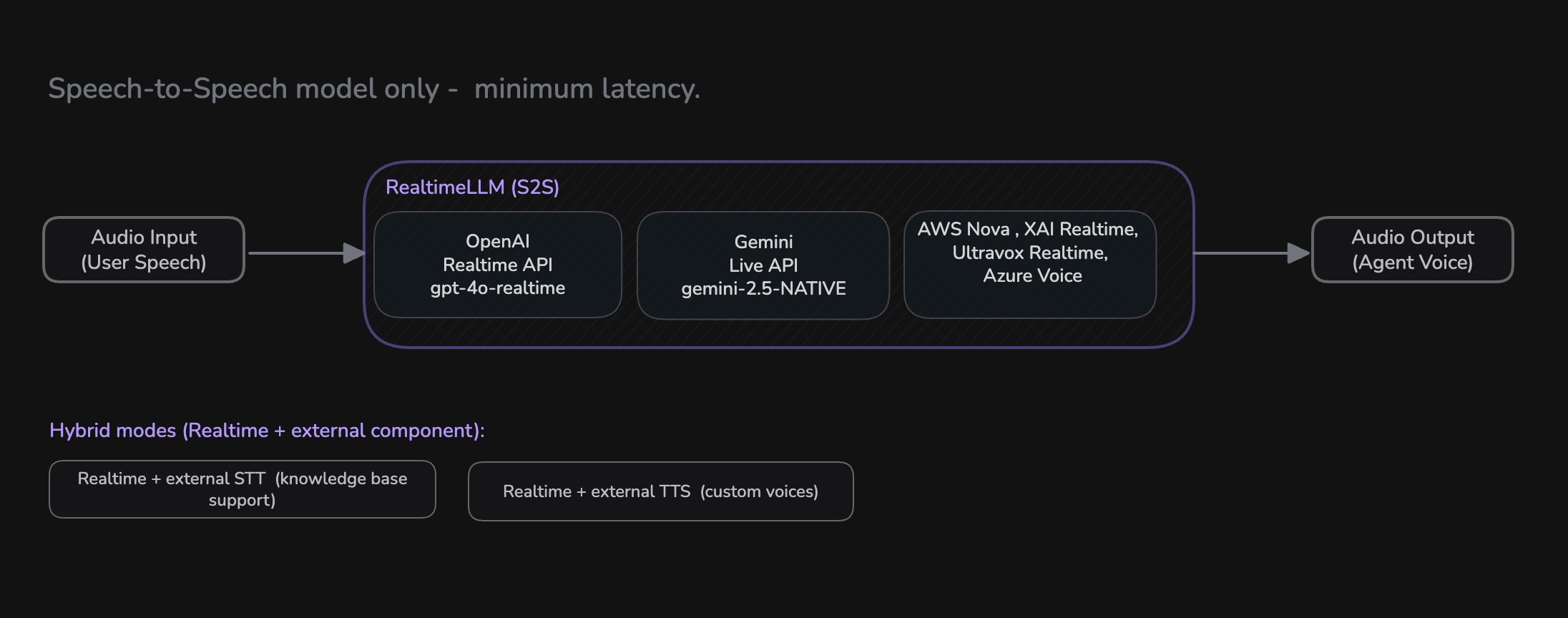
Pass a realtime model (e.g., OpenAI Realtime, Google Gemini Live, AWS Nova Sonic) as the llm parameter to get a speech-to-speech pipeline with minimal latency.
from videosdk.agents import Pipeline, Agent, AgentSession
from videosdk.agents.plugins import OpenAIRealtime, OpenAIRealtimeConfig

class MyAgent(Agent):
    def __init__(self):
        super().__init__(
            instructions="You are a helpful voice assistant."
        )

model = OpenAIRealtime(
    model="gpt-4o-realtime-preview",
    config=OpenAIRealtimeConfig(
        voice="alloy",
        response_modalities=["AUDIO"]
    )
)

pipeline = Pipeline(llm=model)

# The pipeline auto-detects: REALTIME mode (FULL_S2S)
session = AgentSession(agent=MyAgent(), pipeline=pipeline)
In addition to OpenAI, the Pipeline also supports other realtime models like Google Gemini (Live API) and AWS Nova Sonic.
OpenAI
More about OpenAI Realtime Plugin
Google Gemini
More about Gemini Realtime Plugin
AWS Nova Sonic
More about AWSNovaSonic Realtime Plugin
Hybrid Mode
Combine a realtime model with an external STT or TTS. The Pipeline auto-detects the hybrid sub-mode based on which additional components you provide - no extra configuration needed.
Hybrid STT - Use your own STT provider with a realtime model. This is useful when you need local knowledge base (KB) retrieval, since the external STT gives you the transcript text needed to query your KB before the realtime model responds.
from videosdk.agents import Pipeline, Agent, AgentSession, KnowledgeBase, KnowledgeBaseConfig
from videosdk.agents.plugins import GeminiRealtime, GeminiLiveConfig, SarvamAISTT, SileroVAD

model = GeminiRealtime(
    model="gemini-3.1-flash-live-preview",
    config=GeminiLiveConfig(
        voice="Puck",
        response_modalities=["AUDIO"]
    )
)

# Provide external STT - Pipeline auto-detects hybrid_stt mode
pipeline = Pipeline(
    stt=SarvamAISTT(),
    llm=model,
    vad=SileroVAD()
)
Hybrid TTS - Use your own TTS/voice provider with a realtime model. This is useful when you need a specific custom voice that the realtime model doesn't support.
from videosdk.agents import Pipeline
from videosdk.agents.plugins import OpenAIRealtime, OpenAIRealtimeConfig, ElevenLabsTTS

model = OpenAIRealtime(
    model="gpt-4o-realtime-preview",
    config=OpenAIRealtimeConfig(voice="alloy")
)

# Provide external TTS - Pipeline auto-detects hybrid_tts mode
pipeline = Pipeline(
    llm=model,
    tts=ElevenLabsTTS()
)
Realtime Sub-Modes
When using a realtime model, the Pipeline auto-detects the sub-mode:
| Sub-Mode | What It Does | When To Use |
|---|---|---|
full_s2s | End-to-end speech model (default) | Lowest latency, simplest setup |
hybrid_stt | External STT + Realtime LLM & TTS | Knowledge base retrieval, custom STT language support |
hybrid_tts | Realtime STT & LLM + External TTS | Custom voice support with a specific TTS provider |
Advanced Configuration
Fine-tune the behavior of each component by passing specific parameters during initialization.
from videosdk.agents import Pipeline, EOUConfig, InterruptConfig

stt = DeepgramSTT(
    model="nova-2",
    language="en",
    punctuate=True,
    diarize=True
)

llm = OpenAILLM(
    model="gpt-4o",
    temperature=0.7,
    max_tokens=1000
)

tts = ElevenLabsTTS(
    model="eleven_flash_v2_5",
    voice_id="21m00Tcm4TlvDq8ikWAM"
)

vad = SileroVAD(
    threshold=0.35,
    min_silence_duration=0.5
)

turn_detector = TurnDetector(
    threshold=0.8,
    min_turn_duration=1.0
)

pipeline = Pipeline(
    stt=stt,
    llm=llm,
    tts=tts,
    vad=vad,
    turn_detector=turn_detector,
    eou_config=EOUConfig(
        mode="ADAPTIVE",
        min_max_speech_wait_timeout=[0.5, 0.8]
    ),
    interrupt_config=InterruptConfig(
        mode="HYBRID",
        interrupt_min_duration=0.5,
        interrupt_min_words=2,
        resume_on_false_interrupt=False
    )
)
Configuration Parameters
EOUConfig
Controls end-of-utterance detection - how the pipeline decides the user has finished speaking.
| Parameter | Type | Default | Description |
|---|---|---|---|
mode | "DEFAULT" | "ADAPTIVE" | "DEFAULT" | ADAPTIVE uses LLM confidence to adjust wait time |
min_max_speech_wait_timeout | [float, float] | [0.5, 0.8] | Min and max wait time (seconds) after speech ends |
InterruptConfig
Controls how the pipeline handles user interruptions during agent speech.
| Parameter | Type | Default | Description |
|---|---|---|---|
mode | "VAD_ONLY" | "STT_ONLY" | "HYBRID" | "HYBRID" | Detection method for interruptions |
interrupt_min_duration | float | 0.5 | Minimum speech duration (seconds) to trigger interrupt |
interrupt_min_words | int | 2 | Minimum words needed to confirm an interrupt |
false_interrupt_pause_duration | float | 2.0 | Pause duration (seconds) on false interrupt |
resume_on_false_interrupt | bool | False | Whether to resume agent speech after a false interrupt |
Dynamic Component Changes
The Pipeline supports swapping components at runtime without restarting.
Swap Individual Components
# Change a single component during runtime
await pipeline.change_component(
    tts=new_tts_provider
)
Reconfigure Entire Pipeline
A common use of change_pipeline() is to start a call on a deterministic cascade pipeline for tool-heavy work, then flip to a realtime speech-to-speech model when the caller wants snappier latency — without re-introducing the agent or re-asking for details. The agent's chat_context carries across the switch, so the realtime model seeds itself from the full cascade transcript and tool-call history on connect.
class SupportAgent(Agent):
    def __init__(self) -> None:
        super().__init__(
            instructions=(
                "You are a support agent for an online store. Always respond "
                "in English. If the caller asks for faster, snappier responses, "
                "call switch_to_realtime."
            ),
        )
        self._switched = False  # idempotency guard

    @function_tool
    async def switch_to_realtime(self) -> dict:
        """Switch the conversation to a low-latency realtime voice model."""
        if self._switched:
            return {"status": "already on the realtime pipeline"}
        self._switched = True

        # Defer with create_task — change_pipeline tears down the pipeline
        # currently running this very tool. Calling it synchronously would
        # cancel the running task mid-stack.
        async def _do_switch() -> None:
            await self.session.pipeline.change_pipeline(
                llm=GeminiRealtime(
                    model="gemini-3.1-flash-live-preview",
                    config=GeminiLiveConfig(voice="Leda", response_modalities=["AUDIO"]),
                ),
            )
            await self.session.say(
                "Done — I've switched to realtime mode. Let's keep going."
            )

        asyncio.create_task(_do_switch())
        return {"status": "switching to the realtime pipeline"}
After the switch, the realtime model has access to every prior user turn, assistant turn, and tool call result from the cascade half. If the caller previously gave order_id=456 and the cascade LLM called lookup_order(456) → shipped/Tuesday, the realtime model will reference "order 456" and "Tuesday" naturally — without re-asking.
-
Always defer
change_pipeline()withasyncio.create_task(...). The call tears down the pipeline that is currently executing the tool — calling it synchronously makes the running task cancel itself mid-stack. -
change_component()swaps individual components within the same pipeline mode. Usechange_pipeline()when you need to reconfigure the entire pipeline or switch modes (e.g., from Cascade to realtime).
Plugin Ecosystem
There are multiple plugins available for STT, LLM, and TTS. Check them out:
STT
Learn more about STT plugins
LLM
Learn more about LLM plugins
TTS
Learn more about TTS plugins
Realtime
Learn more about Realtime plugins
Plugin Installation
Install the plugins you need:
# Install specific provider plugins
pip install videosdk-plugins-openai
pip install videosdk-plugins-elevenlabs
pip install videosdk-plugins-deepgram
Plugin Development
To create custom plugins, follow the plugin development guide ↗.
Key requirements include:
- Inherit from the correct base class (
STT,LLM, orTTS) - Implement all abstract methods
- Handle errors consistently using
self.emit("error", message) - Clean up resources in the
aclose()method
Best Practices
- Component Selection: Choose providers based on your specific requirements (latency, quality, cost)
- Mode Awareness: Let the Pipeline auto-detect the mode - just provide the components you need and it will configure itself
- Error Handling: Implement proper error handling and fallback strategies using the Fallback Adapter
- Resource Management: Use the
cleanup()method to properly release components - Audio Format: Ensure your custom plugins handle the 48kHz audio format correctly
- Custom Processing: Use Pipeline Hooks for custom turn-taking logic, RAG, content filtering, and lifecycle events
Pipeline Mode Comparison
| Feature | Cascade Mode | Realtime Mode | Hybrid Mode |
|---|---|---|---|
| Control | Maximum control over each component | Integrated model control | Mix of both |
| Flexibility | Mix different providers | Single model provider | Partial provider choice |
| Latency | Higher due to sequential processing | Lowest with streaming | Between Cascade and realtime |
| Customization | Extensive via hooks and config | Limited to model capabilities | Selective customization |
| Complexity | More components to configure | Simplest setup | Moderate |
| Cost | Per-component pricing | Single model pricing | Mixed pricing |
Examples - Try Out Yourself
Got a Question?  Ask us on discord

