Pipeline Hooks
Pipeline Hooks provide a middleware system for intercepting and processing data at different stages of the Pipeline. Instead of subclassing, you register hook functions using the @pipeline.on() decorator to add custom logic - from preprocessing audio before STT, to observing or modifying LLM output, to tracking lifecycle events.
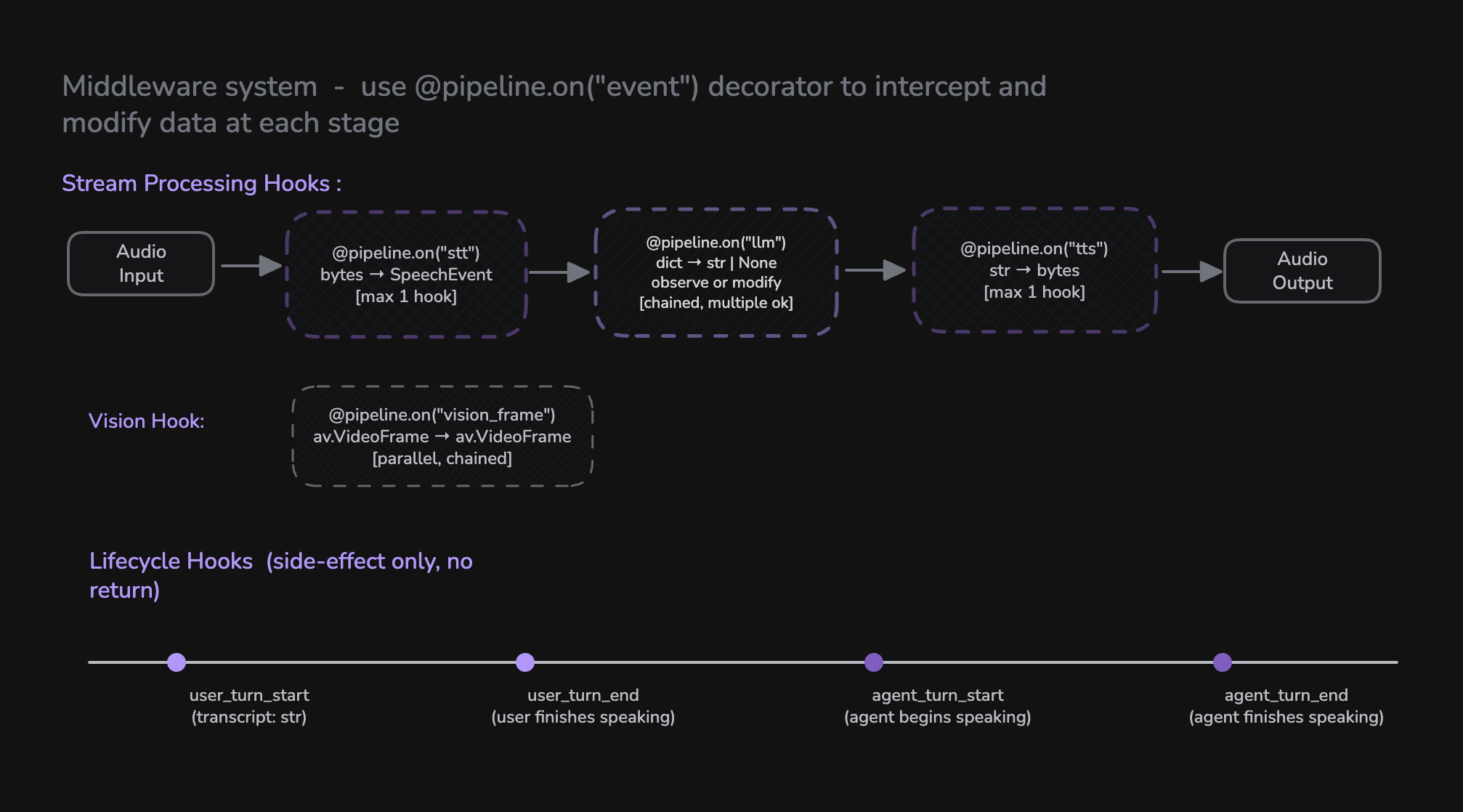
Pipeline Hooks replace the previous ConversationFlow class. All custom turn-taking logic, RAG integration, content filtering, and lifecycle management is now done through hooks.
How Hooks Work
Hooks are registered on a Pipeline instance using the @pipeline.on("event_name") decorator. There are three categories of hooks:
| Category | Hooks | Purpose |
|---|---|---|
| Stream Processing | stt, tts | Replace or wrap the built-in STT/TTS processing |
| LLM | llm | Observe or modify LLM-generated content before TTS |
| Lifecycle | user_turn_start, user_turn_end, agent_turn_start, agent_turn_end, vision_frame | Observe events and trigger side effects |
from videosdk.agents import Pipeline
from videosdk.agents.plugins import DeepgramSTT, OpenAILLM, CartesiaTTS, SileroVAD, TurnDetector

pipeline = Pipeline(
    stt=DeepgramSTT(),
    llm=OpenAILLM(),
    tts=CartesiaTTS(),
    vad=SileroVAD(),
    turn_detector=TurnDetector()
)

# Register hooks using the decorator pattern
@pipeline.on("user_turn_start")
async def on_user_start(transcript: str):
    print(f"User said: {transcript}")

@pipeline.on("agent_turn_end")
async def on_agent_done():
    print("Agent finished speaking")
Hook Availability by Pipeline Mode
Hook support depends on whether you run a cascade (STT → LLM → TTS), realtime/S2S, or hybrid pipeline.
| Hook | Cascade | Realtime (S2S) | Hybrid | Notes |
|---|---|---|---|---|
stt | Yes | No | Partial | Available in cascade and HYBRID_STT only. Replaces built-in STT. |
tts | Yes | No | Partial | Available in cascade and HYBRID_TTS only. Replaces built-in TTS. |
llm | Yes | Yes | Yes | In realtime, observation only - audio is already streaming; cannot modify TTS output. |
vision_frame | Yes | Yes | Yes | Works when vision is enabled. |
user_turn_start | Yes | Yes | Yes | Fires when the final user transcript is available. |
user_turn_end | Yes | Yes | Yes | Fires after the user finishes speaking. |
agent_turn_start | Yes | Yes | Yes | Fires when the agent starts speaking. |
agent_turn_end | Yes | Yes | Yes | Fires when the agent finishes speaking. |
Hybrid modes: HYBRID_STT (external STT + realtime LLM) supports the stt hook; HYBRID_TTS (realtime (STT+LLM) + external TTS) supports the tts hook. Lifecycle and llm hooks work in all modes.
Stream Processing Hooks
Stream processing hooks replace or wrap the built-in component processing. They receive an async iterator as input and yield processed results.
stt - Speech-to-Text Stream Hook
Intercept and process the audio stream before/after STT processing. This hook replaces the built-in STT pipeline entirely - you are responsible for running STT within the hook.
Signature:
async def stt_hook(audio_stream: AsyncIterator[bytes]) -> AsyncIterator[SpeechEvent]
When it fires: When audio arrives from the user and needs to be transcribed.
Behavior: Only one stt hook can be registered. Registering a second will overwrite the first.
Example - Preprocess audio and normalize transcripts:
import re

@pipeline.on("stt")
async def stt_hook(audio_stream):
    # Phase 1: Preprocess audio (filter small chunks)
    async def filtered_audio():
        async for audio in audio_stream:
            if len(audio) < 300:
                continue  # Skip very small audio chunks
            yield audio

    # Phase 2: Run STT on filtered audio and normalize output
    async for event in run_stt(filtered_audio()):
        if event.data and event.data.text:
            text = event.data.text.lower()
            # Remove filler words
            text = re.sub(r"\b(uh|um|like)\b", "", text)
            event.data.text = " ".join(text.split())
        yield event
tts - Text-to-Speech Stream Hook
Intercept and process the text stream before/after TTS synthesis. This hook replaces the built-in TTS processing - you run TTS within the hook.
Signature:
async def tts_hook(text_stream: AsyncIterator[str]) -> AsyncIterator[bytes]
When it fires: When the LLM generates text that needs to be synthesized to speech.
Behavior: Only one tts hook can be registered. Registering a second will overwrite the first.
Example - Format text before synthesis:
@pipeline.on("tts")
async def tts_hook(text_stream):
    # Preprocess text for better pronunciation
    async def preprocess():
        async for text in text_stream:
            yield text.replace("AM", "A M").replace("PM", "P M")

    # Run TTS on preprocessed text
    async for audio in run_tts(preprocess()):
        yield audio
LLM Hook
The llm hook fires when the LLM response is fully collected, before TTS synthesis begins. It can be used to observe or modify the generated response.
llm
Signature:
# Observe only (return None or no return)
async def on_llm(data: dict) -> None

# Modify response (return str or yield str chunks)
async def on_llm(data: dict) -> str | AsyncIterator[str]
Data format: {"text": "the full generated response"}
When it fires: After the LLM has finished generating its full response, before TTS synthesis.
Behavior: You can register multiple llm hooks. They are chained - each receives the (possibly modified) text from the previous hook. If a hook returns/yields a string, it replaces the response. If it returns None, the text passes through unchanged.
Example - Observe:
@pipeline.on("llm")
async def on_llm(data: dict):
    text = data.get("text", "")
    logging.info(f"LLM generated: {text[:100]}...")
    await store_response(text)
Example - Modify (return):
@pipeline.on("llm")
async def filter_response(data: dict):
    text = data.get("text", "")
    # Remove sensitive information before TTS
    return text.replace("SSN", "[REDACTED]")
Example - Modify (yield chunks):
@pipeline.on("llm")
async def format_response(data: dict):
    text = data.get("text", "")
    yield text.replace("AM", "A M").replace("PM", "P M")
Vision Hook
The vision_frame hook fires VProcess video frames when vision is enabled. Hooks are chained - each hook receives the output of the previous one.
vision_frame
Signature:
async def vision_hook(frame_stream: AsyncIterator[av.VideoFrame]) -> AsyncIterator[av.VideoFrame]
Example:
@pipeline.on("vision_frame")
async def process_frames(frame_stream):
    async for frame in frame_stream:
        # Apply custom filter or analysis
        processed = apply_filter(frame)
        yield processed
Lifecycle Hooks
Lifecycle hooks are side-effect-only hooks for observing events. They don't modify data flow - use them for logging, analytics, state management, and triggering external actions.
You can register multiple lifecycle hooks for the same event. All registered hooks will be called in order.
user_turn_start
Called when the user's final transcript is available and a new turn begins.
Signature:
async def on_user_turn_start(transcript: str) -> None
Example:
@pipeline.on("user_turn_start")
async def on_user_turn_start(transcript: str):
    logging.info(f"User said: {transcript}")
    await analytics.track_user_input(transcript)
user_turn_end
Called after the agent finishes generating and speaking its response for the current turn.
Signature:
async def on_user_turn_end() -> None
Example:
@pipeline.on("user_turn_end")
async def on_user_turn_end():
    logging.info("Turn completed")
    await save_turn_to_history()
agent_turn_start
Called when the agent starts speaking (first audio byte is sent to the audio track).
Signature:
async def on_agent_turn_start() -> None
Example:
@pipeline.on("agent_turn_start")
async def on_agent_turn_start():
    logging.info("Agent started speaking")
agent_turn_end
Called when the agent finishes speaking (audio track buffer has fully played out).
Signature:
async def on_agent_turn_end() -> None
Example:
@pipeline.on("agent_turn_end")
async def on_agent_turn_end():
    logging.info("Agent finished speaking")
    await update_conversation_state()
Complete Example
Here's a full example combining multiple hooks for a production-ready voice agent:
import logging
import re
from videosdk.agents import Agent, Pipeline, AgentSession, JobContext
from videosdk.agents.plugins import DeepgramSTT, GoogleLLM, CartesiaTTS, SileroVAD, TurnDetector

class VoiceAgent(Agent):
    def __init__(self):
        super().__init__(
            instructions="You are a helpful customer support agent."
        )

async def entrypoint(ctx: JobContext):
    agent = VoiceAgent()

    pipeline = Pipeline(
        stt=DeepgramSTT(),
        llm=GoogleLLM(),
        tts=CartesiaTTS(),
        vad=SileroVAD(),
        turn_detector=TurnDetector(),
    )

    # --- Stream Processing Hooks ---

    @pipeline.on("stt")
    async def stt_hook(audio_stream):
        """Filter audio and clean up transcripts"""
        async def filtered_audio():
            async for audio in audio_stream:
                if len(audio) < 300:
                    continue
                yield audio

        async for event in run_stt(filtered_audio()):
            if event.data and event.data.text:
                text = event.data.text.lower()
                text = re.sub(r"\b(uh|um|like)\b", "", text)
                event.data.text = " ".join(text.split())
            yield event

    @pipeline.on("tts")
    async def tts_hook(text_stream):
        """Improve pronunciation of abbreviations"""
        async def preprocess():
            async for text in text_stream:
                yield text.replace("AM", "A M").replace("PM", "P M")

        async for audio in run_tts(preprocess()):
            yield audio

    # --- LLM Hook ---

    @pipeline.on("llm")
    async def on_llm(data: dict):
        """Observe or modify LLM output"""
        logging.info(f"[LLM] {data.get('text', '')[:80]}...")

    # --- Lifecycle Hooks ---

    @pipeline.on("user_turn_start")
    async def on_user_start(transcript: str):
        logging.info(f"[USER] {transcript}")

    @pipeline.on("user_turn_end")
    async def on_user_end():
        logging.info("[TURN END]")

    @pipeline.on("agent_turn_start")
    async def on_agent_start():
        logging.info("[AGENT SPEAKING]")

    @pipeline.on("agent_turn_end")
    async def on_agent_done():
        logging.info("[AGENT DONE]")


    # --- Start Session ---

    session = AgentSession(agent=agent, pipeline=pipeline)
    await session.start(wait_for_participant=True, run_until_shutdown=True)
Migration from ConversationFlow
If you were previously using ConversationFlow, here's how to migrate to Pipeline Hooks:
| ConversationFlow Pattern | Pipeline Hooks Equivalent |
|---|---|
on_turn_start(transcript) | @pipeline.on("user_turn_start") |
on_turn_end() | @pipeline.on("user_turn_end") |
Override run() for RAG | Use knowledge base or custom LLM logic |
Override run() for direct response | Use custom LLM logic |
| Custom STT processing | @pipeline.on("stt") |
| Custom TTS processing | @pipeline.on("tts") |
State machine in run() | Use conversational graph or custom logic |
Before (ConversationFlow):
class RAGFlow(ConversationFlow):
    async def on_turn_start(self, transcript: str):
        logging.info(f"User: {transcript}")

    async def run(self, transcript: str):
        context = await retrieve_docs(transcript)
        if context:
            self.agent.chat_context.add_message(
                role="system", content=f"Context: {context}"
            )
        async for chunk in self.process_with_llm():
            yield chunk

pipeline = CascadingPipeline(stt=stt, llm=llm, tts=tts)
flow = RAGFlow(agent)
pipeline.set_conversation_flow(flow)
After (Pipeline Hooks):
pipeline = Pipeline(stt=stt, llm=llm, tts=tts, vad=vad, turn_detector=turn_detector)

@pipeline.on("user_turn_start")
async def on_user_start(transcript: str):
    logging.info(f"User: {transcript}")

@pipeline.on("llm")
async def on_llm(data: dict):
    text = data.get("text", "")
    logging.info(f"LLM generated: {text[:100]}")
Hook Reference
| Hook | Signature | Multiple? | Purpose |
|---|---|---|---|
stt | (AsyncIterator[bytes]) → AsyncIterator[SpeechEvent] | No | STT processing |
tts | (AsyncIterator[str]) → AsyncIterator[bytes] | No | TTS processing |
llm | (dict) → str | AsyncIterator[str] | None | Yes | Observe or modify LLM-generated content |
vision_frame | (AsyncIterator[VideoFrame]) → AsyncIterator[VideoFrame] | Yes | Process video frames |
user_turn_start | (str) → None | Yes | Observe user turn start |
user_turn_end | () → None | Yes | Observe user turn end |
agent_turn_start | () → None | Yes | Observe agent speech start |
agent_turn_end | () → None | Yes | Observe agent speech end |
Examples - Try Out Yourself
Got a Question?  Ask us on discord

