RAG (Retrieval-Augmented Generation) integration
RAG helps your AI agent find relevant information from documents to give better answers. It searches through your knowledge base and uses that context to respond more accurately.
Architecture
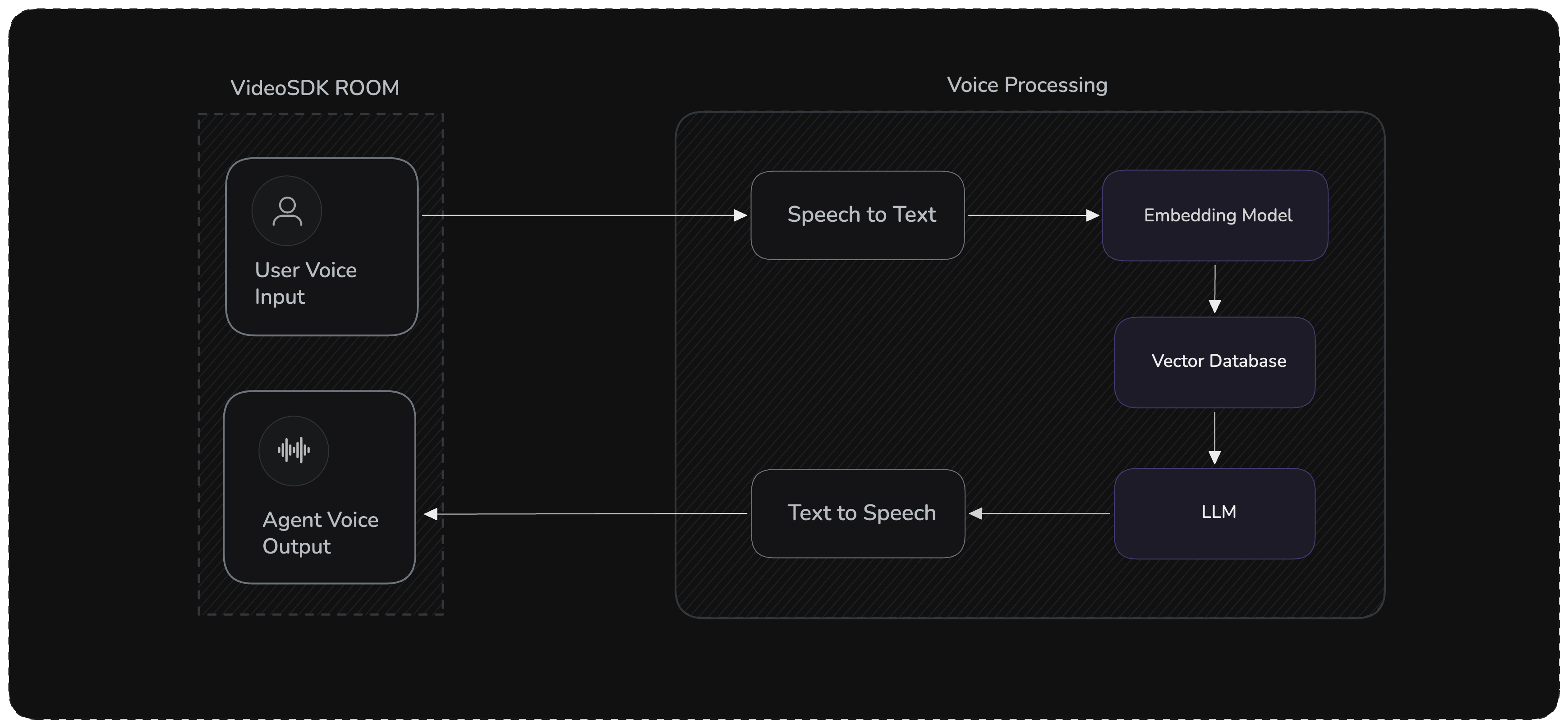
The RAG pipeline flow:
- Voice Input → STT converts speech to text
- Retrieval → Knowledge base fetches relevant documents based on the transcript
- Augmentation → Retrieved context is injected into the LLM prompt
- Generation → LLM generates a grounded response using the context
- Voice Output → TTS converts response to speech
Managed RAG
With Managed RAG, you can upload knowledge bases from the VideoSDK dashboard and attach them to your agent to enhance responses using retrieval-augmented generation.
Step 1 : Upload Knowledge Base on the dashboard
Step 2 : Configure it in Pipeline
After uploading, the Knowledge Base is assigned a unique ID(as shown in Step 1), which you can use to load it, enabling the agent to fetch relevant information during conversations.
import os
from videosdk.agents import KnowledgeBase, KnowledgeBaseConfig

# Initialize Knowledge Base with ID from Dashboard
kb_id = os.getenv("KNOWLEDGE_BASE_ID")
config = KnowledgeBaseConfig(id=kb_id, top_k=3)

# Load Knowledge Base and pass it to the agent
agent = VoiceAgent(
    knowledge_base=KnowledgeBase(config)
)
Custom RAG
Build your own RAG pipeline using any vector database (ChromaDB, Pinecone, etc.) with the user_turn_start hook. This hook fires when the user's transcript is ready — before the LLM is called — giving you the perfect place to retrieve documents and inject context.
Prerequisites
pip install "videosdk-agents[deepgram,openai,elevenlabs,silero,turn_detector]"
pip install chromadb openai numpy
DEEPGRAM_API_KEY = "Your Deepgram API Key"
OPENAI_API_KEY = "Your OpenAI API Key"
ELEVENLABS_API_KEY = "Your ElevenLabs API Key"
VIDEOSDK_AUTH_TOKEN = "VideoSDK Auth token"
For a complete working example with all the code integrated together, check out our GitHub repository: Custom RAG Example
Step 1: Agent with Vector Store
Create a custom agent that initializes a ChromaDB collection with your documents and provides an async retrieve() method:
import os
import chromadb
from openai import OpenAI, AsyncOpenAI
from videosdk.agents import Agent

class RAGVoiceAgent(Agent):
    def __init__(self):
        super().__init__(
            instructions="""You are a helpful voice assistant that answers questions
            based on provided context. Use the retrieved documents to ground your answers.
            If no relevant context is found, say so. Be concise and conversational."""
        )

        self.openai_client = AsyncOpenAI(api_key=os.getenv("OPENAI_API_KEY"))

        # Your documents — replace with your own data
        self.documents = [
            "What is VideoSDK? VideoSDK is a comprehensive real-time communication platform that provides APIs and SDKs for video calling, live streaming, and AI-powered voice agents.",
            "How do I authenticate with VideoSDK? Use JWT tokens generated with your API key and secret from the VideoSDK dashboard. Set the token as the VIDEOSDK_AUTH_TOKEN environment variable.",
            "How do I build voice agents with VideoSDK? You can build voice agents by installing the Python library: pip install videosdk-agents. It supports Cascading, Realtime, and Hybrid modes. Visit https://www.videosdk.live/ for more information.",
            "What is a Pipeline in VideoSDK Agents? A Pipeline is a unified component that automatically detects the best mode (Cascading, Realtime, or Hybrid) based on the components you provide.",
            "If a user's question is related to VideoSDK and the answer is unknown, direct them to https://www.videosdk.live/ for more information."
        ]

        # Set up ChromaDB (in-memory; use PersistentClient for production)
        self.chroma_client = chromadb.Client()
        self.collection = self.chroma_client.create_collection(name="rag_docs")
        self._initialize_knowledge_base()

    def _initialize_knowledge_base(self):
        """Generate embeddings and store documents."""
        client = OpenAI(api_key=os.getenv("OPENAI_API_KEY"))
        embeddings = []
        for doc in self.documents:
            resp = client.embeddings.create(input=doc, model="text-embedding-ada-002")
            embeddings.append(resp.data[0].embedding)
        self.collection.add(
            documents=self.documents,
            embeddings=embeddings,
            ids=[f"doc_{i}" for i in range(len(self.documents))],
        )
Step 2: Retrieval Method
Add an async method that generates a query embedding and searches ChromaDB:
    async def retrieve(self, query: str, k: int = 2) -> list[str]:
        """Retrieve top-k most relevant documents from the vector store."""
        response = await self.openai_client.embeddings.create(
            input=query, model="text-embedding-ada-002"
        )
        query_embedding = response.data[0].embedding

        results = self.collection.query(
            query_embeddings=[query_embedding], n_results=k
        )
        return results["documents"][0] if results["documents"] else []
Step 3: Agent Lifecycle
    async def on_enter(self) -> None:
        await self.session.say(
            "Hello! I'm your VideoSDK assistant powered by a local knowledge base. "
            "Ask me anything about VideoSDK."
        )

    async def on_exit(self) -> None:
        await self.session.say("Thank you for using VideoSDK. Goodbye!")
Step 4: Pipeline with RAG Hook
Use the user_turn_start hook to retrieve documents and inject them into chat_context before the LLM runs. Optionally use the llm hook to observe the generated response.
import logging
from videosdk.agents import Pipeline, AgentSession, JobContext, RoomOptions, WorkerJob
from videosdk.agents.plugins import DeepgramSTT, OpenAILLM, CartesiaTTS, SileroVAD, TurnDetector

logger = logging.getLogger(__name__)

async def entrypoint(ctx: JobContext):
    agent = RAGVoiceAgent()

    pipeline = Pipeline(
        stt=DeepgramSTT(),
        llm=OpenAILLM(),
        tts=CartesiaTTS(),
        vad=SileroVAD(),
        turn_detector=TurnDetector(),
    )

    @pipeline.on("user_turn_start")
    async def on_user_turn_start(transcript: str):
        """Retrieve docs and inject context before the LLM is called."""
        context_docs = await agent.retrieve(transcript)
        if context_docs:
            context_str = "\n\n".join(
                f"Document {i+1}: {doc}" for i, doc in enumerate(context_docs)
            )
            agent.chat_context.add_message(
                role="system",
                content=f"Retrieved Context:\n{context_str}\n\nUse this context to answer the user's question.",
            )
            logger.info(f"Injected {len(context_docs)} docs into chat context")

    @pipeline.on("llm")
    async def on_llm(data: dict):
        """Observe the LLM response (optional)."""
        text = data.get("text", "")
        logger.info(f"[LLM] Generated ({len(text)} chars): {text[:120]}...")

    session = AgentSession(agent=agent, pipeline=pipeline)
    await session.start(wait_for_participant=True, run_until_shutdown=True)

def make_context() -> JobContext:
    return JobContext(room_options=RoomOptions(name="RAG Voice Assistant", playground=True))

if __name__ == "__main__":
    WorkerJob(entrypoint=entrypoint, jobctx=make_context).start()
The user_turn_start hook fires when the user's final transcript is ready, before the LLM generates a response. This is the right place to retrieve documents and add them to chat_context. The LLM then sees the injected context and uses it to generate a grounded answer.
Advanced Features
Dynamic Document Updates
Add documents at runtime:
async def add_document(self, document: str, metadata: dict = None):
    """Add a new document to the knowledge base."""
    response = await self.openai_client.embeddings.create(
        input=document, model="text-embedding-ada-002"
    )
    self.collection.add(
        documents=[document],
        embeddings=[response.data[0].embedding],
        ids=[f"doc_{len(self.documents)}"],
        metadatas=[metadata] if metadata else None,
    )
    self.documents.append(document)
Document Chunking
Split large documents for better retrieval:
def chunk_document(text: str, chunk_size: int = 500, overlap: int = 50) -> list[str]:
    """Split document into overlapping chunks."""
    words = text.split()
    chunks = []
    for i in range(0, len(words), chunk_size - overlap):
        chunk = " ".join(words[i:i + chunk_size])
        chunks.append(chunk)
    return chunks
Best Practices
- Retrieval Count: Start with
k=2-3, adjust based on response quality and latency - Chunk Size: Keep chunks between 300-800 words for optimal retrieval
- Context Window: Ensure retrieved context fits within LLM token limits
- Persistent Storage: Use
chromadb.PersistentClient(path="./chroma_db")in production - Error Handling: Always handle retrieval failures gracefully
- Caching: Cache embeddings for frequently asked queries to reduce latency
Common Issues
| Issue | Solution |
|---|---|
| Slow responses | Reduce retrieval count (k), use faster embedding model, or cache embeddings |
| Irrelevant results | Improve document quality, adjust chunking strategy, or use metadata filtering |
| Out of memory | Use PersistentClient instead of in-memory Client |
Got a Question?  Ask us on discord

