TTS Caching
Many phrases in a voice agent never change. The greeting, the "let me check that for you" hold message, the goodbye. Synthesizing them through a TTS provider on every call wastes ~300 to 800 ms per phrase and burns provider credits. TTSAudioCache synthesizes each phrase once, stores the PCM bytes in memory, and replays them on every subsequent session.say().
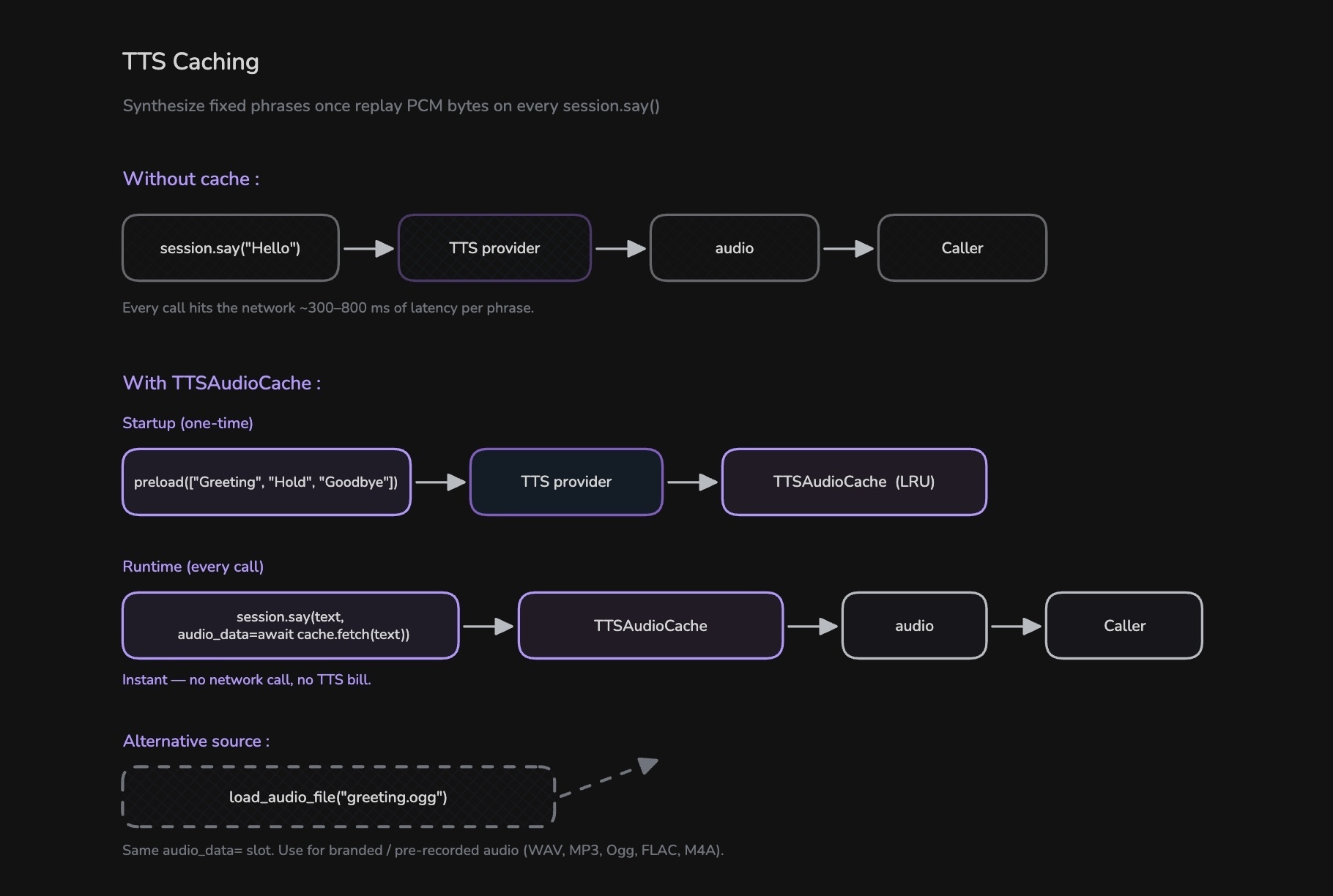
How TTSAudioCache Works
- Define the fixed phrases your agent will say.
- Call
await cache.preload([...])once at startup. Each phrase is synthesized and stored. - At runtime, pass the cached bytes through
session.say(text, audio_data=await cache.fetch(text)). No TTS call is made; playback is instant.
The cache uses LRU eviction at max_entries (default 128) and deduplicates concurrent fetches. If two coroutines call fetch("Hello") at the same time on a cold key, the second awaits the first instead of triggering a duplicate synthesis.
Preload at Startup
Share one TTS instance between the pipeline and the cache so cached phrases use the exact same voice as the agent's dynamic speech.
from videosdk.agents import Pipeline, TTSAudioCache
from videosdk.agents.plugins import CartesiaTTS

GREETING = "Thanks for calling Northwind support. How can I help you today?"
HOLD     = "Sure, let me pull that up for you. One moment."
GOODBYE  = "Thanks for calling Northwind. Have a great day!"

tts       = CartesiaTTS()
tts_cache = TTSAudioCache(tts)

# One synthesis per phrase, up front. Every fetch() after this is instant.
await tts_cache.preload([GREETING, HOLD, GOODBYE])

pipeline = Pipeline(stt=..., llm=..., tts=tts, vad=..., turn_detector=...)
Replay in on_enter / on_exit
Pass audio_data= alongside the text. The text argument is still required. It's what gets recorded into the transcript and chat context.
class SupportAgent(Agent):
    def __init__(self, tts_cache: TTSAudioCache) -> None:
        super().__init__(instructions="You are Aria, a friendly phone support agent.")
        self._cache = tts_cache

    async def on_enter(self) -> None:
        await self.session.say(GREETING, audio_data=await self._cache.fetch(GREETING))

    async def on_exit(self) -> None:
        await self.session.say(GOODBYE, audio_data=await self._cache.fetch(GOODBYE))
Overlap a Hold Phrase With a Slow Operation
Cached audio is perfect for filler speech during database lookups, API calls, or RAG retrieval. Start playback in parallel with the slow work using asyncio.create_task, and set add_to_chat_context=False so the filler doesn't pollute the LLM's context.
@function_tool
async def check_order_status(self, order_id: str) -> dict:
    """Look up the status of a customer's order."""
    hold_task = asyncio.create_task(
        self.session.say(
            HOLD,
            audio_data=await self._cache.fetch(HOLD),
            add_to_chat_context=False,
        )
    )
    order = await db.get_order(order_id)
    await hold_task
    return order
Alternative: Pre-recorded Audio Files
If you have a produced or branded audio file (a recorded human voice, an IVR jingle), play it through the same audio_data= slot using load_audio_file(). No TTS provider is called.
from videosdk.agents import load_audio_file

# Decodes WAV, MP3, Ogg, FLAC, M4A/AAC, etc. to PCM bytes.
audio = load_audio_file("greeting.ogg")

await self.session.say(GREETING, audio_data=audio)
Output defaults to 24 kHz mono 16-bit signed PCM, matching the agent audio track. Pass sample_rate= and num_channels= to override. The text argument is still required: it's recorded into the transcript even though the audio is pre-supplied.
Use TTSAudioCache when the phrase should share the agent's TTS voice. Use load_audio_file for branded or pre-recorded audio. Both feed the same audio_data= slot, so you can mix them freely.
Example - Try It Yourself
Got a Question?  Ask us on discord

