Quick Start for Interactive Live Streaming in Android
This quick start adds interactive live streaming to your Android app. A live stream supports up to 100 hosts/co-hosts and 2,000 viewers in real-time.
For standard live streaming with 6-7 second latency and playback support, follow this documentation.
Prerequisites
Before proceeding, ensure that your development environment meets the following requirements:
- Android Studio Narwhal 3 Feature Drop (2025.1.3) or later.
- Android SDK API Level 24 or higher.
- A mobile device that runs Android 7.0 or later with an ARM (
arm64-v8aorarmeabi-v7a) processor, or an emulator with anarm64-v8asystem image.
Getting Started with the Code!
Follow the steps to create the environment necessary to add video calls into your app.
Create new Android Project
For a new project in Android Studio, create a Phone and Tablet Android project with an Empty Activity.
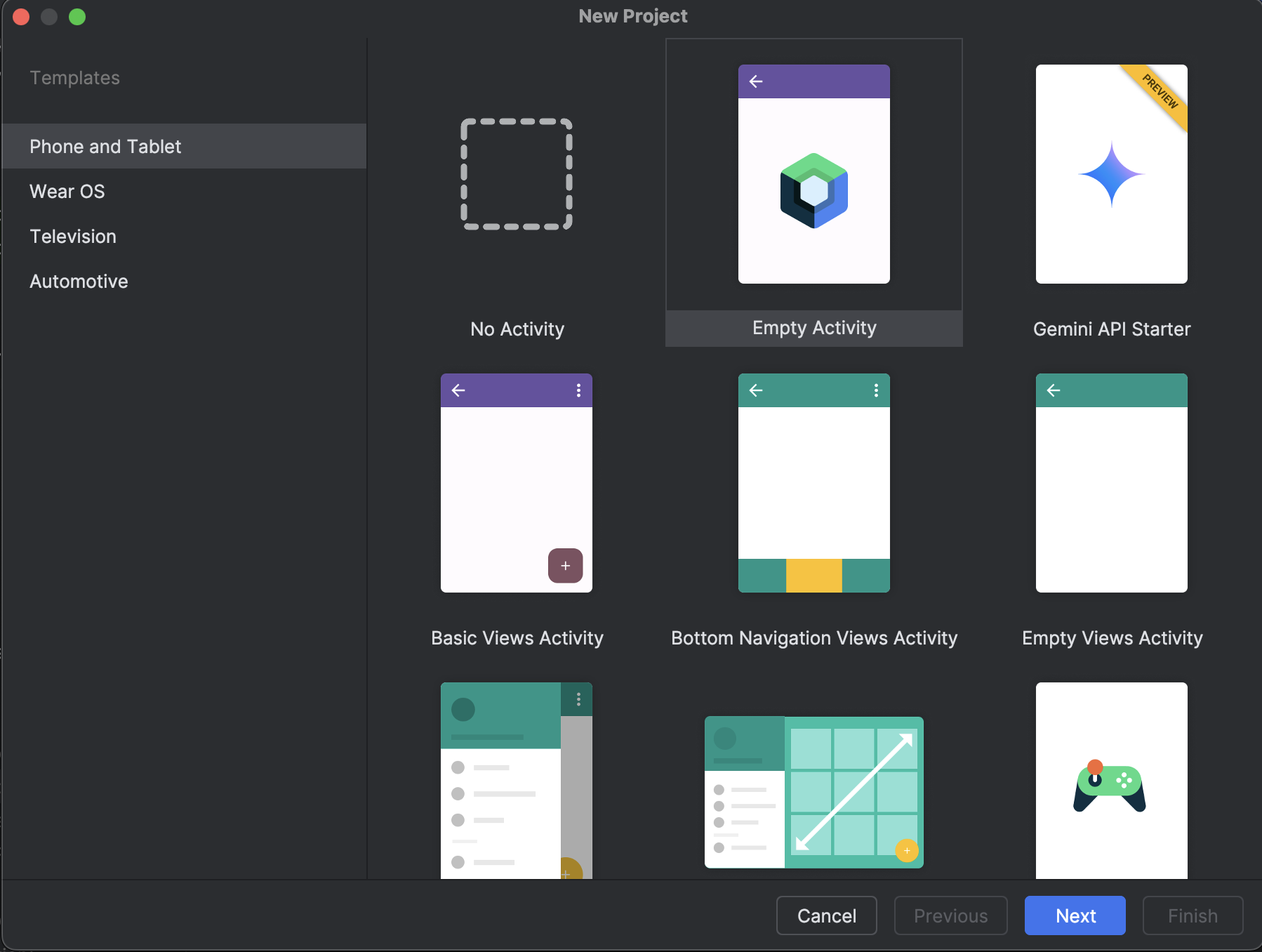
After creating the project, Android Studio automatically starts gradle sync. Ensure that the sync succeeds before you continue.
Integrate Video SDK
dependencyResolutionManagement {
  repositories {
    google()
    mavenCentral()
  }
}
- Add the following dependency in your app's
app/build.gradle.kts.
dependencies {
  implementation("live.videosdk:rtc-android-sdk:3.0.1")

  // library to perform Network call to generate a stream id
  implementation("com.squareup.okhttp3:okhttp:4.12.0")

  // navigation and viewModel() for the Compose screens
  implementation("androidx.navigation:navigation-compose:2.7.7")
  implementation("androidx.lifecycle:lifecycle-viewmodel-compose:2.8.7")

  // other app dependencies
}
Android SDK runs on arm64-v8a and armeabi-v7a devices only. If you want to run the application in an emulator, choose an arm64-v8a system image when creating a device. x86 / x86_64 emulator images are not supported.
Add permissions into your project
- In
/app/Manifests/AndroidManifest.xml, add the following permissions. The SDK doesn't addINTERNETorMODIFY_AUDIO_SETTINGSto your app, so declare them here.
<uses-feature android:name="android.hardware.camera" android:required="false" />
<uses-permission android:name="android.permission.INTERNET"/>
<uses-permission android:name="android.permission.CAMERA"/>
<uses-permission android:name="android.permission.RECORD_AUDIO"/>
<uses-permission android:name="android.permission.MODIFY_AUDIO_SETTINGS"/>
Structure of the project
Your project structure should look like this.
app/
├── src/main/
│   ├── java/com/example/app/
│   │   ├── components/
│   │   ├── screens/
│   │   ├── ui/
│   │   │   └── theme/
│   │   ├── model/
│   │   ├── MainApplication.kt
│   │   ├── MainActivity.kt
│   │   └── NetworkClass.kt
|   |   └── StreamingMode.kt
│   ├── res/
│   └── AndroidManifest.xml
├── build.gradle.kts
└── settings.gradle.kts
App Architecture
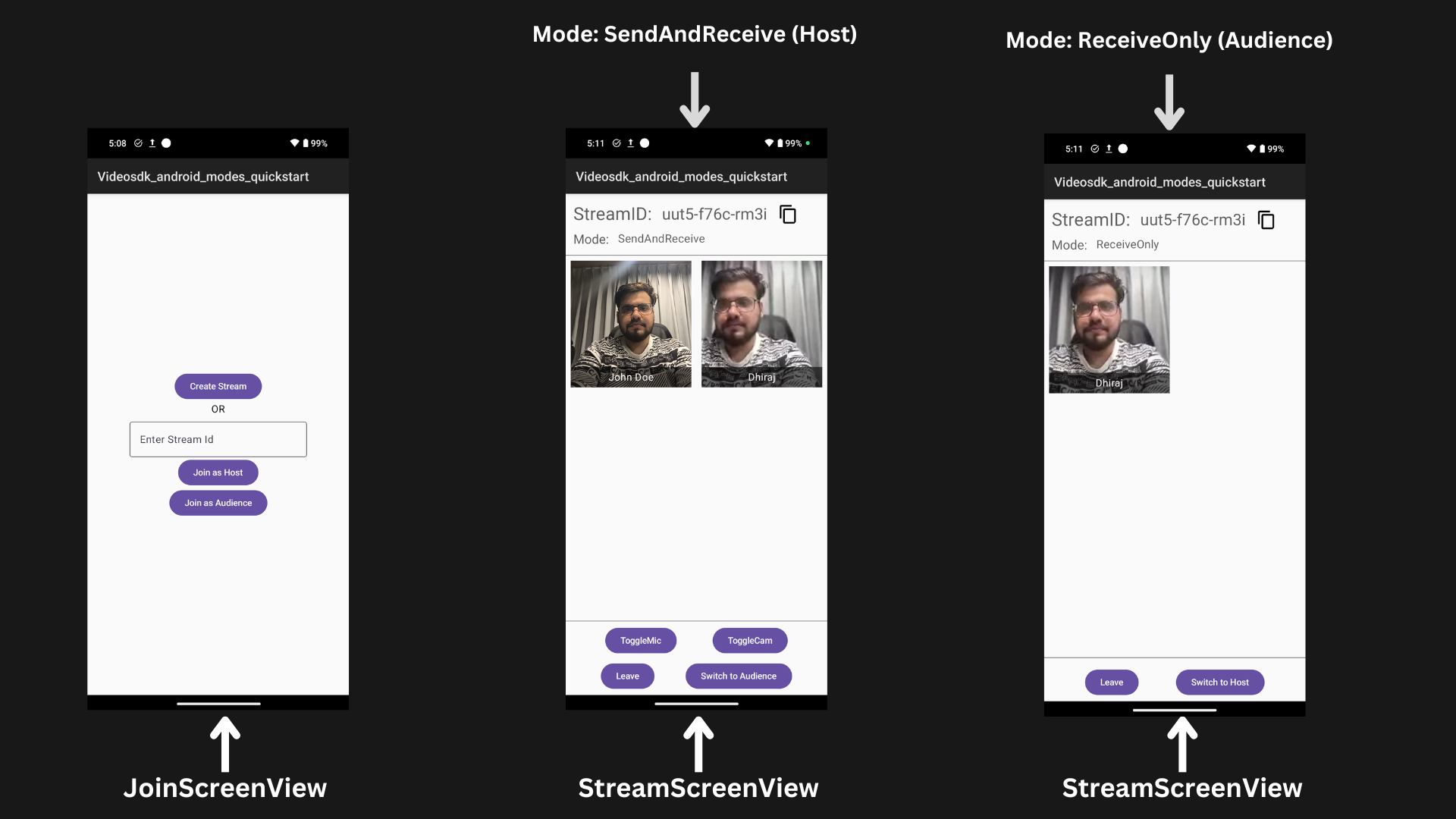
Step 1: Initialize VideoSDK
- Create
MainApplicationclass which will extend theandroid.app.Application.
- Create field
sampleTokeninMainApplicationwhich will hold the generated token from the VideoSDK dashboard. This token is passed tocreateRoom()and is also used to generate the stream id.
This quick start pastes a temporary token from the VideoSDK Dashboard into the client and lets the user choose the mode. Use this setup only for development. In production, your client must obtain its token from your backend server, and your server must decide whether a participant joins as a host or as an audience member. A token cannot restrict the mode, so any client that holds a valid token can join in SEND_AND_RECV mode. See Authentication and Tokens.
import android.app.Application
import live.videosdk.rtc.android.VideoSDK

class MainApplication: Application() {

    val sampleToken = "YOUR_TOKEN" //paste your token here

    override fun onCreate() {
        super.onCreate()
        VideoSDK.initialize(applicationContext)
    }
}
- Add
MainApplicationtoAndroidManifest.xml
<application
    android:name=".MainApplication" >
   <!-- ... -->
</application>
Step 2: Managing Permissions and Setting Up Navigation
The MainActivity handles permission requests for the camera and microphone and sets up navigation using Jetpack Compose.
On creation it requests RECORD_AUDIO and CAMERA if they are not granted yet, then sets the content to the MyApp composable, which holds the navigation through NavigationGraph.
The NavigationGraph defines two screens:
- JoinScreen: For joining or creating a stream.
- StreamingScreen: For participating in a stream, passing streamId and mode as arguments.
class MainActivity : ComponentActivity() {
    override fun onCreate(savedInstanceState: Bundle?) {
        super.onCreate(savedInstanceState)
        checkSelfPermission(REQUESTED_PERMISSIONS[0], PERMISSION_REQ_ID)
        checkSelfPermission(REQUESTED_PERMISSIONS[1], PERMISSION_REQ_ID)

        setContent {
            Videosdk_android_modes_quickstartTheme {
                MyApp(this) } }
    }

    private fun checkSelfPermission(permission: String, requestCode: Int): Boolean {
        if (ContextCompat.checkSelfPermission(this, permission) != PackageManager.PERMISSION_GRANTED) {
            ActivityCompat.requestPermissions(this, REQUESTED_PERMISSIONS, requestCode)
            return false
        }
        return true
    }

    companion object {
        private const val PERMISSION_REQ_ID = 22
        private val REQUESTED_PERMISSIONS = arrayOf(Manifest.permission.RECORD_AUDIO, Manifest.permission.CAMERA)
    }
}

@Composable
fun MyApp(context: Context) {
    NavigationGraph(context = context)
}

@Composable
fun NavigationGraph(navController: NavHostController = rememberNavController(), context: Context) {
    NavHost(navController = navController, startDestination = "join_screen") {
        composable("join_screen") { JoinScreen(navController, context) }
        composable("stream_screen?streamId={streamId}&mode={mode}") { backStackEntry ->
            val streamId = backStackEntry.arguments?.getString("streamId")
            val modeStr = backStackEntry.arguments?.getString("mode")
            val mode = StreamingMode.valueOf(modeStr ?: StreamingMode.SendAndReceive.name)

            streamId?.let {
                // viewModel() keeps one StreamViewModel for this screen, across recompositions and rotation.
                StreamingScreen(viewModel = viewModel(), navController, streamId, mode, context)
            }
        }
    }
}
Step 3: Creating Reusable Components
- Before building the individual screens, create the reusable composable components used throughout the project.
- Create a
ReusableComponents.ktfile to organize all reusable components for the project, such as buttons, spacers, and customizable text.
@Composable
fun MyAppButton(task: () -> Unit, buttonName: String) {
    Button(onClick = task) {
        Text(text = buttonName) }
}

@Composable
fun MySpacer() {
    Spacer(modifier = Modifier.fillMaxWidth()
            .height(1.dp)
            .background(color = Color.Gray)) }

@Composable
fun MyText(text: String, fontSize: TextUnit = 23.sp) {
    Text(text = text,
        fontSize = fontSize,
        fontWeight = FontWeight.Normal,
        modifier = Modifier.padding(4.dp),
        style = MaterialTheme.typography.bodyMedium.copy(fontSize = 16.sp),
        color = MaterialTheme.colorScheme.onSurface.copy(alpha = 0.7f))
}
- Create a
ParticipantVideoView.ktfile that includes two composable functions:ParticipantVideoViewfor rendering individual participant video streams, andParticipantsGridfor displaying a grid of participant videos.
- Here the participant's video is displayed using
VideoView. To know more aboutVideoView, please visit here VideoViewis a custom View. Since Jetpack Compose does not natively support traditionalViewobjects, we need to integrate theVideoViewinto the Compose layout using theAndroidViewwrapper.AndroidView()hosts an AndroidViewinside a composable.
import videosdk.org.webrtc.VideoTrack

@Composable
fun ParticipantVideoView(
    participant: Participant
) {
        var videoTrack by remember(participant) { mutableStateOf<VideoTrack?>(null) }

        // Follows the participant's camera. Adding the listener also replays the streams
        // the participant already has, so a camera that is already on shows at once.
        DisposableEffect(participant) {
            val eventListener = object : ParticipantEventListener() {
                override fun onStreamEnabled(stream: RTCStream) {
                    if (stream.kind == MediaType.VIDEO) {
                        videoTrack = stream.track as? VideoTrack
                    }
                }
                override fun onStreamDisabled(stream: RTCStream) {
                    if (stream.kind == MediaType.VIDEO) {
                        videoTrack = null
                    }
                }
            }
            participant.addEventListener(eventListener)
            onDispose { participant.removeEventListener(eventListener) }
        }

        val isVideoEnabled = videoTrack != null

        Box(
            modifier = Modifier.fillMaxWidth()
                .height(200.dp)
                .background(if (isVideoEnabled) Color.DarkGray else Color.Gray)
        ) {
            AndroidView(
                factory = { context -> VideoView(context) },
                update = { videoView ->
                    // Re-attach only when the track actually changed.
                    if (videoView.tag != videoTrack) {
                        videoView.removeTrack()
                        videoTrack?.let { videoView.addTrack(it) }
                        videoView.tag = videoTrack
                    }
                },
                // Detaches the track and frees the renderer.
                onRelease = { videoView -> videoView.releaseSurfaceViewRenderer() },
                modifier = Modifier.fillMaxSize()
            )

            if (!isVideoEnabled) {
                Box(
                    modifier = Modifier.fillMaxSize()
                        .background(Color.DarkGray),
                    contentAlignment = Alignment.Center
                ) {
                    Text(text = "Camera Off", color = Color.White)
                }
            }

            Box(
                modifier = Modifier.align(Alignment.BottomCenter)
                    .fillMaxWidth()
                    .background(Color(0x99000000))
                    .padding(4.dp)
            ) {
                Text(
                    text = participant.displayName,
                    color = Color.White,
                    modifier = Modifier.align(Alignment.Center)
                )
            }
        }
}

@Composable
fun ParticipantsGrid(
    participants: List<Participant>,
    modifier: Modifier = Modifier
) {
    LazyVerticalGrid(columns = GridCells.Fixed(2),
        verticalArrangement = Arrangement.spacedBy(16.dp),
        horizontalArrangement = Arrangement.spacedBy(16.dp),
        modifier = modifier.fillMaxWidth()
            .padding(8.dp)
    ) {
        // Keyed by participant id so a tile is never reused for someone else.
        items(participants, key = { it.id }) { participant ->
            ParticipantVideoView(participant = participant)
        }
    }
}
Before proceeding, let's understand the two modes of a Live Stream:
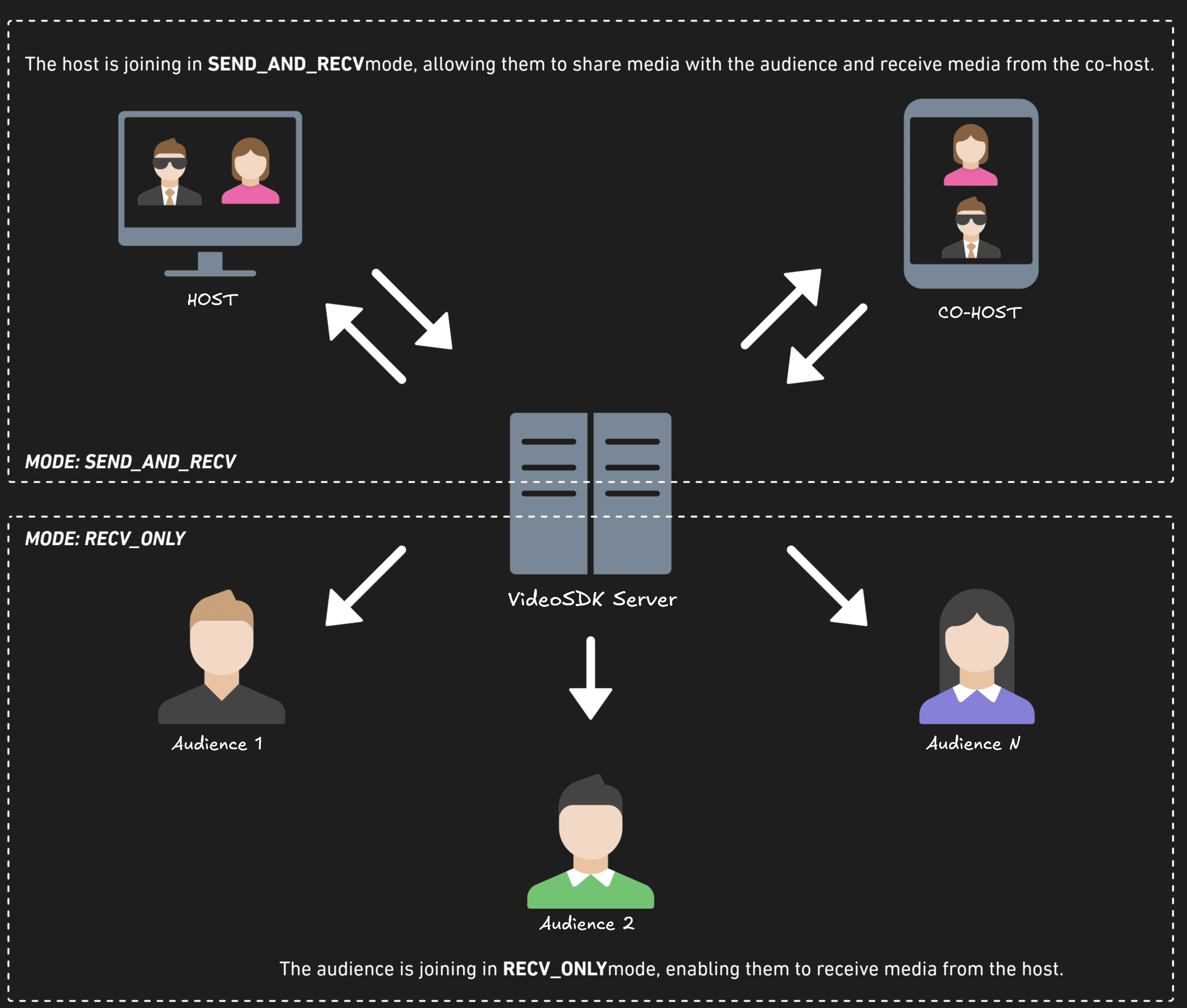
- SEND_AND_RECV:
- Designed primarily for the Host or Co-host.
- Allows sending and receiving media.
- Hosts can broadcast their audio/video and interact directly with the audience.
- RECV_ONLY:
- Tailored for the Audience.
- Enables receiving media shared by the Host.
- Audience members can view and listen but cannot share their own media.
enum class StreamingMode {
    SendAndReceive,
    ReceiveOnly
}
Step 4: Creating Joining Screen
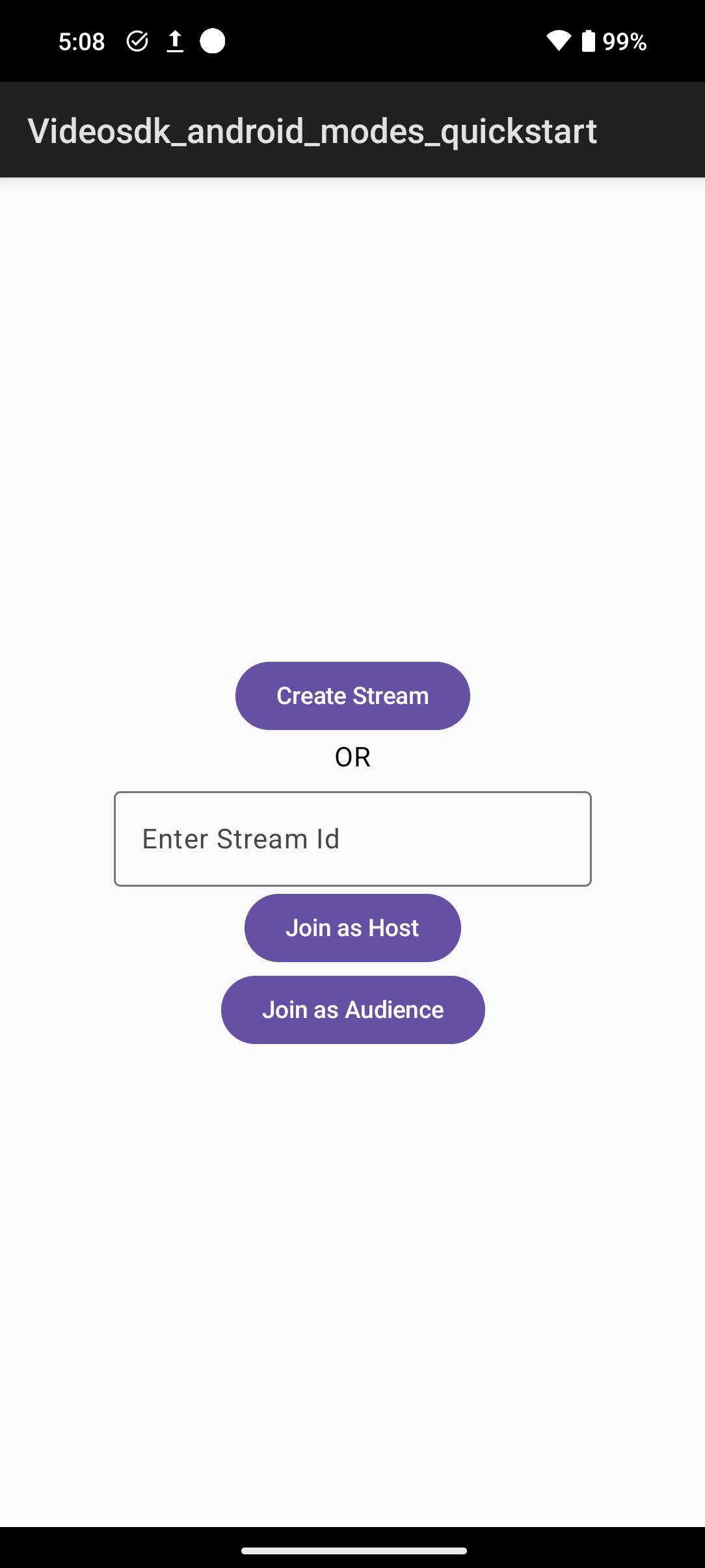
Join screen will serve as a medium to either Create a new Live Stream or join an existing one as a host or an audience member.
We will create a simple UI for the Join screen that includes three action buttons for joining or creating a Live Stream:
Create Stream: Lets the user initiate a new Live Stream in SEND_AND_RECV mode, granting full host controls.Join as Host: Allows the user to join an existing Live Stream using the provided stream id with the SEND_AND_RECV mode, enabling full host privileges.Join as Audience: Enables the user to join an existing Live Stream using the provided stream id with the RECV_ONLY mode, allowing view-only access.
@Composable
fun JoinScreen(
    navController: NavController, context: Context
) {
    val app = context.applicationContext as MainApplication
    val token = app.sampleToken
    Box(
        modifier = Modifier.fillMaxSize()
            .padding(8.dp),
        contentAlignment = Alignment.Center
    ) {
        Column(
            modifier = Modifier.padding(4.dp),
            horizontalAlignment = Alignment.CenterHorizontally,
            verticalArrangement = Arrangement.SpaceEvenly
        ) {
            var input by rememberSaveable { mutableStateOf("") }
            CreateStreamBtn(navController, token)
            Text(text = "OR")
            InputStreamId(input) { updateInput -> input = updateInput }
            JoinHostBtn(navController, input)
            JoinAudienceBtn(navController, input)
        }
    }
}


@Composable
fun JoinHostBtn(navController: NavController, streamId: String) {
    MyAppButton({
        if (streamId.isNotEmpty()) {
            navController.navigate("stream_screen?streamId=$streamId&mode=${StreamingMode.SendAndReceive.name}")
        }
    }, "Join as Host")
}

@Composable
fun JoinAudienceBtn(navController: NavController, streamId: String) {
    MyAppButton({
        if (streamId.isNotEmpty()) {
            navController.navigate("stream_screen?streamId=$streamId&mode=${StreamingMode.ReceiveOnly.name}")
        }
    }, "Join as Audience")
}

@Composable
fun CreateStreamBtn(navController: NavController, token: String) {
    MyAppButton({
        NetworkManager.createStreamId(token) { streamId ->
            navController.navigate("stream_screen?streamId=$streamId&mode=${StreamingMode.SendAndReceive.name}")
        }
    }, "Create Stream")
}

@Composable
fun InputStreamId(input: String, onInputChange: (String) -> Unit) {
    OutlinedTextField(value = input,
        onValueChange = onInputChange,
        label = { Text(text = "Enter Stream Id") })
}
Output
Step 5: Creating StreamId
The NetworkManager singleton handles stream creation by making a POST request to the VideoSDK API:
- Stream Creation: Sends a request to the API with an authorization token to create a stream.
- Response Handling: Extracts the roomId from the response and calls the
onStreamIdCreatedcallback on the main thread.
object NetworkManager {
    private val client = OkHttpClient()

    fun createStreamId(token: String, onStreamIdCreated: (String) -> Unit) {
        val request = Request.Builder()
            .url("https://api.videosdk.live/v2/rooms")
            .header("Authorization", token)
            .post("".toRequestBody())
            .build()
        client.newCall(request).enqueue(object : Callback {
            override fun onResponse(call: Call, response: Response) {
                response.use {
                    val body = it.body?.string().orEmpty()
                    if (!it.isSuccessful) {
                        Log.d("TAG", "onError: HTTP ${it.code} $body")
                        return
                    }
                    try {
                        val streamId = JSONObject(body).getString("roomId")
                        // OkHttp answers on a background thread; navigate on the main thread.
                        Handler(Looper.getMainLooper()).post { onStreamIdCreated(streamId) }
                    } catch (e: JSONException) {
                        e.printStackTrace()
                    }
                }
            }

            override fun onFailure(call: Call, e: IOException) {
                e.printStackTrace()
                Log.d("TAG", "onError: $e")
            }
        })
    }
}
A stream here is the same thing as a room.
Step 6: Creating Streaming Screen
We will create a simple Streaming screen UI with two main sections:
Header: Displays the stream ID and current streaming mode at the top of the screen for reference.ParticipantsGrid: Shows the list of participants in a grid layout, adjusting dynamically.
In Step 3, we created the ParticipantsGrid component.
@Composable
fun StreamingScreen(viewModel: StreamViewModel, navController: NavController,
    streamId: String,
    mode: StreamingMode,
    context: Context
) {
    val app = context.applicationContext as MainApplication
    val isStreamLeft = viewModel.isStreamLeft
    val currentMode = viewModel.currentMode
    val isJoined = viewModel.isJoined

    LaunchedEffect(isStreamLeft) {
        if (isStreamLeft) {
            navController.navigate("join_screen") }
    }

    // Leave the stream on Back, so the room is not left running in the background.
    BackHandler(enabled = isJoined) { viewModel.leaveStream() }

    Column(modifier = Modifier.fillMaxSize()) {
        Header(streamId, currentMode)
        MySpacer()
        ParticipantsGrid(
            participants = viewModel.currentParticipants,
            modifier = Modifier.weight(1f)
        )
        MySpacer()
        MediaControlButtons(
            onJoinClick = { viewModel.initStream(app.sampleToken, streamId, mode)},
            onMicClick = { viewModel.toggleMic() },
            onCamClick = { viewModel.toggleCam()},
            onModeToggleClick = { viewModel.toggleMode() },
            showMediaControls = currentMode == StreamingMode.SendAndReceive,
            currentMode = currentMode,
            onLeaveClick = { viewModel.leaveStream() },
            isJoined = isJoined )
    }
}
@Composable
fun Header(streamId: String, mode: StreamingMode) {
    val context = LocalContext.current
    val clipboardManager = context.getSystemService(Context.CLIPBOARD_SERVICE) as ClipboardManager

    Box(modifier = Modifier.fillMaxWidth()
                        .padding(8.dp),
        contentAlignment = Alignment.TopStart
    ) {
        Row( modifier = Modifier.fillMaxWidth(),
            horizontalArrangement = Arrangement.SpaceBetween,
            verticalAlignment = Alignment.CenterVertically
        ) {
            Column {
                Row(verticalAlignment = Alignment.CenterVertically) {
                    MyText("StreamID: ", 28.sp)
                    MyText(streamId, 25.sp)
                    IconButton( onClick = {
                            val clip = ClipData.newPlainText("Stream ID", streamId)
                            clipboardManager.setPrimaryClip(clip)
                        })
                    {
                        //get baseline_content_copy_24 icon from Vector Asset
                        Icon( painter = painterResource(R.drawable.baseline_content_copy_24),
                            contentDescription = "Copy Stream ID",
                            modifier = Modifier.size(40.dp).padding(start = 8.dp)
                        )
                    }
                }
                Row {
                    MyText("Mode: ", 20.sp)
                    MyText(mode.name, 18.sp)
                }
            }
        }
    }
}
//...
Step 7: Implementing Mode Switch and Media Toggles
Implement interactive controls to leave the stream, toggle microphone and camera, and switch between Host (SEND_AND_RECV) and Audience (RECV_ONLY) modes.
@Composable
fun MediaControlButtons(
    onJoinClick: () -> Unit,
    onMicClick: () -> Unit,
    onCamClick: () -> Unit,
    onModeToggleClick: () -> Unit,
    onLeaveClick: () -> Unit,
    showMediaControls: Boolean = true,
    currentMode: StreamingMode,
    isJoined: Boolean
) {
    Column( modifier = Modifier.fillMaxWidth()
                        .padding(6.dp),
        horizontalAlignment = Alignment.CenterHorizontally,
        verticalArrangement = Arrangement.spacedBy(8.dp)
    ) {
        Row( modifier = Modifier.fillMaxWidth(),
            horizontalArrangement = Arrangement.SpaceEvenly,
            verticalAlignment = Alignment.CenterVertically
        ) {
            if (!isJoined) {
                MyAppButton(onJoinClick, "Join")
            }
            if (showMediaControls && isJoined) {  // Only show media controls if joined
                MyAppButton(onMicClick, "ToggleMic")
                MyAppButton(onCamClick, "ToggleCam")
            }
        }

        Row( modifier = Modifier.fillMaxWidth(),
            horizontalArrangement = Arrangement.SpaceEvenly,
            verticalAlignment = Alignment.CenterVertically
        ) {
            if (isJoined) {
                MyAppButton(onLeaveClick, "Leave")
                MyAppButton(
                    task = onModeToggleClick,
                    buttonName = if (currentMode == StreamingMode.SendAndReceive)
                        "Switch to Audience"
                    else
                        "Switch to Host"
                )
            }
        }
    }
}
Step 8: Setting Up StreamViewModel
The StreamViewModel manages the core functionality of Interactive Live Streaming (ILS), serving as the central state manager:
-
Stream State Management
- Handles stream initialization with appropriate mode (
SEND_AND_RECVfor hosts,RECV_ONLYfor the audience) - Tracks stream lifecycle (joined, left, current mode)
- Handles stream initialization with appropriate mode (
-
Media Control Integration
- Provides microphone toggle (mute/unmute)
- Controls camera state (enable/disable)
-
Mode Switching
- Switches between host (
SEND_AND_RECV) and audience (RECV_ONLY) modes withchangeMode(). The SDK turns the mic and camera off when you switch toRECV_ONLY.
- Switches between host (
-
Coroutines
join(),leave(),changeMode()and the media toggles aresuspendfunctions, so the view model calls them fromviewModelScopeand catchesVideoSDKException.
class StreamViewModel : ViewModel() {
    private var room: Room? = null
    private var micEnabled by mutableStateOf(true)
    private var camEnabled by mutableStateOf(true)
    var isConferenceMode by mutableStateOf(true)
    val currentParticipants = mutableStateListOf<Participant>()

    var localParticipantId by mutableStateOf("")
        private set

    var isStreamLeft by mutableStateOf(false)
        private set

    var currentMode by mutableStateOf(StreamingMode.SendAndReceive)
        private set

    var isJoined by mutableStateOf(false)
        private set

    fun initStream(token: String, streamId: String, mode: StreamingMode) {
        if (room != null) return  // already joining or joined
        currentMode = mode
        val room = try {
            if (mode == StreamingMode.SendAndReceive) {
                VideoSDK.createRoom(
                    roomId = streamId,
                    token = token,
                    participantName = "John Doe",
                    micEnabled = micEnabled,
                    camEnabled = camEnabled,
                )
            } else {
                // The audience does not publish, so it joins with the mic and camera off.
                VideoSDK.createRoom(
                    roomId = streamId,
                    token = token,
                    participantName = "John Doe",
                    micEnabled = false,
                    camEnabled = false,
                    mode = Mode.RECV_ONLY,
                )
            }
        } catch (e: VideoSDKException) {
            // thrown for an empty token or stream id
            Log.e("StreamViewModel", "init failed: ${e.code} ${e.message}")
            return
        }
        room.addEventListener(roomEventListener)
        this.room = room
        isJoined = true
        viewModelScope.launch {
            try {
                room.join()
            } catch (e: VideoSDKException) {
                Log.e("StreamViewModel", "join failed: ${e.code} ${e.message}")
                room.removeAllEventListeners()
                this@StreamViewModel.room = null
                isJoined = false
            }
        }
    }

    private val roomEventListener: RoomEventListener = object : RoomEventListener() {
        override fun onRoomJoined(switchRoomId: String?) {
            room?.let {
                if (it.localParticipant.mode != Mode.RECV_ONLY) {
                    if (!currentParticipants.contains(it.localParticipant)) {
                        currentParticipants.add(it.localParticipant)
                    }
                }
                localParticipantId = it.localParticipant.id
            }
        }

        override fun onRoomLeft(reason: LeaveReason) {
            currentParticipants.clear()
            room = null
            isStreamLeft = true
        }

        override fun onParticipantJoined(participant: Participant) {
            if (participant.mode != Mode.RECV_ONLY) {
                currentParticipants.add(participant)
            }
        }

        override fun onParticipantLeft(participant: Participant, reason: LeaveReason) {
            currentParticipants.remove(participant)
        }

        override fun onParticipantModeChanged(participantId: String, mode: Mode) {
            val participant = if (room?.localParticipant?.id == participantId) {
                room?.localParticipant
            } else {
                room?.participants?.get(participantId)
            } ?: return

            when (mode) {
                Mode.RECV_ONLY -> currentParticipants.remove(participant)
                Mode.SEND_AND_RECV -> {
                    if (!currentParticipants.contains(participant)) {
                        currentParticipants.add(participant)
                    }
                }
                else -> {}
            }
        }
    }

    fun toggleMic() {
        val room = room ?: return
        viewModelScope.launch {
            try {
                if (room.isMicEnabled) room.muteMic() else room.unmuteMic()
            } catch (e: VideoSDKException) {
                Log.e("StreamViewModel", "toggleMic failed: ${e.message}")
            }
        }
    }

    fun toggleCam() {
        val room = room ?: return
        viewModelScope.launch {
            try {
                if (room.isCamEnabled) room.disableCam() else room.enableCam()
            } catch (e: VideoSDKException) {
                Log.e("StreamViewModel", "toggleCam failed: ${e.message}")
            }
        }
    }

    fun leaveStream() {
        val room = room ?: return
        currentParticipants.clear()
        room.removeAllEventListeners()
        this.room = null
        isStreamLeft = true
        isJoined = false
        viewModelScope.launch {
            // Finish leaving even if the ViewModel is cleared in the meantime.
            withContext(NonCancellable) {
                try {
                    room.leave()
                } catch (e: VideoSDKException) {
                    // The join never completed, so there is nothing to leave.
                }
            }
        }
    }

    fun toggleMode() {
        val room = room ?: return
        val newMode = if (currentMode == StreamingMode.SendAndReceive) {
            StreamingMode.ReceiveOnly
        } else {
            StreamingMode.SendAndReceive
        }
        viewModelScope.launch {
            try {
                // The SDK turns your mic and camera off when you switch to RECV_ONLY,
                // so don't call disableCam() or enableCam() around changeMode().
                room.changeMode(
                    if (newMode == StreamingMode.SendAndReceive) Mode.SEND_AND_RECV else Mode.RECV_ONLY
                )
            } catch (e: VideoSDKException) {
                Log.e("StreamViewModel", "changeMode failed: ${e.message}")
                return@launch
            }
            isConferenceMode = newMode == StreamingMode.SendAndReceive

            // Rebuild the grid: every host, plus you if you are now a host.
            currentParticipants.clear()
            room.participants.values.forEach { participant ->
                if (participant.mode != Mode.RECV_ONLY) {
                    currentParticipants.add(participant)
                }
            }
            if (newMode == StreamingMode.SendAndReceive &&
                !currentParticipants.contains(room.localParticipant)
            ) {
                currentParticipants.add(room.localParticipant)
            }
            currentMode = newMode
        }
    }
}
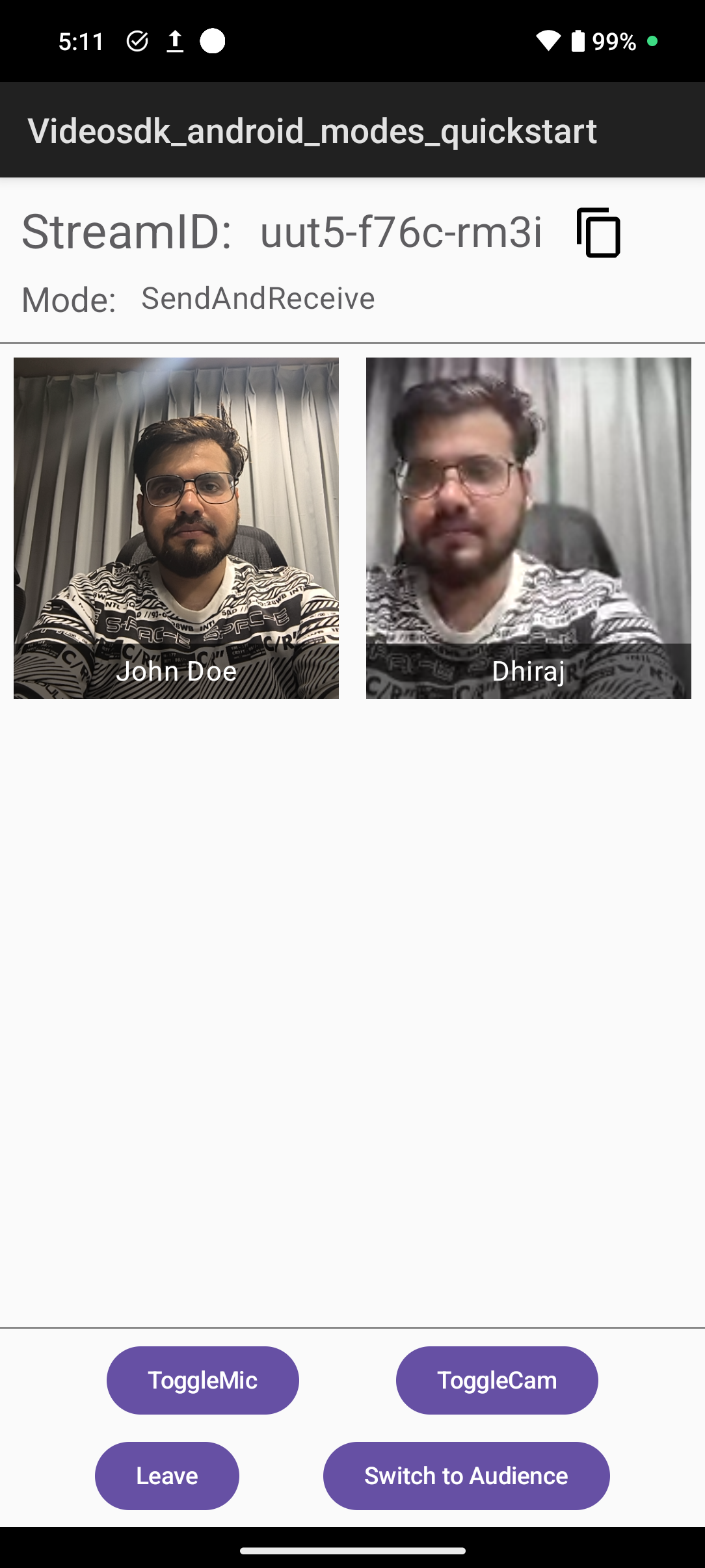
Final Output
You have built an interactive live streaming app in Android with VideoSDK. To explore more features, go through Basic and Advanced features.
Got a Question?  Ask us on discord

