Background Handling - Flutter
Due to platform-specific restrictions on iOS and Android, essential functionalities like microphone and camera access are limited when the app moves to Background Mode.
-
iOS has strict resource management policies, preventing access to the camera in the background. However, it allows microphone access, which is crucial for maintaining media transmission.
-
Android 14 and above restrict background microphone and camera access and enforce strict battery optimization policies. These policies can aggressively kill background processes.
To keep sending media while your app is in the background, address these platform limitations:
- Enable the required background modes on iOS.
- Configure permissions and use foreground services on Android.
Alternatively, on Android, if you prefer not to implement a foreground service, you can use Picture-in-Picture (PiP) mode. This allows the app to continue media playback in a small floating window, bypassing some of the background restrictions.
If these steps aren’t correctly implemented, the app will lose the ability to send or receive media when backgrounded, disrupting core communication features.
The sections below explain how to implement background support effectively on both platforms with VideoSDK.
iOS Background Handling
For iOS devices, you need to enable the necessary capabilities in Xcode to continue publishing and playing media while the app is in the background:
- Open your project in Xcode.
- Navigate to the target settings.
- Select the "Signing & Capabilities" tab.
- Click the "+" button to add capabilities.
- Add Background Modes.
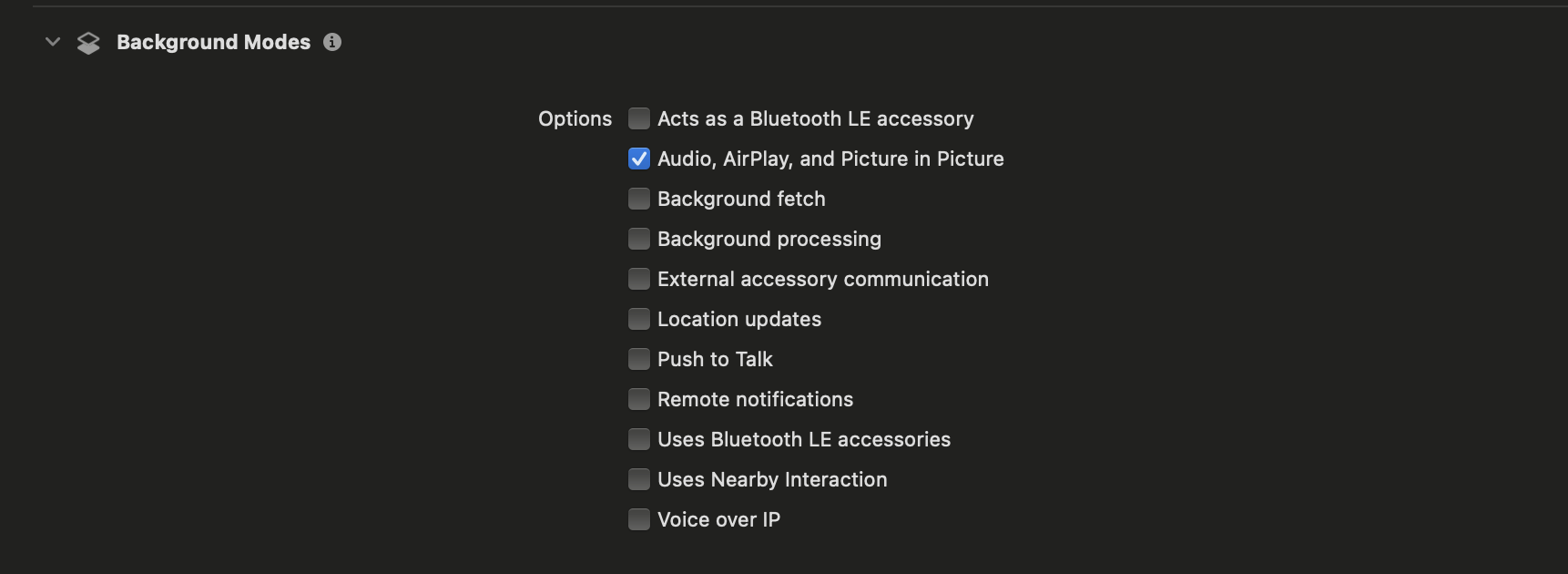
Under Background Modes, enable the following options:
- Audio, AirPlay, and Picture in Picture
This will allow your app to keep sending and playing audio in the background, ensuring that essential media features like calls continue uninterrupted.
Android Background Handling
On Android, background media capture is more restrictive. Challenges include:
- Limited microphone/camera access when the app is backgrounded (usually ~60 seconds by default).
- OEM-specific optimizations that aggressively kill background processes.
To ensure reliable background capture and playback, use a foreground service with a persistent notification.
- The SDK turns your camera off when the app goes to the background and turns it on again when the app returns to the foreground. That is why the service below only keeps the microphone running.
- Screen sharing does not need this service. While you share your screen, the SDK runs its own foreground service, and it adds the permissions that service needs to your app's manifest.
Update your AndroidManifest.xml to declare permissions and the foreground service:
<manifest xmlns:android="http://schemas.android.com/apk/res/android">
<!-- Permissions -->
<uses-permission android:name="android.permission.FOREGROUND_SERVICE"/>
<uses-permission android:name="android.permission.FOREGROUND_SERVICE_MICROPHONE"/>
<uses-permission android:name="android.permission.POST_NOTIFICATIONS"/>

<!-- Foreground Service -->
  <application>
    <service android:name=".ForegroundService"
    android:foregroundServiceType="microphone"
    android:stopWithTask="true" />
  </application>
</manifest>
Implement a foreground service that displays a persistent notification and keeps the microphone running:
package com.example.example

import android.app.*
import android.content.Intent
import android.os.Build
import android.os.IBinder
import android.util.Log
import androidx.core.app.NotificationCompat

class ForegroundService : Service() {

    companion object {
        const val NOTIFICATION_ID = 1001
        const val CHANNEL_ID = "AppChannelID"
        private const val TAG = "ForegroundService"

        // Actions
        const val ACTION_START = "com.example.example.START_FOREGROUND_SERVICE"
        const val ACTION_STOP = "com.example.example.STOP_FOREGROUND_SERVICE"
    }

    override fun onCreate() {
        super.onCreate()
        Log.d(TAG, "Service onCreate")
        createNotificationChannel()
    }

    override fun onStartCommand(intent: Intent?, flags: Int, startId: Int): Int {
        Log.d(TAG, "Service onStartCommand")

        when (intent?.action) {
            ACTION_START -> {
                startForegroundService()
            }
            ACTION_STOP -> {
                stopForegroundService()
            }
            else -> {
                // Default action - start the service
                startForegroundService()
            }
        }

        return START_STICKY
    }

    override fun onBind(intent: Intent?): IBinder? {
        return null
    }

    override fun onDestroy() {
        super.onDestroy()
        Log.d(TAG, "Service onDestroy")
    }

    private fun startForegroundService() {
        Log.d(TAG, "Starting foreground service")

        try {
            val notification = createNotification()
            startForeground(NOTIFICATION_ID, notification)
            Log.d(TAG, "Foreground service started successfully")
        } catch (e: SecurityException) {
            Log.e(TAG, "Security exception while starting foreground service", e)
            // This usually means missing permissions. Stop instead of crashing the app.
            stopSelf()
        } catch (e: Exception) {
            // For example, Android refuses it while the app is in the background.
            Log.e(TAG, "Error starting foreground service", e)
            stopSelf()
        }
    }

    private fun stopForegroundService() {
        Log.d(TAG, "Stopping foreground service")
        stopForeground(true)
        stopSelf()
    }

    private fun createNotification(): Notification {
        val notificationIntent = Intent(this, MainActivity::class.java)
        val pendingIntent = PendingIntent.getActivity(
            this,
            0,
            notificationIntent,
            PendingIntent.FLAG_IMMUTABLE
        )

        return NotificationCompat.Builder(this, CHANNEL_ID)
            .setContentTitle("Foreground Service")
            .setContentText("Microphone is active")
            .setSmallIcon(R.mipmap.ic_launcher)
            .setContentIntent(pendingIntent)
            .setPriority(NotificationCompat.PRIORITY_LOW)
            .setOngoing(true)
            .build()
    }

    private fun createNotificationChannel() {
        if (Build.VERSION.SDK_INT >= Build.VERSION_CODES.O) {
            val channel = NotificationChannel(
                CHANNEL_ID,
                "Foreground Service",
                NotificationManager.IMPORTANCE_LOW
            ).apply {
                description = "Channel for foreground service notifications"
                setShowBadge(false)
                enableLights(false)
                enableVibration(false)
            }

            val notificationManager = getSystemService(NotificationManager::class.java)
            notificationManager?.createNotificationChannel(channel)
            Log.d(TAG, "Notification channel created")
        }
    }
}
Use a MethodChannel in MainActivity to start/stop the service from Dart:
package com.example.example
import com.example.example.ForegroundService
import io.flutter.plugin.common.MethodChannel
import android.content.Intent
import io.flutter.embedding.android.FlutterActivity
import android.os.Bundle
import io.flutter.embedding.engine.FlutterEngine
import android.net.Uri

class MainActivity : FlutterActivity() {
private val CHANNEL = "com.example.example/channel"

    override fun configureFlutterEngine(flutterEngine: FlutterEngine) {
    super.configureFlutterEngine(flutterEngine)

        MethodChannel(flutterEngine.dartExecutor.binaryMessenger, CHANNEL).setMethodCallHandler { call, result ->
            when (call.method) {
                "startMicrophoneService" -> {
                    startService(Intent(this, ForegroundService::class.java).apply {
                        action = ForegroundService.ACTION_START
                    })
                    result.success(null)
                }
                "stopMicrophoneService" -> {
                    startService(Intent(this, ForegroundService::class.java).apply {
                        action = ForegroundService.ACTION_STOP
                    })
                    result.success(null)
                }
                else -> result.notImplemented()
            }
        }
    }
}
Finally, request permissions and start the service from Flutter.
On Android 14 and above, a microphone foreground service can only start after the user has granted microphone permission, and only while your app is in the foreground. The example asks for permission before it joins. When the room is joined, it starts the service only if the user granted that permission.
import 'dart:async' show unawaited;
import 'dart:io';

import 'package:flutter/material.dart';
import 'package:flutter/services.dart';
import 'package:videosdk/videosdk.dart';

class RoomScreen extends StatefulWidget {
    final String roomId;
    final String token;
    final String displayName;
    final bool micEnabled;
    final bool camEnabled;
    final CustomStreamTrack? cameraTrack;
    final CustomStreamTrack? micTrack;

    const RoomScreen({
        super.key,
        required this.roomId,
        required this.token,
        required this.displayName,
        this.micEnabled = true,
        this.camEnabled = true,
        this.cameraTrack,
        this.micTrack,
    });

    @override State<RoomScreen> createState() => _RoomScreenState();
}

class _RoomScreenState extends State<RoomScreen> {
    static const platform = MethodChannel('com.example.example/channel');
    late final Room room;
    bool _micGranted = false;

    @override
    void initState() {
        super.initState();

        room = VideoSDK.createRoom(
            roomId: widget.roomId,
            token: widget.token,
            customCameraTrack: widget.cameraTrack,
            customMicrophoneTrack: widget.micTrack,
            participantName: widget.displayName,
            micEnabled: widget.micEnabled,
            camEnabled: widget.camEnabled,
            maxResolution: MaxResolution.HD,
        );

        // Register room events
        registerRoomEvents(room);

        // Join room
        unawaited(joinRoom());
    }

    Future<void> joinRoom() async {
        // On Android, the SDK does not ask for camera and microphone permission.
        final permissions = await VideoSDK.requestPermissions();
        _micGranted = permissions['audio'] ?? false;
        try {
            await room.join();
        } on VideoSDKError catch (error) {
            print("Failed to join: ${error.code} ${error.name}");
        }
    }

    Future<void> _startMicrophoneService() async {
        try {
            await platform.invokeMethod('startMicrophoneService');
        } on PlatformException catch (e) {
            print("Failed to start service: '${e.message}'.");
        }
    }

    Future<void> _stopMicrophoneService() async {
        try {
            await platform.invokeMethod('stopMicrophoneService');
        } on PlatformException catch (e) {
            print("Failed to stop service: '${e.message}'.");
        }
    }

    void registerRoomEvents(Room _room) {

        // Called when joined in room
        _room.on(Events.roomJoined, () async {
            // Android 14 refuses a microphone service without the permission.
            if (Platform.isAndroid && _micGranted) {
                await _startMicrophoneService();
            }
        });

        // Called when room is ended
        _room.on(Events.roomLeft, () async {
            if (Platform.isAndroid) {
                await _stopMicrophoneService();
            }
        });
    }

    @override
    void dispose() {
        // The screen can close before roomLeft arrives, so stop the service here too.
        if (Platform.isAndroid) unawaited(_stopMicrophoneService());
        super.dispose();
    }

    @override
    Widget build(BuildContext context) {
        return YourRoomWidget();
    }
}
Got a Question?  Ask us on discord

