Billing Add-ons
The Add-ons tab lists optional capabilities that can be added to your organization for a recurring monthly charge. Use it to review available add-ons, prepare a selection, and confirm the current-month and recurring totals before continuing to payment.
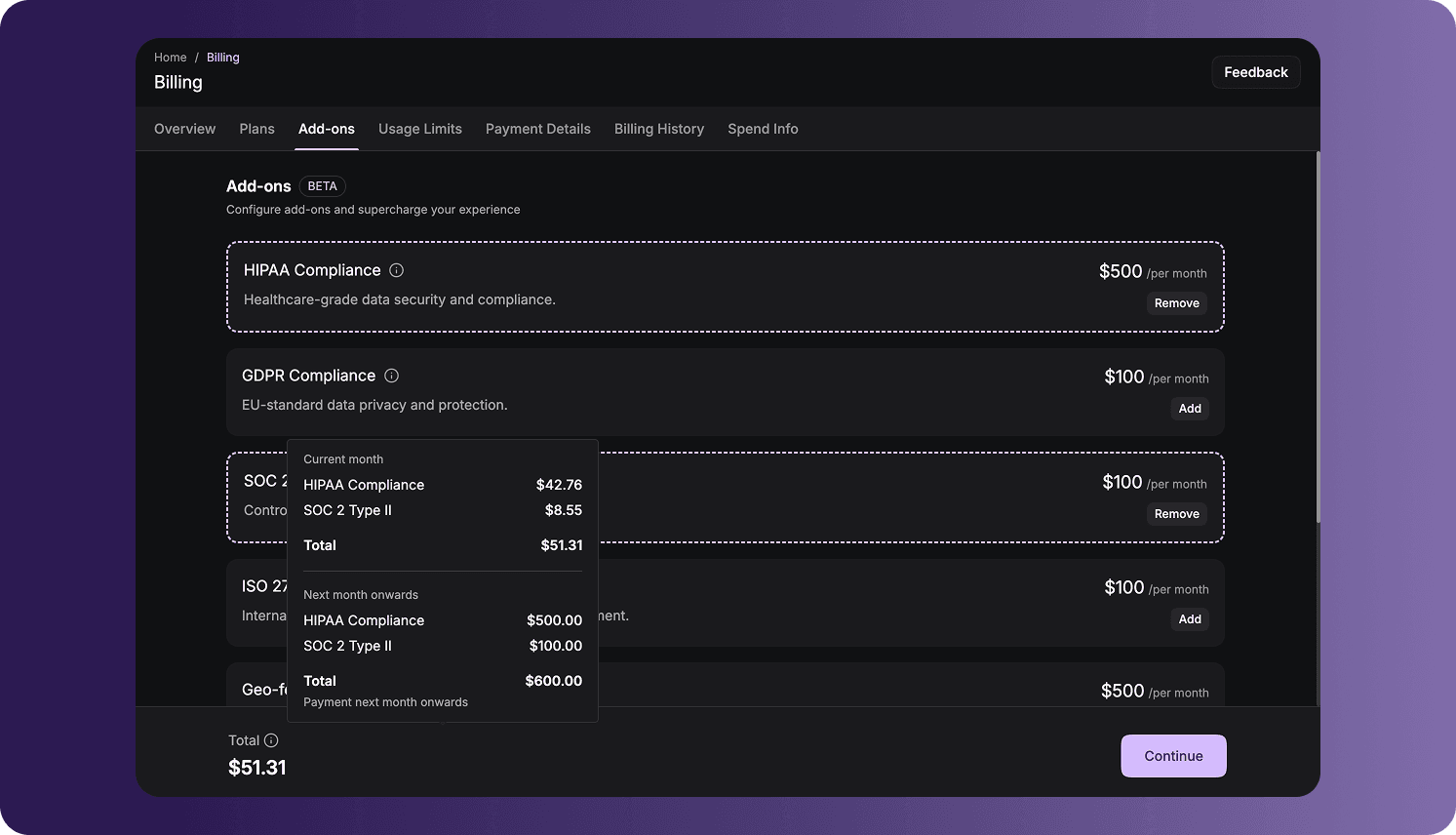
Add-ons are currently in Beta. Availability, behavior, and pricing can change while the feature is in beta.
Open Billing Add-ons
To access the page:
- Sign in to the VideoSDK Dashboard.
- Select RTC.
- Select Billing from the navigation sidebar.
- Select Add-ons.
Available Add-ons
Each add-on card displays its name, purpose, monthly price, and an action for including or removing it from the current selection.
| Add-on | Purpose |
|---|---|
| HIPAA Compliance | Adds healthcare-focused data security and compliance capabilities. |
| GDPR Compliance | Adds controls intended for EU data privacy and protection requirements. |
| SOC 2 Type II | Adds controls associated with security, availability, and confidentiality. |
| ISO 27001 | Adds capabilities associated with the international information-security management standard. |
| Geo-fencing (Geo Restriction) | Unlocks region-based access controls that can be configured for individual API keys. |
| Cloud Proxy | Provides secure traffic routing through private network controls. |
| CERT-IN Compliance | Adds capabilities associated with India's cybersecurity guidelines. |
The add-ons and prices available to your organization are shown directly in the dashboard. Prices are displayed in INR for organizations registered in India and USD for organizations registered outside India.
Select Add-ons
To prepare an add-on purchase:
- Select Add on each add-on you want to include.
- Review the highlighted add-on cards. Their action changes to Remove.
- Select Remove if you want to exclude an add-on before continuing.
- Review the total displayed at the bottom of the page.
- Select Continue to proceed to confirmation and payment.
Selecting or removing an add-on updates the order total. The change is not complete until you continue through the remaining confirmation and payment steps.
Configure Geo-fencing After Purchase
The Geo-fencing configuration becomes available only after the Geo-fencing (Geo Restriction) add-on has been purchased.
After the purchase is active:
- Open API Keys in the Dashboard.
- Find the API key whose access you want to restrict.
- Select Settings for that API key.
- Locate the Geo-fencing settings and select the permitted region.
- Save the API key settings.
Geo-fencing is configured separately for each API key. If the Geo-fencing settings do not appear, confirm that the add-on purchase was completed for the current organization.
Review the Order Total
When one or more add-ons are selected, the total section summarizes two billing periods:
- Current month: Shows the prorated charge for the remainder of the current billing month.
- Next month onwards: Shows the full recurring monthly charge for the selected add-ons.
Select or hover over the information icon beside Total to review the charge for each selected add-on and the subtotal for both periods.
Applicable taxes, such as GST, are displayed separately from the subtotal. Review the complete amount before selecting Continue.
The current-month charge can be lower than the displayed monthly price because it is prorated according to the time remaining in the current billing month.
Add-on Pricing and Currency
The dashboard is the current source of truth for add-on availability and pricing. The displayed currency is based on the country selected when the organization was created:
| Signup country | Billing currency |
|---|---|
| India | Indian rupee (INR) |
| Any country outside India | United States dollar (USD) |
Taxes and the final payable total can vary based on the organization's billing information and applicable regulations.
Frequently Asked Questions
Why is the current-month total lower than the listed monthly price?
The dashboard prorates the first charge according to the time remaining in the current billing month. The Next month onwards section shows the full recurring monthly amount.
Got a Question?  Ask us on discord

