Billing Overview
The Overview tab summarizes your organization's active plan, wallet balance, recent usage charges, saved payment method, and latest billing activity. The sections shown on this page depend on whether you have added a card, used a billable service, or completed a transaction.
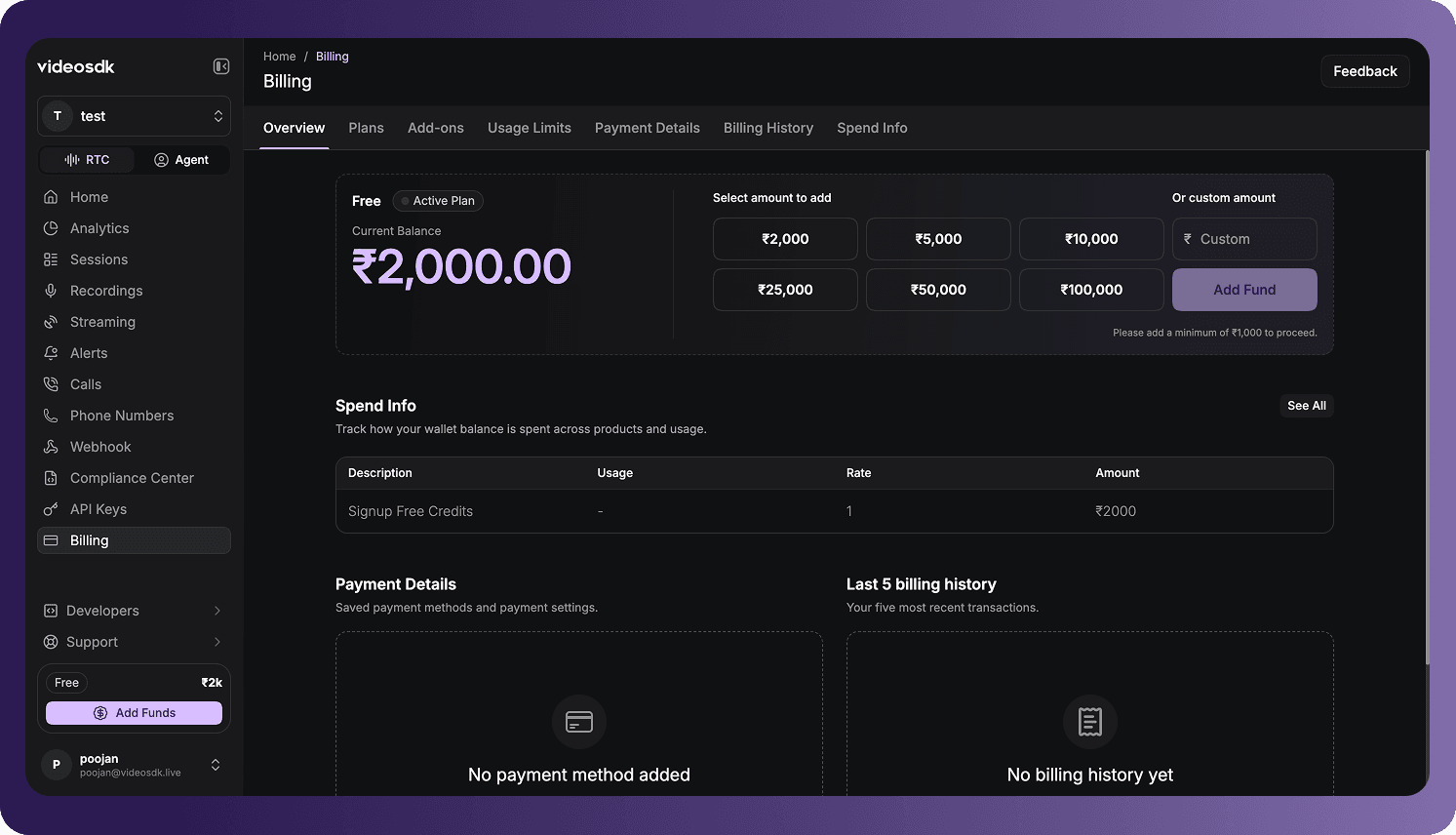
Open Billing Overview
To access the page:
- Sign in to the VideoSDK Dashboard.
- Select RTC.
- Select Billing from the navigation sidebar.
- Select Overview.
The Billing section also contains separate tabs for Plans, Add-ons, Usage Limits, Payment Details, Billing History, and Spend Info.
Active Plan and Wallet Balance
The balance panel displays:
- Your organization's active plan, such as Free or Pay As You Go - On Demand.
- The current prepaid wallet balance available to pay for usage.
- Preset amounts that can be added to the wallet.
- A custom amount field for entering a different top-up amount.
To add funds:
- Select a preset amount or enter a custom amount.
- Select Add Fund.
- Complete the payment flow.
The dashboard displays the minimum top-up amount beside the controls. In the current dashboard, the minimum is ₹1,000 for INR billing and $10 for USD billing.
Billing Currency
The billing currency is determined by the country selected when the organization is first created:
| Signup country | Billing currency |
|---|---|
| India | Indian rupee (INR) |
| Any country outside India | United States dollar (USD) |
Preset top-up amounts, custom amounts, balances, charges, and invoices are displayed in the organization's billing currency.
Auto Reload
Enable Auto Reload to automatically add funds when the wallet balance falls below the configured threshold. This helps prevent service interruption caused by an insufficient balance.
Auto Reload is currently unavailable for cards issued in India because of RBI regulations. Indian organizations can continue to add funds manually.
Spend Info
The Spend Info preview shows how wallet funds are consumed across products and usage. Free-plan users can use this section to review charges deducted from their available credit.
When spending data is available, each entry can show:
| Column | Description |
|---|---|
| Description | The product, feature, or metered usage that generated the charge. |
| Usage | The measured quantity for the entry. |
| Rate | The rate applied to the measured usage. |
| Amount | The amount deducted from the wallet for the entry. |
Select See All to open the complete Spend Info tab. Spend data in the updated dashboard is available by month starting from January 2026.
If the organization has not incurred any usage-based charges, the section displays No spending activity yet.
Payment Details
After you add a card, the Payment Details section displays the saved card and billing-address information. Select Manage Card to open the complete Payment Details tab.
If no card has been added, the section displays No payment method added. Select Add New Card to add one.
Recent Billing History
After the organization completes a billing transaction, the Overview page displays the five most recent entries under Last 5 billing history. Select See All to open the complete Billing History tab.
If the organization has not completed any billing activity, the section displays No billing history yet.
Billing history is separated by account model:
- Prepaid: Used for the current Pay As You Go (On-Demand) plan, where funds are added before usage.
- Postpaid: Used for legacy Pay As You Go accounts and Enterprise organizations configured for postpaid billing.
Usage Limits
VideoSDK limits supported services by concurrent usage rather than total lifetime usage. Open Billing > Usage Limits to review current limits, realtime usage, maximum concurrent requests, and available add-on packs.
For an explanation of concurrency and the available limits, see Understanding Usage Quota Limits.
Frequently Asked Questions
Why is my organization billed in INR instead of USD?
The billing currency is based on the country selected when the organization was first created. Organizations registered in India use INR, while organizations registered outside India use USD.
Why are Payment Details or Billing History empty?
Payment Details remains empty until a card is added. Billing History remains empty until the organization completes a billing transaction. These sections populate automatically when the corresponding information becomes available.
Why can I not enable Auto Reload for my card?
Auto Reload is unavailable for cards issued in India because of RBI regulations. Add funds manually when you need to replenish the wallet balance.
Why can I not find spend data from before January 2026?
Monthly Spend Info in the updated dashboard starts from January 2026. Earlier months are not available in this view.
Got a Question?  Ask us on discord

