Billing Plans
The Plans tab shows the plans available to your organization and identifies its active plan. Use this page to move from the Free plan to usage-based billing or to contact VideoSDK about an Enterprise plan.
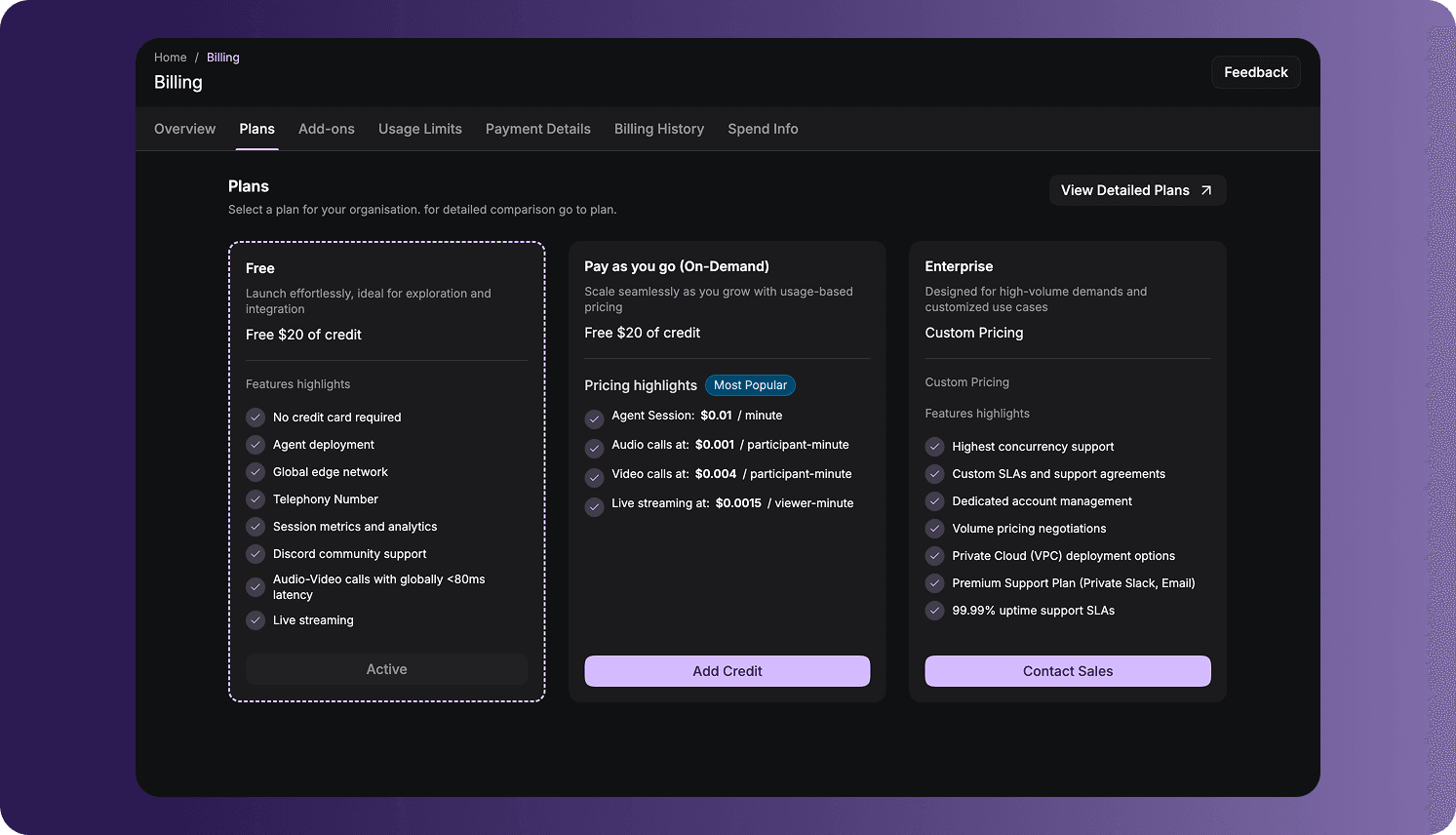
Open Billing Plans
To access the page:
- Sign in to the VideoSDK Dashboard.
- Select RTC.
- Select Billing from the navigation sidebar.
- Select Plans.
Available Plans
The page displays the following plan options:
| Plan | Best suited for | Dashboard action |
|---|---|---|
| Free | Exploring VideoSDK, testing an integration, and getting started without adding a credit card. | The card displays Active when this is the organization's current plan. |
| Pay As You Go (On-Demand) | Production usage that should be charged according to consumption. | Select Add Credit to begin the payment flow and fund the wallet. |
| Enterprise | High-volume or customized requirements, including negotiated limits, support, deployment, or commercial terms. | Select Contact Sales to discuss requirements with VideoSDK. |
Each plan card provides a short summary and selected feature or pricing highlights. The active plan is visually outlined and marked as active.
Move to Pay As You Go
To move from the Free plan to Pay As You Go (On-Demand):
- Locate the Pay As You Go (On-Demand) card.
- Select Add Credit.
- Add or confirm the required billing information.
- Select an amount and complete the payment.
After the payment succeeds, the funds are added to the organization's prepaid wallet. Usage charges are deducted from that balance.
The amount and currency shown during payment depend on the organization's billing country. Organizations registered in India use INR, while organizations registered outside India use USD.
Choose an Enterprise Plan
Select Contact Sales on the Enterprise card when your organization needs custom pricing, higher concurrency, dedicated support, private deployment options, or other negotiated requirements.
VideoSDK works with the organization to define the applicable limits, features, support arrangements, and commercial terms.
Compare Current Plans and Pricing
Select View Detailed Plans to open the complete plan comparison. For the latest rates, included credit, supported features, and Enterprise options, see VideoSDK Pricing.
For answers to common questions about plans, usage calculations, credits, and charges, see the Pricing FAQ.
Prices and plan inclusions can change. Use the pricing page and the values displayed in your dashboard as the current source of truth.
Frequently Asked Questions
Why are the prices or currency in my dashboard different from an example?
The dashboard uses the organization's billing currency, which is determined by the country selected when the organization was first created. India-based organizations use INR, while organizations outside India use USD. Current prices can also change over time, so refer to the values displayed in your dashboard.
Why does the Enterprise plan not show a fixed price?
Enterprise pricing is customized around the organization's usage, concurrency, support, deployment, and commercial requirements. Select Contact Sales to receive an applicable configuration and quote.
Why does the Free plan not have an upgrade button?
When Free is the organization's current plan, its card is marked Active. Use Add Credit on the Pay As You Go card to begin moving to usage-based billing, or select Contact Sales for Enterprise.
Got a Question?  Ask us on discord

