Spend Info
The Spend Info tab shows how your organization's wallet balance is consumed across VideoSDK products and metered services. Use it to review the measured usage, applied rate, and resulting wallet deduction for each usage category.
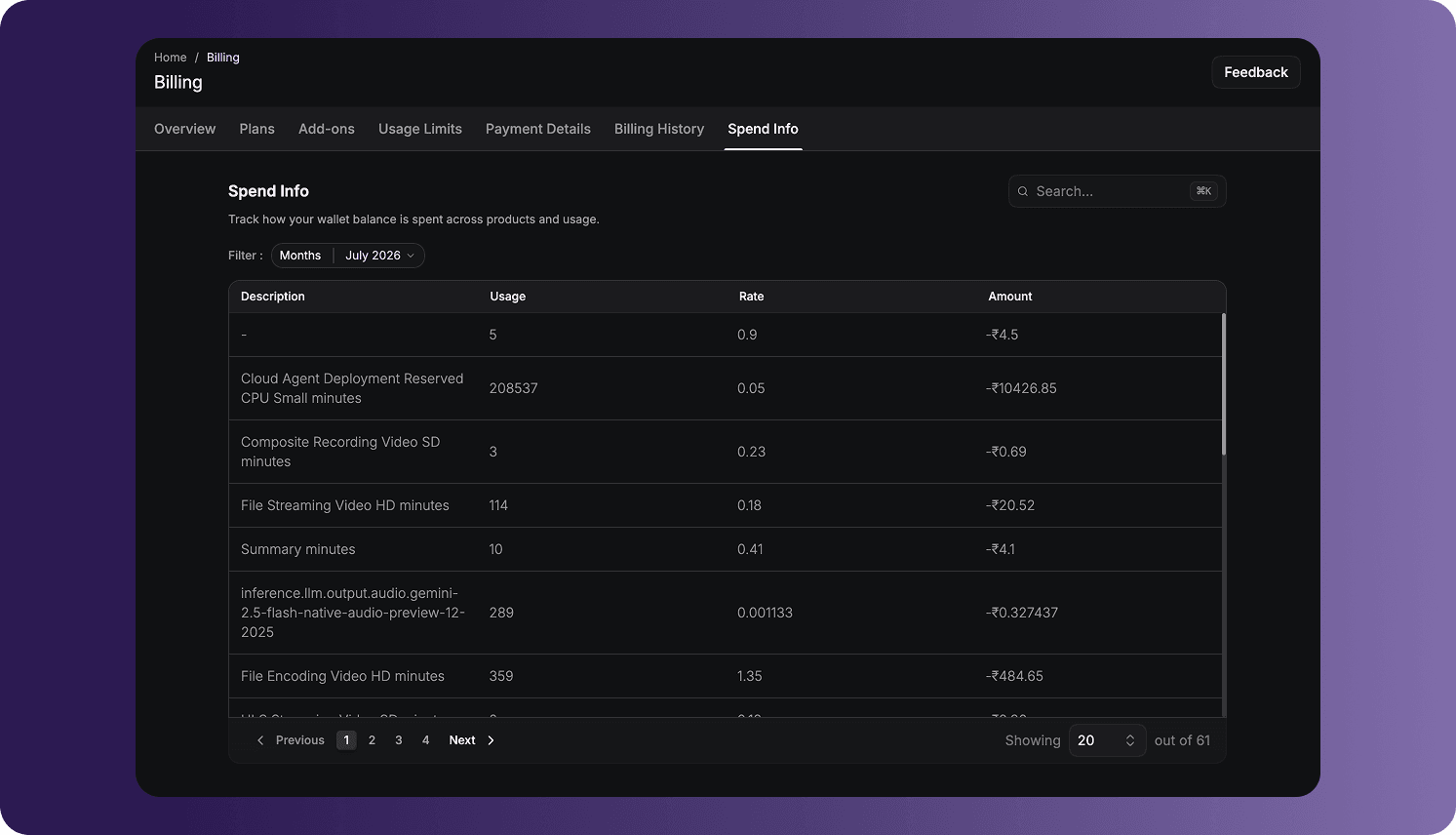
Open Spend Info
To access the page:
- Sign in to the VideoSDK Dashboard.
- Select RTC.
- Select Billing from the navigation sidebar.
- Select Spend Info.
Free-plan organizations can also use this page to review usage deducted from their available free credit.
Select a Month
Use the Months filter to select the billing month you want to inspect. Monthly Spend Info in the updated Dashboard is available from January 2026 onward.
The table refreshes when another month is selected. Only usage assigned to the selected month appears in the results.
Search and Navigate Results
Use the available controls to find and review entries:
- Enter a product, model, or usage name in Search to narrow the table.
- Use Previous, Next, or a page number to move between result pages.
- Change the number of rows displayed per page when more or fewer entries should be visible at once.
Search and pagination affect only the displayed results. They do not change billing data.
Understand Spend Entries
Each row represents a metered product or usage category:
| Column | Description |
|---|---|
| Description | The VideoSDK product, feature, model, storage operation, or metered service that generated the charge. |
| Usage | The measured quantity consumed during the selected month. |
| Rate | The billing rate applied to each unit of measured usage. |
| Amount | The total amount deducted from the wallet for that entry. |
The measurement unit depends on the product. Examples can include:
- RTC audio or video minutes
- HLS encoding or viewer minutes
- File encoding and storage
- Speech-to-text minutes
- AI model input or output usage
- Other VideoSDK services enabled for the organization
The product name or model can be included in Description when multiple variants are billed at different rates.
Understand Amounts and Precision
Spend amounts are displayed with a minus sign because they represent deductions from the organization's prepaid wallet balance. For example, -₹100 means ₹100 was deducted for that usage category.
Usage, rates, and calculated amounts can contain different numbers of decimal places. Very small per-unit rates can therefore produce an amount with greater precision than a typical currency display.
The rate and amount shown in the Dashboard use the organization's billing currency. Organizations registered in India use INR, while organizations registered outside India use USD.
Spend Info and Billing History
Spend Info and Billing History answer different questions:
| Page | Purpose |
|---|---|
| Spend Info | Explains which products and measured usage consumed wallet funds. |
| Billing History | Records payments, credit additions, reloads, subscriptions, invoices, and other billing transactions. |
Adding funds appears in Billing History, while using those funds appears as product-level deductions in Spend Info.
When No Spending Is Available
If the organization has not incurred any metered charges during the selected month, the page displays an empty state such as No spending activity yet.
An empty result can also appear when a search does not match any entries. Clear the search and confirm that the intended month is selected before concluding that no usage was recorded.
Frequently Asked Questions
Why can I not select a month before January 2026?
Spend Info in the updated Dashboard is available by month starting from January 2026. Earlier usage is not exposed through this view.
Why does the Amount column contain negative values?
The values represent money deducted from the organization's wallet for metered usage. Payments and funds added to the wallet are recorded separately under Billing History.
Why does a calculated amount contain many decimal places?
Some services use very small per-unit rates or highly granular usage measurements. Multiplying that usage by the applicable rate can produce an amount with greater decimal precision.
Why is recent usage missing from Spend Info?
Confirm that the correct month is selected and clear any active search. Recently completed usage may also take time to be processed and added to the billing ledger.
Got a Question?  Ask us on discord

