Invite Guest on Stage - iOS
In this guide, we will see how you can request a viewer to join your livestream by using the changeMode().
Important Changes iOS SDK in Version v2.2.0
- The following modes have been deprecated:
CONFERENCEhas been replaced bySEND_AND_RECVVIEWERhas been replaced bySIGNALLING_ONLY
Please update your implementation to use the new modes.
⚠️ Compatibility Notice:
To ensure a seamless meeting experience, all participants must use the same SDK version.
Do not mix version v2.2.0 + with older versions, as it may cause significant conflicts.
Let's first have a look at how we will be using the PubSub mechanism to acheive the requesting and switching of the participant's mode.

Before going forward in this guide, do make sure all the attendees join the meeting with mode as SIGNALLING_ONLY and the host joins with mode as SEND_AND_RECV
Step 1: Loading Viewer List
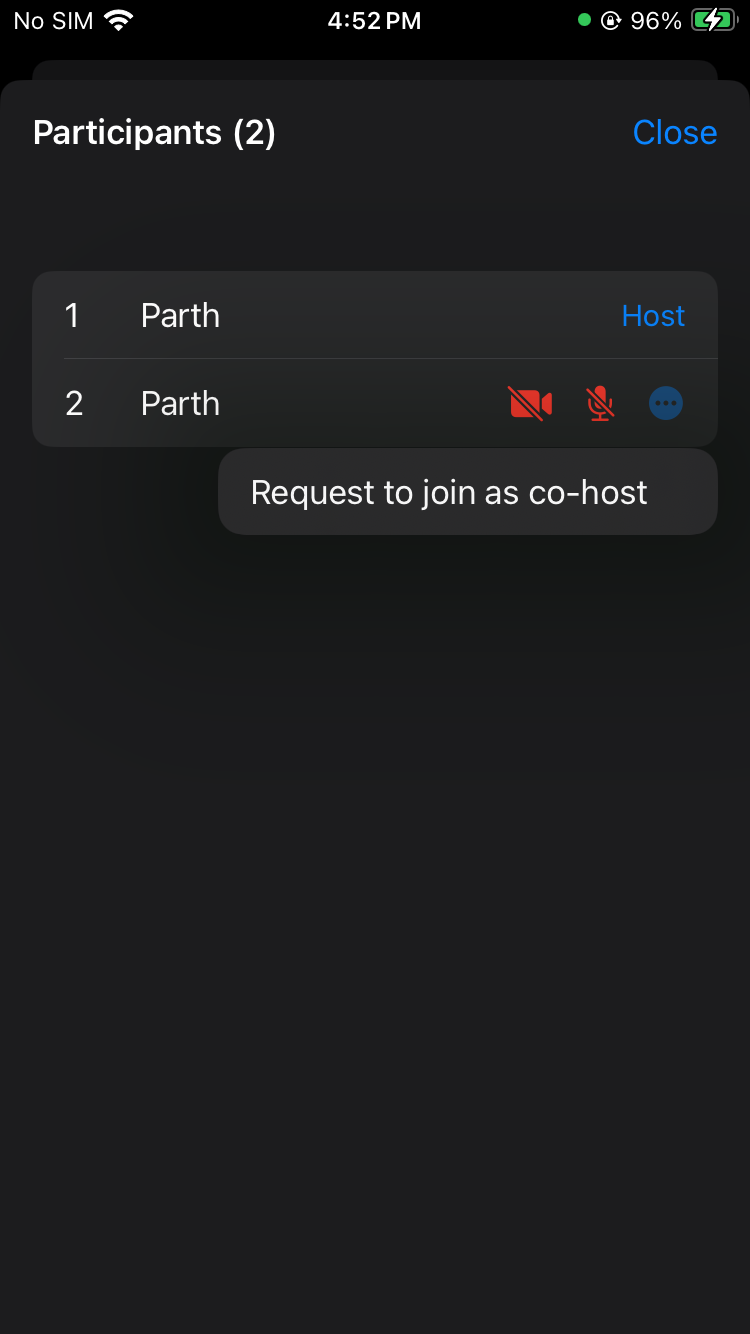
The host will see a list of participants who have joined as SIGNALLING_ONLY along with a button that, when selected, will invite that user to join the livestream.
Here we are using List to display viewer list with button.
struct ParticipantListView: View {
    let participants: [Participant]
    let participantCameraStatus: [String: Bool]
    let participantMicStatus: [String: Bool]
    let onClose: () -> Void
    let sendHostRequest: (Participant) -> Void

    @State private var requestedParticipantId: String?

    var body: some View {
        VStack(alignment: .leading) {
            HStack {
                Text("Participants (\(participants.count))")
                    .font(.headline)
                Spacer()
                Button("Close") {
                    onClose()
                }
                .foregroundColor(.blue)
            }
            .padding()

            List {
                ForEach(participants.indices, id: \.self) { index in
                    HStack {
                        Text("\(index + 1)")
                            .frame(width: 30, alignment: .leading)

                        // Participant name
                        Text(participants[index].displayName)
                            .frame(maxWidth: .infinity, alignment: .leading)

                        // Show "Host" or "Requested" tag
                        if participants[index].id == requestedParticipantId {
                            Text("Requested")
                                .font(.subheadline)
                                .foregroundColor(.orange)
                        } else if participants[index].mode == .SEND_AND_RECV {
                            Text("Host")
                                .font(.subheadline)
                                .foregroundColor(.blue)
                        }
                        if participants[index].isLocal != true {
                            // Camera status
                            Image(
                                systemName: participantCameraStatus[
                                    participants[index].id
                                ] ?? false ? "video.fill" : "video.slash.fill"
                            )
                            .foregroundColor(
                                participantCameraStatus[participants[index].id]
                                    ?? false ? .green : .red
                            )

                            // Mic status
                            Image(
                                systemName: participantMicStatus[
                                    participants[index].id
                                ] ?? false ? "mic.fill" : "mic.slash.fill"
                            )
                            .foregroundColor(
                                participantMicStatus[participants[index].id]
                                    ?? false ? .green : .red
                            )
                            .frame(width: 30)

                            // Option button to show options
                            Menu {
                                Button("Request to join as co-host") {
                                    requestedParticipantId =
                                        participants[index].id
                                    sendHostRequest(participants[index])
                                    onClose()
                                }
                            } label: {
                                Image(systemName: "ellipsis.circle.fill")
                                    .foregroundColor(.blue)
                            }
                        }
                    }
                    .padding(.vertical, 5)
                }
            }
        }
    }
}
- On the click of option menu button, host can request for being the co-host and request send via PubSub to the viewer, now viewer can accept and reject the request.
- Swift
struct LiveStreamView: View {
  @State private var showParticipantsList = false

   var body: some View {
        VStack {
          //...
          Button {
              showOptionSelector = true
          } label: {
              Image(systemName: "ellipsis")
                  .font(.system(size: 20))
                  .frame(width: 45, height: 45)
                  .background(Color.white.opacity(0.3))
                  .clipShape(RoundedRectangle(cornerRadius: 10))
                  .foregroundColor(.white)
          }
          .confirmationDialog(
              "Select an Option", isPresented: $showOptionSelector) {
              //Other options...
              Button("Show Participants List") {
                  showParticipantsList = true
              }
              Button("Cancel", role: .cancel) {}
          }
          //...
        }
        .sheet(isPresented: $showParticipantsList) {
            ParticipantListView(
                participants: controller.participants,
                participantCameraStatus: controller
                    .participantCameraStatus,
                participantMicStatus: controller
                    .participantMicStatus,
                onClose: { showParticipantsList = false },
                sendHostRequest: controller.sendTheHostRequest
            )
        }
   }
}
Step 2: Requesting a Viewer to Join Livestream
We have a Viewer list ready. Now, let us handle the click event for sending the request.
We will be using HOSTREQUESTED as the topic for PubSub.
- Swift
// sendTheHostRequest implementation to send request
func sendTheHostRequest(_ participant: Participant) {
    let message = "Request for mode change your mode"
    let senderName = participants.first?.displayName ?? "Unknown"
    let senderId = participants.first?.id ?? "Unknown"
    let payload = [
        "receiverId": participant.id,
        "senderName": senderName,
        "senderId": senderId,
    ]
    Task {
        do {
            try await self.meeting?.pubsub.publish(
                topic: "HOSTREQUESTED",
                message: message,
                options: [:],
                payload: payload
            )
        } catch {
            print("Error while sending request to become host: \(error)")
        }
    }
}
Step 3: Showing Viewer Request Dialog
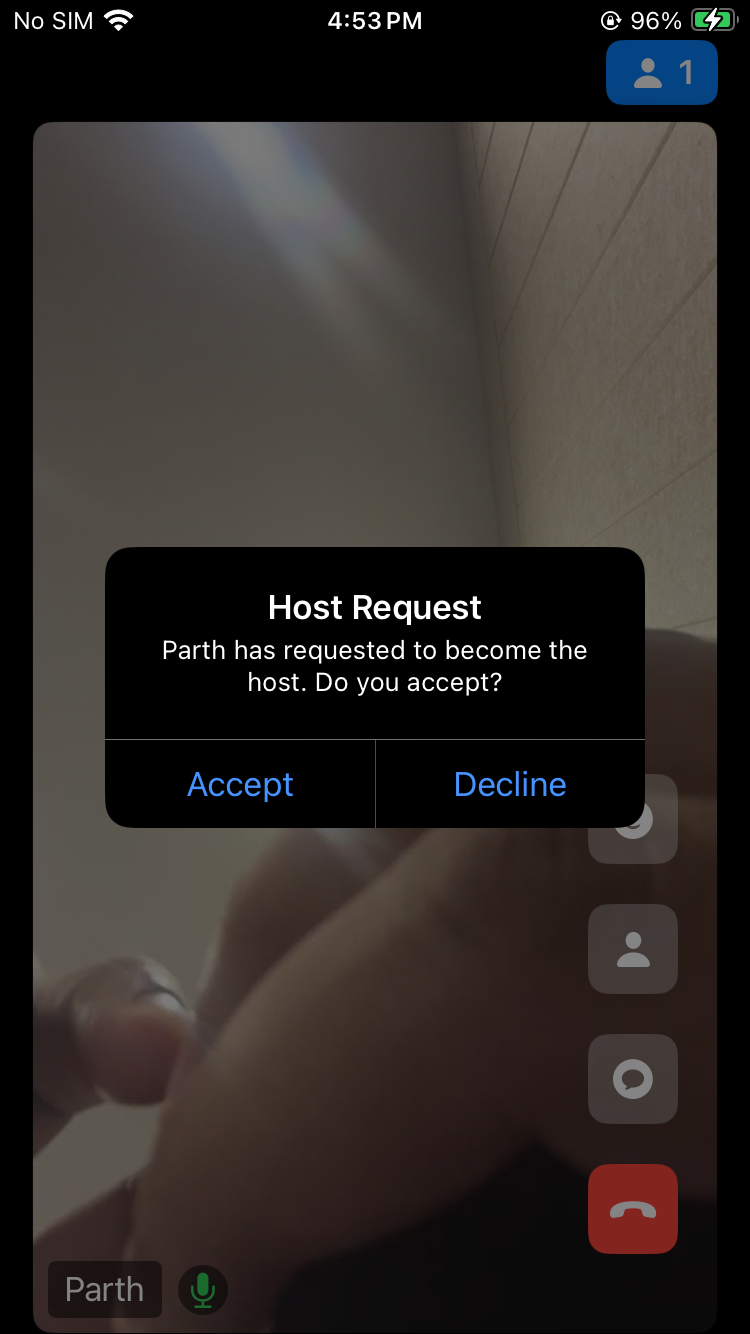
After implementing the Host requesting viewer to join the livestream, let's display the viewer's request dialogue and switch the SIGNALLING_ONLY mode to SEND_AND_RECV.
- Swift
struct LiveStreamView: View {
  @StateObject var controller: LiveStreamViewController

  var body: some View {
      VStack {
        //...
      }
      .alert(isPresented: $controller.showAlert) {
            if controller.showActionButtons {
                return Alert(
                    title: Text(controller.alertTitle),
                    message: Text(controller.alertMessage),
                    primaryButton: .default(Text("Accept")) {
                        self.controller.acceptHostChange()
                    },
                    secondaryButton: .default(Text("Decline")) {
                        self.controller.declineHostChange()
                    }
                )
            } else {
                return Alert(
                    title: Text(controller.alertTitle),
                    message: Text(controller.alertMessage),
                    dismissButton: .default(Text("Okay")) {
                        self.controller.showAlert = false
                    }
                )
            }
        }
  }

}

class LiveStreamViewController: ObservableObject {
  @Published var showAlert = false
  @Published var alertTitle = ""
  @Published var alertMessage = ""
  @Published var showActionButtons = false

  func showHostRequestAlert(participantId: String, participantName: String) {
      self.alertTitle = "Host Request"
      self.alertMessage =
          "\(participantName) has requested to become the host. Do you accept?"
      self.showAlert = true
      self.showActionButtons = true
  }

  func acceptHostChange() {
        let senderName = participants.first?.displayName ?? "Unknown"
        let recvID = requestFrom ?? "Unknown"
        let payload = [ "receiverId": recvID, "accpeterName": senderName ]
        Task {
            await meeting?.changeMode(.SEND_AND_RECV)
            do {
                try await self.meeting?.pubsub.publish(
                    topic: "ACK",
                    message: "ACCEPTED",
                    options: [:],
                    payload: payload)
            } catch { print("Error while accepting host request: \(error)") }
        }
    }

    func declineHostChange() {
        let senderName = participants.first?.displayName ?? "Unknown"
        let recvID = requestFrom ?? "Unknown"
        let payload = [ "receiverId": recvID, "accpeterName": senderName ]
        Task {
            do {
                try await self.meeting?.pubsub.publish(
                    topic: "ACK",
                    message: "DECLINED",
                    options: [:],
                    payload: payload)
            } catch { print("Error in declining host request: \(error)") }
        }
    }
}

extension LiveStreamViewController: MeetingEventListener {

    func onMeetingJoined() {
      //... subscribing the event of pubsub while joining the meeting to get the messages...
      Task {
        try? await meeting?.pubsub.subscribe(topic: "HOSTREQUESTED", forListener: self)
        try? await meeting?.pubsub.subscribe(topic: "ACK", forListener: self)
      }
    }
}

extension LiveStreamViewController: PubSubMessageListener {
   func onMessageReceived(_ message: VideoSDKRTC.PubSubMessage) {
      print("Message Received:= " + message.message)
      switch message.topic {
        //... other cases
        case "HOSTREQUESTED":
          if message.senderId != participants.first?.id {
            let json = message.payload
            if !json.isEmpty {
                if let participantId = json["receiverId"] as? String,
                    let participantName = json["senderName"] as? String
                {
                    self.requestFrom = json["senderId"] as? String
                    if participantId == participants.first?.id {
                        DispatchQueue.main.async {
                            self.showHostRequestAlert(
                                participantId: participantId,
                                participantName: participantName
                            )
                        }
                    }
                }
            }
        }
        case "ACK":
          let json = message.payload
          if !json.isEmpty {
              if let toSendTo = json["receiverId"] as? String,
                  let toPrintName = json["accpeterName"] as? String
                {
                  if toSendTo == participants.first?.id {
                      if message.message == "ACCEPTED" {
                          DispatchQueue.main.async {
                              self.alertTitle = "Host Request Accepted"
                              self.alertMessage =
                                  "The request to become the host has been accepted by \(toPrintName)."
                              self.showAlert = true
                              self.showActionButtons = false
                          }
                      } else if message.message == "DECLINED" {
                          DispatchQueue.main.async {
                              self.alertTitle = "Host Request Rejected"
                              self.alertMessage =
                                  "The request to become the host has been declined by \(toPrintName)."
                              self.showAlert = true
                              self.showActionButtons = false
                          }
                      }
                  }
              }
          }
      }
   }
}
Step 4: Pin the participant
We need to pin the participant so that he/she can appears on the livestream. To achieve this, we will listen to the callback on the onParticipantModeChanged of Meeting class.
- Swift
//...
extension LiveStreamViewController: MeetingEventListener {
  //...
  func onParticipantModeChanged(participantId: String, mode: VideoSDKRTC.Mode) {
      let participant = self.participants.first { $0.id == participantId }
      if participant != nil {
          DispatchQueue.main.async {
              if (participant?.mode == .SEND_AND_RECV) {
                  participant?.pin()
              } else {
                  participant?.unpin()
              }
              //...
          }
      }
  }
  //...
}
//...
API Reference
The API references for all the methods utilized in this guide are provided below.
Got a Question?  Ask us on discord

