Interactive Livestream (HLS) - iOS
What is Interactive Livestream (HLS)?
Interactive live streaming (HLS) refers to a type of live streaming where viewers can actively engage with the content being streamed and with other viewers in real-time.
In an interactive live stream (HLS), viewers can take part in a variety of activities like live polling, Q&A sessions, and even sending virtual gifts to the content creator or each other.
What is Adaptive Live Streaming?
Adaptive live streaming means the stream automatically switches to a lower or higher resolution to match each viewer's network bandwidth.
What is Latency?
Latency is the delay between capturing video content and its playback. Key factors that affect latency:
- Buffering: Balance buffer size for smoother playback against latency.
- Network Conditions: Efficient servers and network health contribute to lower latency.
Standard HLS has a latency around 5-6 seconds.
HLS Architecture of VideoSDK
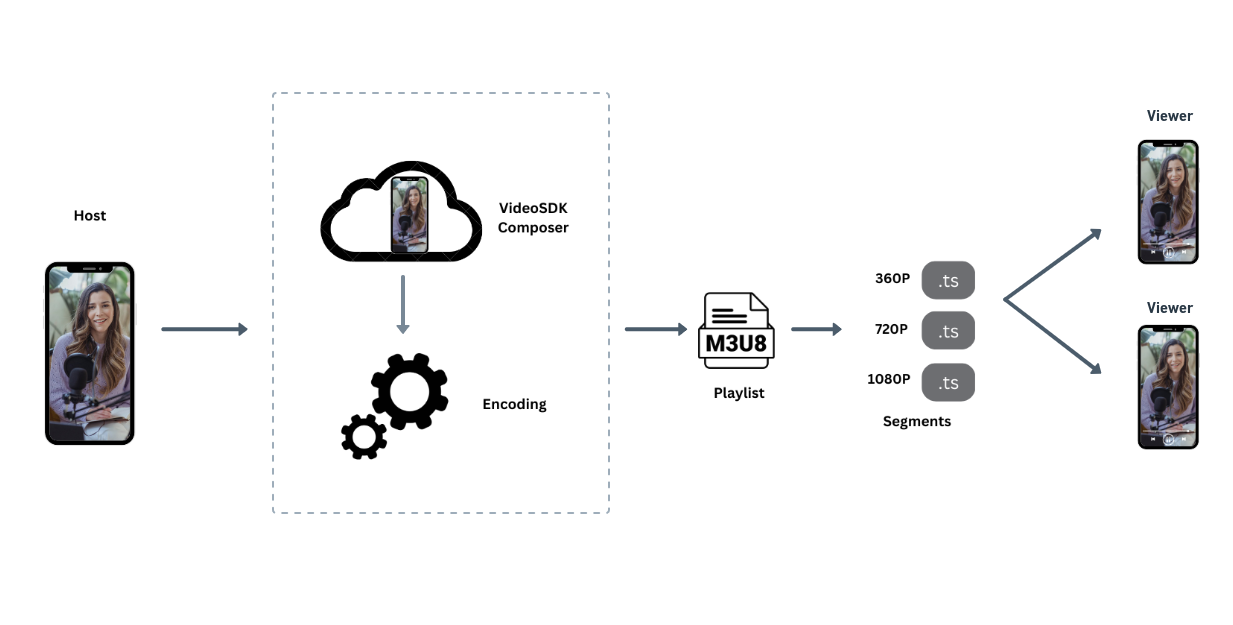
When a host starts the interactive live stream, VideoSDK lays it out with the default theme or your custom template and delivers it to viewers as an M3U8 playlist. Viewers can play it directly, and it adapts to each viewer's network bandwidth.
When using VideoSDK for interactive live stream, you get multiple types of URLs which you can use based on your requirements.
1. Standard Streaming: Viewers watch the stream live and cannot go back.
2. Rolling Playback: Viewers can rewind and play back the complete stream.
3. VoD Playback With this, users can play back the complete live stream on demand whenever needed.
Using HLS with VideoSDK
You can use HLS with VideoSDK in two different ways.
1. Simple Adaptive Streaming
When we talk about simple adaptive streaming, we imply that there is hardly any interaction between the hosts and the viewers.
These livestreams are helpful when there are a lot of viewers, and they don't want to engage with the host. In this scenario, every presenter attends a VideoSDK room, while every viewer only watches the livestream.
This video is for educational purposes
2. Adaptive Streaming with increased engagement
When you want to communicate with your audience by enabling polls, conversations, and the ability for viewers to join and leave the livestream based on the host's decision, adaptive streaming with enhanced engagement will be the best fit for you.
In this scenario, both the host and the viewer will have to join a VideoSDK room with different roles. To learn more about the roles follow this guide.
This video is for educational purposes
Got a Question?  Ask us on discord

