Recording Encryption - iOS
Recording Encryption protects your meeting recordings at rest. When it's enabled, every recording is encrypted before it is written to cloud storage, and it can be decrypted only with a private key that stays entirely in your control.
How it works
Set up your keys → recordings are encrypted automatically → you decrypt with your key.
- Set up your keys. From the dashboard, you add an RSA public key (or generate one in a click) and keep the matching private key to yourself.
- Recordings are encrypted automatically. Each recording is encrypted with a unique key, which is then locked with your public key before the files are uploaded to your cloud storage.
- You decrypt when you need it. Download the files and unlock them with your private key. Because that key stays with you, you stay in full control of who can open your recordings.
Supported algorithms
| Setting | Available options | Notes |
|---|---|---|
| Algorithm (recording content) | AES-256-GCM, AES-256-CTR | AES-256-GCM is recommended because it is authenticated, so tampering is detected on decryption. |
| Key Algorithm (RSA key strength) | RSA 2048, RSA 4096 | Both are secure. RSA 4096 offers a larger margin; RSA 2048 is faster. |
The AES key wrapping always uses RSA-OAEP with SHA-256.
Enable encryption
Encryption is configured per API Key from the dashboard, inside Cloud Storage Configuration. There is no separate API to set it up.
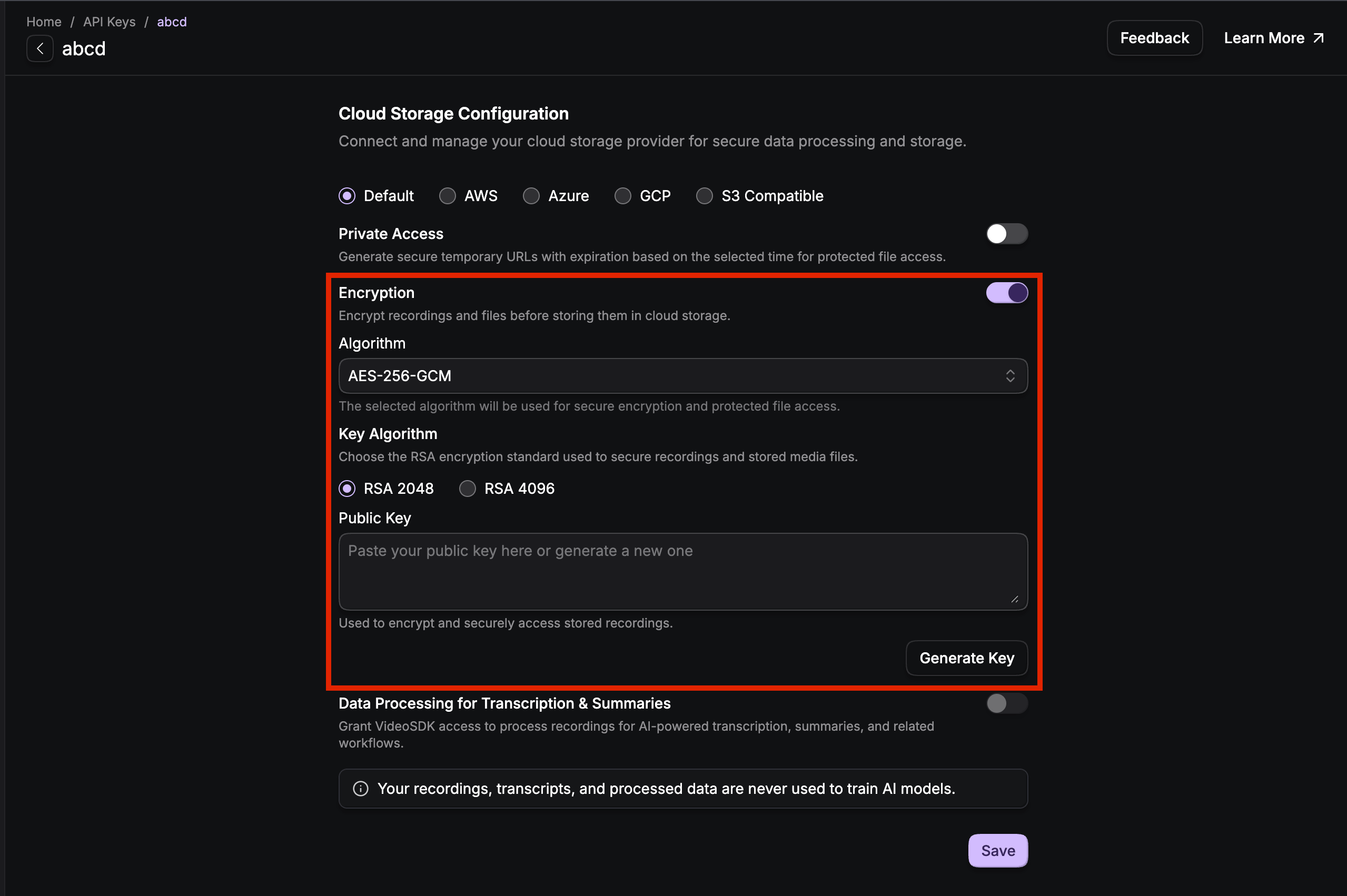
- Go to the VideoSDK Dashboard and select the API Key you want to configure.
- Open Cloud Storage Configuration and turn on Encryption.
- Choose an Algorithm (
AES-256-GCMrecommended). - Choose a Key Algorithm (
RSA 2048orRSA 4096). - Provide your Public Key:
- Paste an existing RSA public key in PEM format, or
- Click Generate Key to create a new keypair in the browser.
- Click Save.
If you generate a keypair, download and store the private key immediately. It is shown only once and is never stored by VideoSDK. If you lose it, your encrypted recordings cannot be recovered.
Encryption and Data Processing for Transcription & Summaries cannot be enabled at the same time. AI features like transcription and summaries run on unencrypted recordings, so you choose one or the other per API Key.
What you get in storage
With encryption on, each recording is delivered as three files instead of one (the extension matches the recording format, e.g. .mp4 or .webm):
| File | Contents |
|---|---|
recording.mp4.enc | The encrypted recording. |
recording.mp4.key.enc | The AES key for this recording, wrapped with your RSA public key. |
recording.mp4.meta.json | Encryption details needed to decrypt (algorithm, key and IV lengths). |
A typical meta.json looks like this:
{
  "version": 1,
  "algorithm": "AES-256-GCM",
  "rsaScheme": "RSA-OAEP-SHA256",
  "keyLength": 32,
  "ivLength": 12,
  "authTagLength": 16,
  "bundleStructure": "aesKey || iv || authTag",
  "fingerprint": "<sha256 of your public key>"
}
Decrypt a recording
Decryption happens entirely on your side, with your private key. Download all three files, then unwrap the AES key and decrypt the recording. The example below (Node.js) reads meta.json, so it works for both AES-256-GCM and AES-256-CTR:
const { readFileSync, writeFileSync } = require("fs");
const { privateDecrypt, createDecipheriv, constants } = require("crypto");

// Your RSA private key (kept only by you)
const privateKeyPem = readFileSync("private_key.pem", "utf8");

// The three downloaded artifacts
const ciphertext = readFileSync("recording.mp4.enc");
const wrappedKey = readFileSync("recording.mp4.key.enc");
const meta = JSON.parse(readFileSync("recording.mp4.meta.json", "utf8"));

// 1. Unwrap the AES key bundle with your private key (RSA-OAEP-SHA256)
const bundle = privateDecrypt(
  {
    key: privateKeyPem,
    oaepHash: "sha256",
    padding: constants.RSA_PKCS1_OAEP_PADDING,
  },
  wrappedKey,
);

// 2. Split the bundle into aesKey + iv + authTag (lengths come from meta.json)
const aesKey = bundle.subarray(0, meta.keyLength);
const iv = bundle.subarray(meta.keyLength, meta.keyLength + meta.ivLength);
const authTag = meta.authTagLength
  ? bundle.subarray(meta.keyLength + meta.ivLength)
  : null;

// 3. Decrypt the recording
const cipherName =
  meta.algorithm === "AES-256-CTR" ? "aes-256-ctr" : "aes-256-gcm";
const decipher = createDecipheriv(cipherName, aesKey, iv);
if (authTag) decipher.setAuthTag(authTag); // GCM only

const recording = Buffer.concat([
  decipher.update(ciphertext),
  decipher.final(),
]);
writeFileSync("recording.mp4", recording);
Good to know
- A new AES key is generated for every recording, so one key can never expose another recording.
- You hold the only private key, so you alone control who can open your recordings. VideoSDK stores just your public key.
- Decryption is your responsibility and runs wherever you choose. Any language works, as long as it supports RSA-OAEP-SHA256 and AES-256.
Got a Question?  Ask us on discord

