Understanding Call Quality - React Native
When developing a video call app, customer satisfaction heavily depends on the app's video and audio quality and its fluctuation.
Call Quality
From the user's perspective, good video quality is defined as smooth and clear video, along with clear audio. Developers consider good video quality as high-resolution, high-frame-rate video with minimal latency and high-bitrate audio with minimal audio loss.
Factors affecting Quality
When measuring video and audio quality, several variables come into play. The common factors affecting quality are as follows:
1. Network Bandwidth
- Network bandwidth is the measure of a user's network capacity, indicating how much data can be received and sent.
- If the participant's bandwidth is low, they are likely to experience pixelated or frozen video, along with robotic voice or minor audio interruptions.
- Frequent changes in network providers can also lead to significant fluctuations in internet bandwidth, resulting in poor video quality.
2. Latency
- Latency refers to the time it takes for data to transfer from one machine to another.
- If the room is hosted in
Ohioregion, and users are joining fromSingaporeregion, this can result in a long delay for data to transfer between machines. Therefore, it is advisable to choose a server based on your user base. - With VideoSDK, you can specify the server during the creation of a Room.
3. CPU Usage
- CPU Usage is also a determining factor, as all the audio and video streams going out and coming in need to be encoded or decoded, requiring a significant amount of computation.
- The higher the resolution and frame rate of the videos, the greater the computation required, which can lead to a bottleneck in delivering good-quality video.
- High CPU usage can also result in choppy or robotic audio.
4. Camera and Mic Quality
- The camera and microphone should capture good quality streams, otherwise remote participants get low quality media even on a good network.
Identifying various issues related to Quality.
In order to identify potential issues, VideoSDK collects various audio and video-related metrics that can help pinpoint quality concerns. Take a look at these metrics and understand what they indicate.
1. Resolution and Framerates
-
Resolution and frame rate serve as crucial metrics for video quality in a video call app. Resolution indicates the number of pixels in a video image, while frame rate denotes the number of frames displayed per second.
-
While higher resolutions and frame rates can enhance video quality, they also demand more bandwidth and processing power. It's essential to optimize these metrics based on the devices and network conditions of your users.
-
For instance, if the majority of your users are on mobile devices, opting for a lower resolution and frame rate may be more suitable to ensure smooth playback and minimize bandwidth usage.
-
If your user base comprises both mobile and desktop devices, adopting higher resolution for desktops and mid-resolutions for mobile devices can contribute to improved performance and quality while conserving bandwidth on mobile devices.
2. Bitrate
-
Bitrate represents the number of bits per second transmitted or received during the transmission of audio or video streams. It is a crucial parameter for assessing the quality of audio or video streams and should be adjusted for each resolution to strike a balance between performance and bandwidth utilization.
-
In scenarios with excellent network conditions, a higher bitrate can lead to significantly improved video quality. However, it's essential to be cautious when dealing with very high bitrates on mobile devices, as it may result in heating issues due to the substantial computational requirements for encoding and decoding videos.
Example
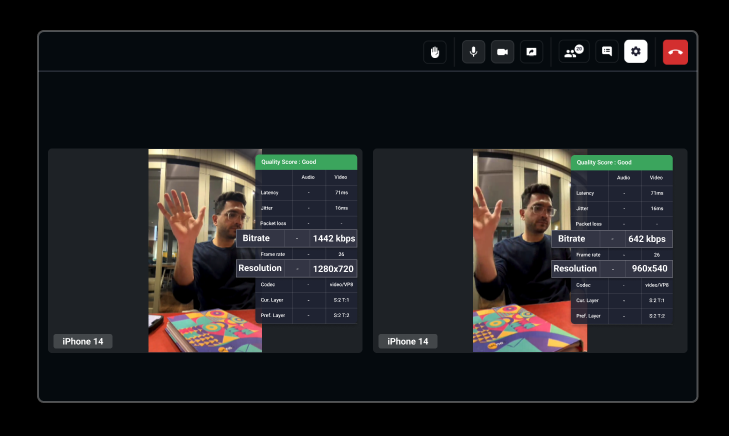
We used the same phone (iPhone 14), for both participants, but there were differences in resolution and bitrate. The first participant had a resolution of 1280x720 with a bitrate of 1442 kbps, while the second participant had a resolution of 960x540 with a bitrate of 642 kbps. Both participants' videos appeared to be of equal quality despite variations in resolution and bitrate.
3. Packet Loss
- Packet loss is a metric that reveals the number of lost data packets during transmission from the sender to the receiver. It can happen due to network congestion, hardware or software issues, or network latency. Increased packet loss can lead to degraded video and audio quality, as the absence of packets may cause gaps or distortions in the media stream.
4. Jitter
-
Audio and video packets are sent at regular intervals between the server and the client. Jitter is the variation in when these packets arrive, usually caused by a poor network connection.
-
When packets are delayed on the way to a participant, usually because the network is busy, they arrive at irregular intervals. This shows up as pixelated video on a video call, or choppy, distorted or robotic sound on a voice call.
5. Round Trip Time (Latency)
-
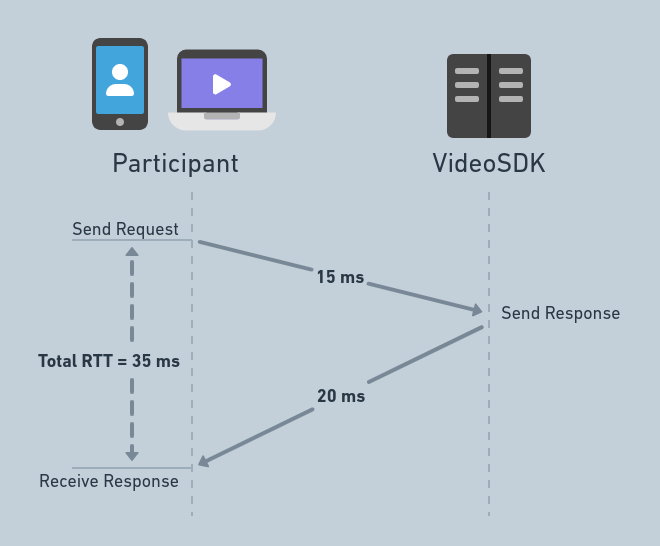
Round trip time refers to the duration it takes for data packets to be transmitted from the user's device to the server and back. If the servers are located far from the user's location, they may experience high latency (delay).
-
With VideoSDK, this factor is addressed as we automatically choose the nearest available server for participants. However, if you are geofencing to a specific region, ensure that you choose the server nearest to your users.
Checking Realtime Statistics
VideoSDK provides methods to check the realtime statistics of the audio and video of all the participants.
getVideoStats()
-
The
getVideoStats()method returns a Promise that resolves to an array of objects (ornullwhen there are no stats) containing the different quality parameters for video stream, which can be accessed through theuseParticipanthook. -
These objects contain values for the specific participant's video stream, including resolution, frame rate, bitrate, jitter, round trip time, and packet loss.
getAudioStats()
-
The
getAudioStats()method returns a Promise that resolves to an array of objects (ornullwhen there are no stats) containing the different quality parameters for audio stream, which can be accessed through theuseParticipanthook. -
These objects contain values for the specific participant's audio stream, including bitrate, jitter, round trip time and packet loss.
getShareStats()
-
The
getShareStats()method returns a Promise that resolves to an array of objects (ornullwhen there are no stats) containing the different quality parameters for screen share stream, which can be accessed through theuseParticipanthook. -
These objects contain values for the specific participant's screen share stream, including resolution, frame rate, bitrate, jitter, round trip time, and packet loss.
To show the popup dialog for the participant's realtime stats, you can refer to this component.
Quality analysis Graphs
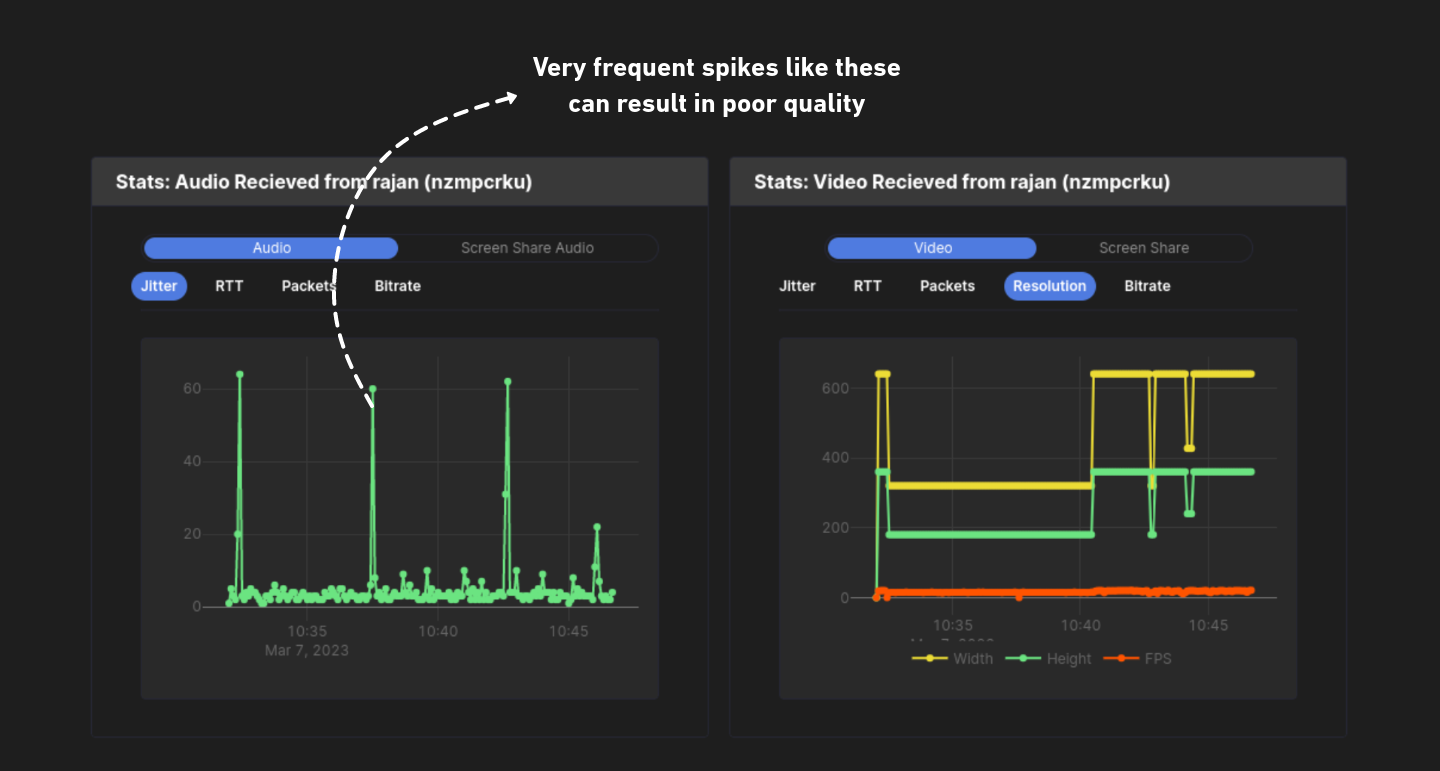
For all sessions conducted using VideoSDK, you can access quality analysis graphs from the VideoSDK Dashboard. These graphs help you visualize real-time data and identify spikes in certain parameters during calls, aiding in understanding the reasons for quality issues.
API Reference
The API references for all the methods and events utilised in this guide are provided below.
Got a Question?  Ask us on discord

