Realtime Transcription - React Native
Realtime transcription allows you to transcribe audio content into text in real-time during a session. Start and stop it with startTranscription() and stopTranscription() of the useTranscription hook.
You can also set up webhooks for realtime transcription.
To turn what participants say into text in other languages, see Realtime Translation.
This page uses the following asynchronous methods. Refer to their API reference for the errors each Promise may reject with, and handle these rejections appropriately based on your use case.
Integrating Realtime Transcription Feature
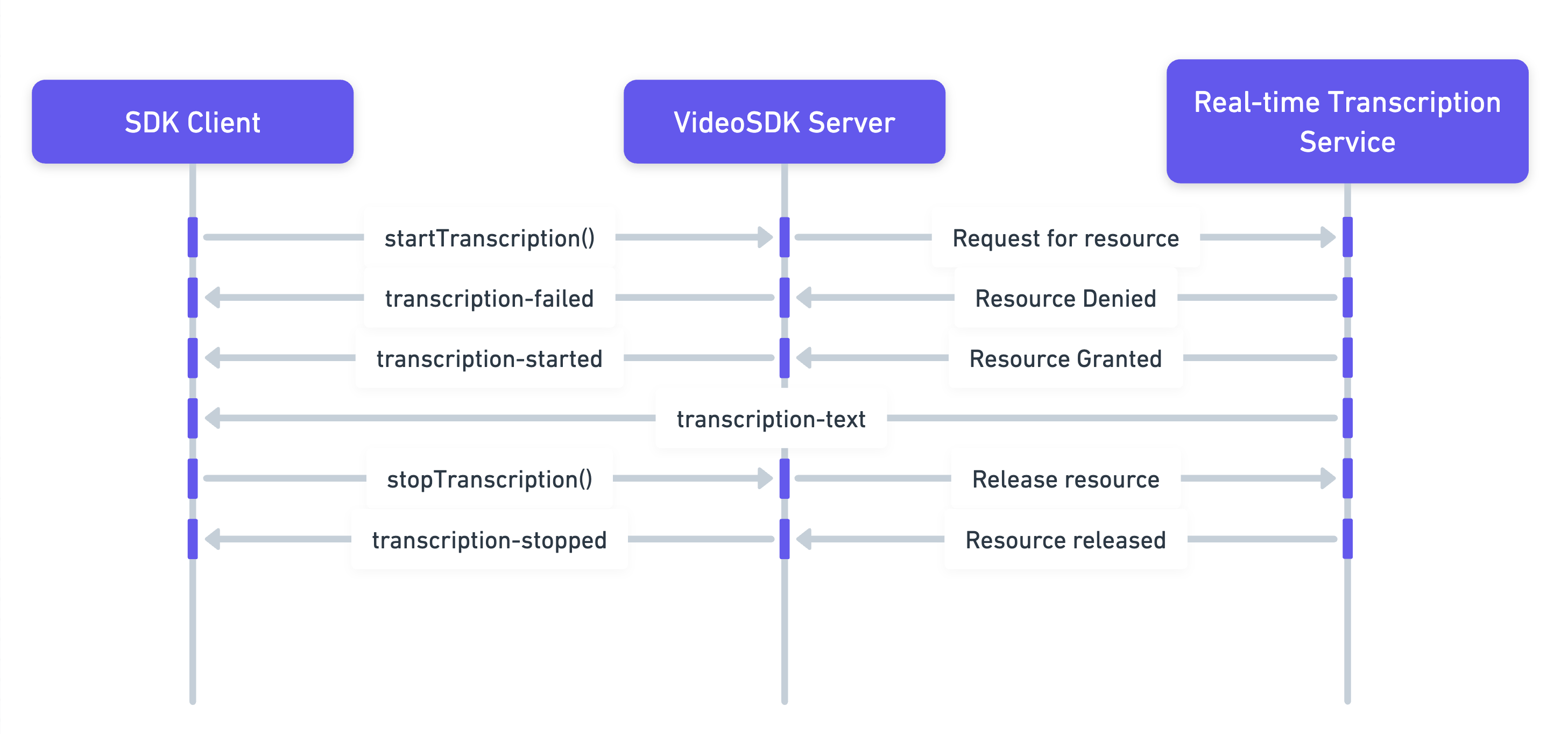
The image above shows these steps:
-
Start Transcription: The SDK Client initiates real-time transcription using the
startTranscriptionmethod. -
Server Response: VideoSDK starts transcription for the room, or refuses the request.
- If the request is denied,
onErrorof theuseRoomhook receivesTRANSCRIPTION_FAILED. - If the request is successful,
onTranscriptionStateChangedreceivesTRANSCRIPTION_STARTED, indicating that transcription has begun.
- If the request is denied,
-
Transcription Data: As transcription progresses,
onTranscriptionTextreceives data such as the text itself, the speaker's name, and timestamp. -
Stop Transcription: The client stops transcription with the
stopTranscription()method.onTranscriptionStateChangedthen receivesTRANSCRIPTION_STOPPEDto confirm that transcription has ended.
Step 1: Configure Realtime Transcription
- Create the transcription configuration.
webhookUrlreceives the webhooks.
// Configurations for Realtime Transcription
const config = {
  webhookUrl: "https://www.example.com",
  summary: {
    enabled: true,
    prompt: "Write summary in sections like Title, Agenda, Speakers, Action Items, Outlines, Notes and Summary"
  }
};
Step 2: Listen for the transcription events
- Pass callbacks for the transcription events.
onTranscriptionTextreceives the speaker'sparticipantIdandparticipantName, thetext, atimestampand atype.typeis"REALTIME"for a partial line, which a later line for the same sentence replaces, or"FULL_SENTENCE"for the settled sentence.
import { Constants, useTranscription } from "@videosdk.live/react-native-sdk";

function onTranscriptionStateChanged(data) {
  const { state } = data;

  if (state === Constants.transcriptionEvents.TRANSCRIPTION_STARTING) {
    console.log("Realtime Transcription is starting");
  } else if (state === Constants.transcriptionEvents.TRANSCRIPTION_STARTED) {
    console.log("Realtime Transcription is started");
  } else if (state === Constants.transcriptionEvents.TRANSCRIPTION_STOPPING) {
    console.log("Realtime Transcription is stopping");
  } else if (state === Constants.transcriptionEvents.TRANSCRIPTION_STOPPED) {
    console.log("Realtime Transcription is stopped");
  }
}

function onTranscriptionText(data) {
  let { participantName, text, timestamp, type } = data;
  console.log(`${participantName}: ${text} ${timestamp} (${type})`);
}

const { startTranscription, stopTranscription } = useTranscription({
  onTranscriptionStateChanged,
  onTranscriptionText,
});
Step 3: Start realtime transcription
- Initiate the realtime transcription using the
startTranscription()method.
// Starts realtime transcription
try {
  await startTranscription(config);
} catch (err) {
  console.error("startTranscription failed:", err);
}
Step 4: Stop realtime transcription
- Terminate the realtime transcription using the
stopTranscription()method.
// Stops realtime transcription
try {
  await stopTranscription();
} catch (err) {
  console.error("stopTranscription failed:", err);
}
You can access a summary of your realtime transcription using the Fetch Realtime Transcription API.
Example
- The following React code snippet allows you to start and stop realtime transcription with just a click. When you click the "Start Realtime Transcription" button, it begins realtime transcription. Clicking the "Stop Realtime Transcription" button ends the realtime transcription.
import { TouchableOpacity, Text } from "react-native";
import { Constants, useTranscription } from "@videosdk.live/react-native-sdk";

const RoomView = () => {

  // Configuration for realtime transcription
  const config = {
    webhookUrl: "https://www.example.com",
    summary: {
      enabled: true,
      prompt: "Write summary in sections like Title, Agenda, Speakers, Action Items, Outlines, Notes and Summary"
    }
  };

  // Callback function for transcription state change event
  function onTranscriptionStateChanged(data) {
    const { state } = data;

    if (state === Constants.transcriptionEvents.TRANSCRIPTION_STARTING) {
      console.log("Realtime Transcription is starting");
    } else if (state === Constants.transcriptionEvents.TRANSCRIPTION_STARTED) {
      console.log("Realtime Transcription is started");
    } else if (
      state === Constants.transcriptionEvents.TRANSCRIPTION_STOPPING
    ) {
      console.log("Realtime Transcription is stopping");
    } else if (state === Constants.transcriptionEvents.TRANSCRIPTION_STOPPED) {
      console.log("Realtime Transcription is stopped");
    }
  }

  // Callback function for transcription text event
  function onTranscriptionText(data) {
    let { participantName, text, timestamp } = data;
    console.log(`${participantName}: ${text} ${timestamp}`);
  }

  // Passing callback functions to useTranscription hook
  const { startTranscription, stopTranscription } = useTranscription({
    onTranscriptionStateChanged,
    onTranscriptionText,
  });

  // Start realtime transcription
  const handleStartTranscription = async () => {
    try {
      await startTranscription(config);
    } catch (err) {
      console.error("startTranscription failed:", err);
    }
  };

  // Stop realtime transcription
  const handleStopTranscription = async () => {
    try {
      await stopTranscription();
    } catch (err) {
      console.error("stopTranscription failed:", err);
    }
  };

  return (
    <>
      <TouchableOpacity onPress={handleStartTranscription}>
        <Text>Start Realtime Transcription</Text>
      </TouchableOpacity>

      <TouchableOpacity onPress={handleStopTranscription}>
        <Text>Stop Realtime Transcription</Text>
      </TouchableOpacity>
    </>
  );
};
API Reference
The API references for all the methods utilized in this guide are provided below.
Got a Question?  Ask us on discord

