Authentication and Token
VideoSDK uses access tokens for authentication. Using our dashboard (app.videosdk.live), anyone can generate access tokens tokens with an API key and secret pair.
- Your backend server will generate access tokens using API Key and secret.
- Your client obtains token from your backend server.
- Your client will pass the token to VideoSDK server.
- VideoSDK client sdk will conncts to the VideoSDK server with available token.
- VideoSDK server will validate the token and accpets your incoming connection.
Here is the simple sequence diagram represents the authentication.
Generate API Key and Secret
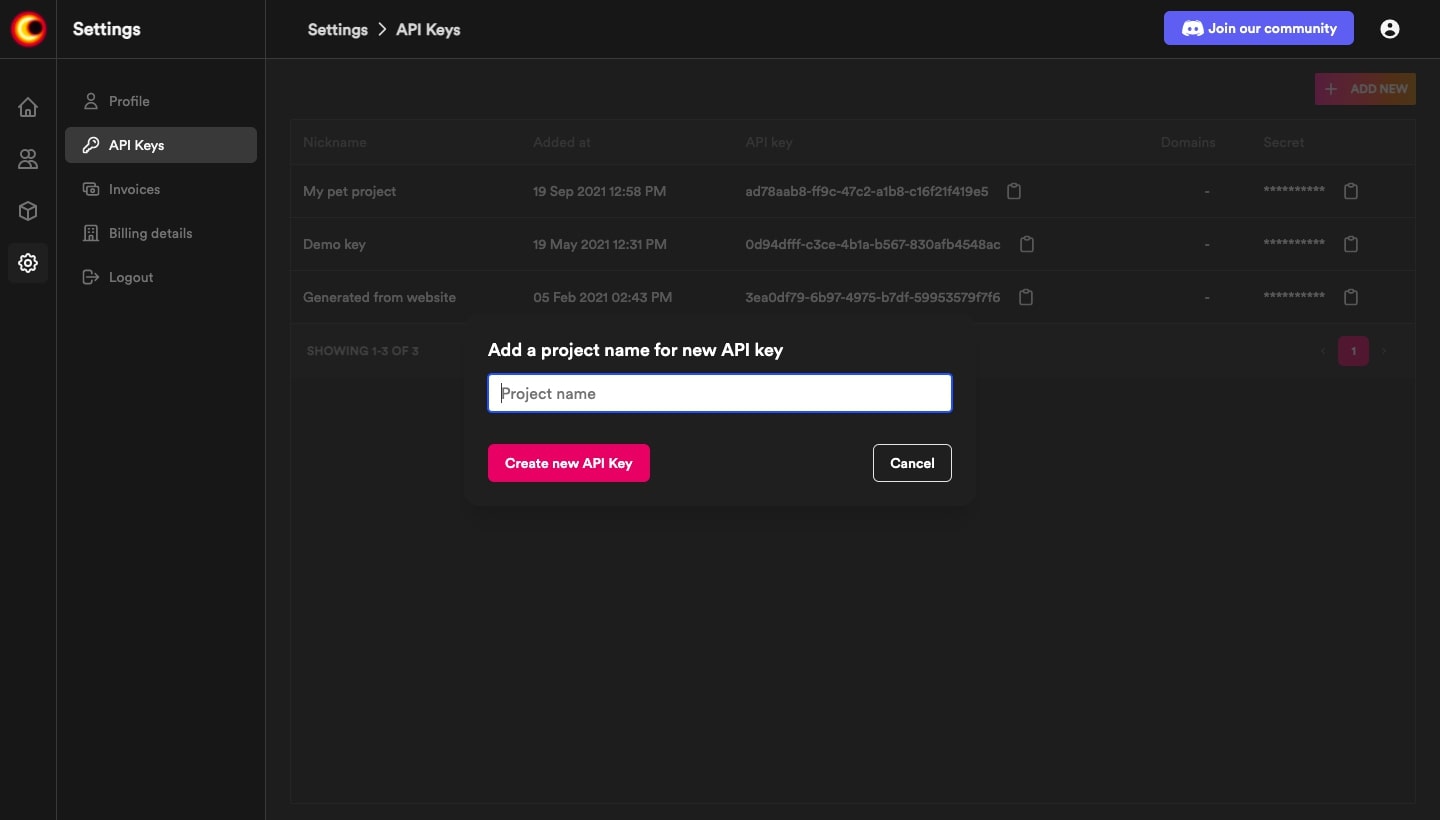
Visit, app.videosdk.live to gererate API Key and secret.
Generate Access Token
For security, every participant that connects to meeting needs a access token. By substituting apikey and permissions in it.
- Node.js
- Python
- Java
- Ruby
- PHP
var jwt = require("jsonwebtoken");
var uuid4 = require("uuid4");

// Need to generate from app.videosdk.live
const API_KEY = "API_KEY_GENERATED";
const SECRET_KEY = "API_SECRET_KEY_GENERATED";

jwt.sign(
  {
    apikey: API_KEY,
    permissions: ["allow_join"], // Permission to join the meeting
  },
  SECRET_KEY,
  {
    algorithm: "HS256",
    expiresIn: "24h",
    jwtid: uuid4(),
  },
  function (err, token) {
    console.log(token);
  }
);
#!/usr/bin/env python3
import jwt
import uuid
import datetime

api_key = 'api_key_generated'
secret_key = 'secret_key_generated'


def generateToken():
    expires = 24 * 3600
    now = datetime.datetime.utcnow()
    exp = now + datetime.timedelta(seconds=expires)
    return jwt.encode(payload={
          'apikey': api_key,
          permissions: ["allow_join"]
        }, key=secret_key).decode('utf-8')

if __name__ == '__main__':
    print(generateToken())
import java.time.Instant;
import java.util.Date;
import java.util.HashMap;
import java.util.Map;
import java.util.UUID;
import io.jsonwebtoken.Jwts;
import io.jsonwebtoken.SignatureAlgorithm;

private void generateManagementToken() {
    Map<String, Object> payload = new HashMap<>();
    payload.put("apikey", "<api_key_generated>");
    payload.put("permissions", ["allow_join"]);
    String token = Jwts.builder().setClaims(payload).setId(UUID.randomUUID().toString())
        .setExpiration(new Date(System.currentTimeMillis() + 86400 * 1000))
        .setIssuedAt(Date.from(Instant.ofEpochMilli(System.currentTimeMillis() - 60000)))
        .setNotBefore(new Date(System.currentTimeMillis()))
        .signWith(SignatureAlgorithm.HS256, "<secret_key_generated>".getBytes()).compact();
  }
require 'jwt'
require 'securerandom'

$api_key = "api_key_generated"
$secret_key = "secret_key_generated"

def generateToken()
    payload = {
      apikey: $api_key,
      permissions: ["allow_join"]
    }
token = JWT.encode(payload, $secret_key, 'HS256')
return token
end

puts generateToken
<?php

use Firebase\JWT\JWT;
use Ramsey\Uuid\Uuid;

$api_key = "api_key_generated";
$secret_key = "secret_key_generated"

$payload = [
    'apikey' => api_key,
    'permissions': ["allow_join"],
];

$token = JWT::encode($payload, $secret_key, 'HS256');
?>
Available permissions are:
- allow_join: The participant will be permitted entry without request.
- ask_join: The participant will not be permitted entry without request.
- allow_mod: Allow participant to enable/disable other participant's mic/webcam.
Got a Question?  Ask us on discord

