WebSocket Connector
A connector bridges live call audio into a VideoSDK room over a media WebSocket, without a SIP trunk. You create a connector, point your telephony provider's webhook at it, and the provider streams the call audio straight into a room. Audio flows both ways, so the caller hears the room and the room hears the caller.
Use a connector when you want to keep your phone numbers and call control in your provider account, and bridge only the audio into VideoSDK.
Connectors vs SIP Connect
Connectors and SIP Connect are two different ways to bring the same providers into VideoSDK. A connector streams audio over a WebSocket and leaves your number in the provider's account. SIP Connect imports the number into VideoSDK and carries audio over SIP.
| Connector | SIP Connect | |
|---|---|---|
| Setup | Create a connector, point a provider webhook at it | Import a phone number into VideoSDK |
| Transport | Media WebSocket | SIP / RTP to sip:$YOUR_ORG_ID.sip.videosdk.live |
| Phone number | Stays in your provider account | Imported and managed by VideoSDK |
| Best for | Bridging only the audio into a room | A managed SIP setup with inbound and outbound gateways |
Key Concepts
Three things make up a connector. Knowing how they relate makes the rest of the flow easy to follow.
| Term | What it is |
|---|---|
| Connector | The per-provider configuration you create with POST /v2/connectors. It generates a webhook URL that you set as the voice webhook in your provider console. The URL embeds a secret webhook key (whk_...), so treat it like a credential. |
| Socket URL | The WebSocket endpoint the provider streams audio to, for example wss://ingest.videosdk.live/twilio. It carries a single-use reference (ref) that VideoSDK uses to claim the waiting call. The reference expires 90 seconds after the webhook response. |
| Lifecycle webhook | Server-to-server events such as call-started and call-hangup that VideoSDK posts to your registered URLs, signed with videosdk-signature. |
Supported Providers
Pick a provider to jump to its setup guide. The connector flow is the same across providers; only the console steps and the audio markup differ. Support for more providers is added over time.
| Provider | Guide | Connect markup | Codec |
|---|---|---|---|
| Twilio | Twilio | TwiML <Connect><Stream> | μ-law (PCMU), 8 kHz |
| Plivo | Plivo | Plivo XML <Stream bidirectional> | μ-law, 8 kHz |
| Telnyx | Telnyx | TeXML <Start><Stream> | PCMU, 8 kHz |
| Custom client | Custom WebSocket | Your own WebSocket | PCM16-LE, 8 kHz |
How It Works
A call passes between three parties: your provider, VideoSDK, and the room. The flow is the same for inbound and outbound calls, and each step below hands off to the next.
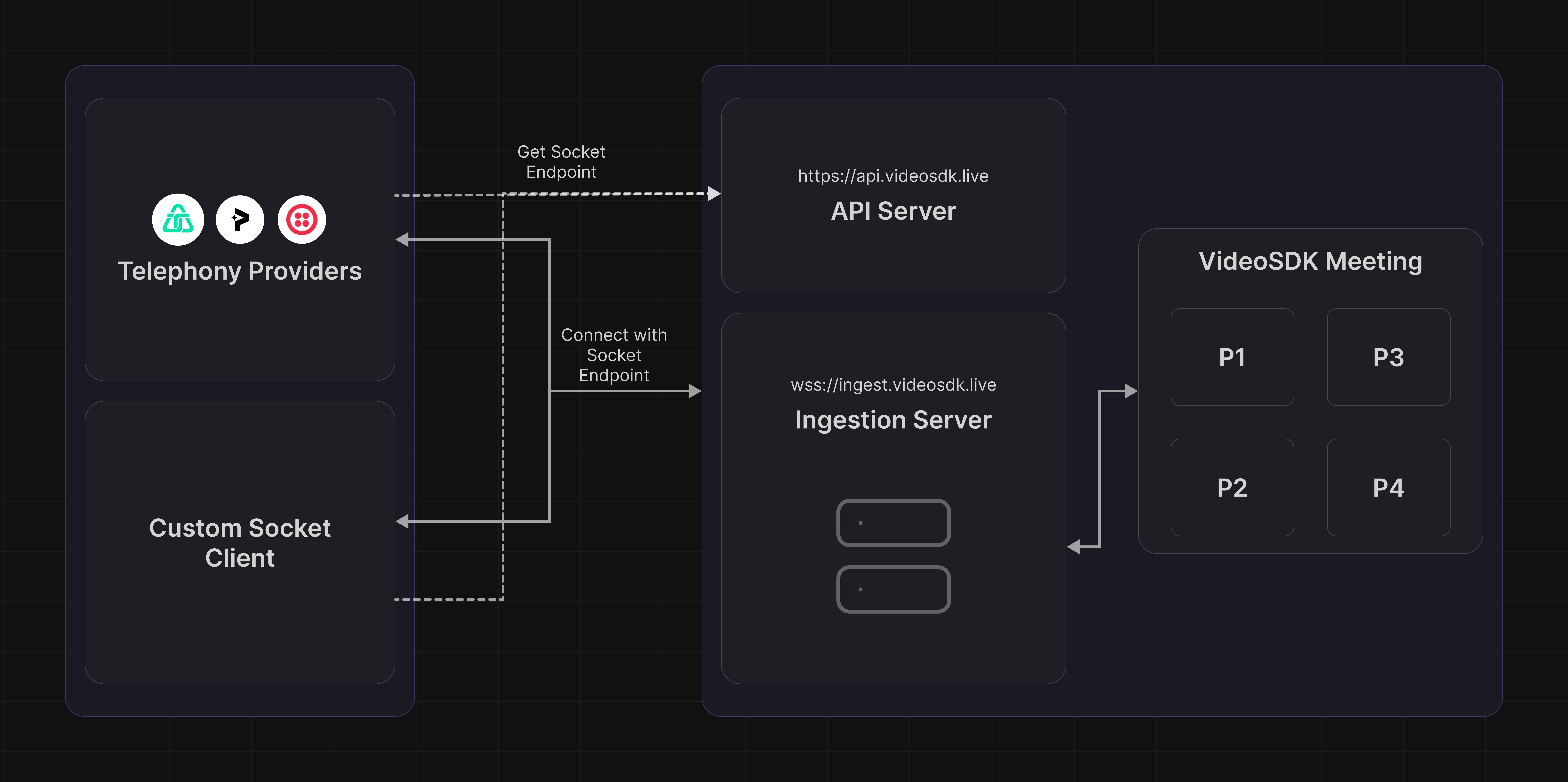
- A call is placed. The provider handles the call (an inbound call to your number, or an outbound call you initiate) and sends a voice webhook to the connector's webhook URL (
POST /v2/hooks/:provider/:webhookKey). - VideoSDK resolves routing. It decides which room the call joins, and optionally which agent, from the connector's
defaultRoomIdordefaultRuleId, a matching phone-number routing rule, or aroomIdquery parameter. - VideoSDK returns connect markup. The response (TwiML, Plivo XML, or TeXML) tells the provider to open a media WebSocket to the socket URL, carrying a single-use
refthat identifies the call. - The provider opens the WebSocket. VideoSDK claims the call using the
ref, joins the room, and bridges audio in both directions. - VideoSDK emits lifecycle events. As the call progresses, VideoSDK posts signed webhooks (
call-started,call-answered,call-hangup) to your server.
The ref is valid for 90 seconds after VideoSDK returns the markup. The provider must open the WebSocket within that window, or the claim expires and the call fails. Providers normally connect within a second, so this only matters when a webhook is misconfigured.
Lifecycle Webhooks
Connectors use the same webhook system as SIP Connect. VideoSDK posts call events such as call-started, call-answered, and call-hangup to your registered URLs, each signed with a videosdk-signature header so you can verify it.
For the full event list, payloads, signature verification, and registration, see SIP Webhooks.
Next Steps
Got a Question?  Ask us on discord

