Handling Calls with VideoSDK
VideoSDK lets you handle both inbound and outbound SIP calls in a single configuration. When you create a phone number, VideoSDK provisions both the inbound and outbound gateways for that number in one go — so you can receive calls from traditional telephony users into your meetings, and dial out from meetings to external phone numbers or SIP endpoints, using the same setup.
This guide walks you through:
- How inbound and outbound calls flow through VideoSDK.
- Configuring a phone number with inbound + outbound gateways.
- Setting up routing rules.
- Initiating outbound calls via the API.
Understanding Inbound Call Flow
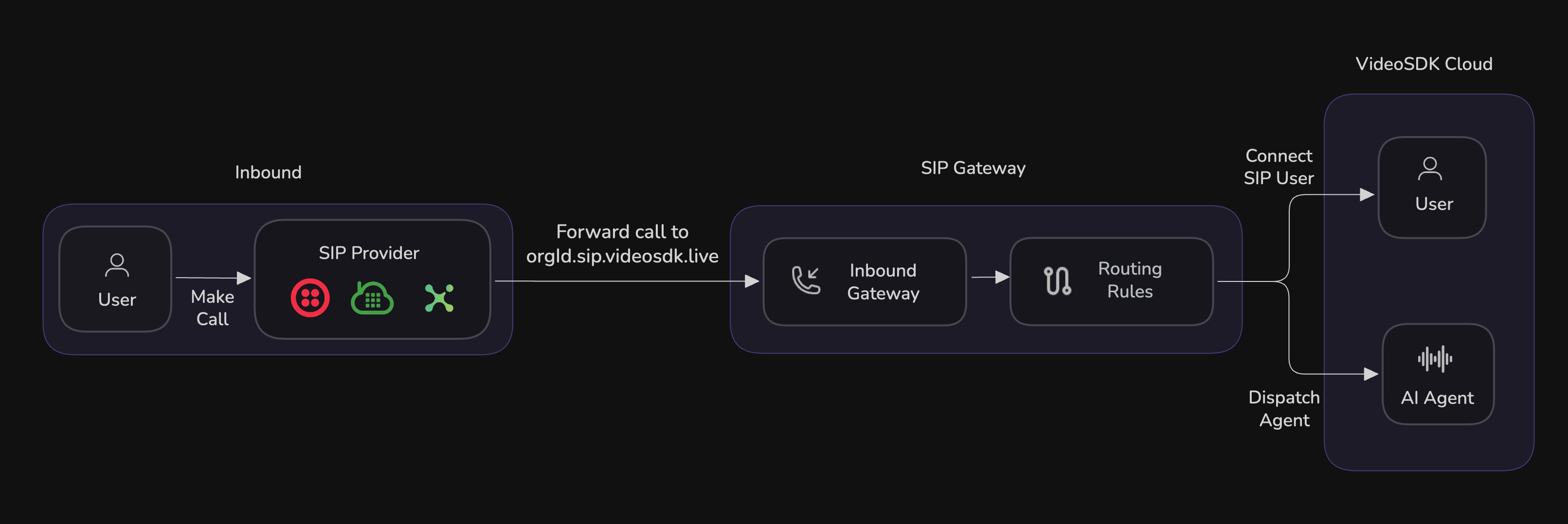
The diagram above illustrates the end-to-end flow for handling inbound SIP calls with VideoSDK:
- User Initiates Call: A user dials a phone number using their phone or SIP device.
- SIP Provider Receives Call: The call is received by your SIP provider (such as Twilio, Plivo, Telnyx, or Vonage).
- Forward to VideoSDK: The SIP provider is configured to forward the call to your organization's VideoSDK SIP URI (e.g.,
orgId.sip.videosdk.live). - Inbound Gateway: The call reaches the Inbound Gateway in VideoSDK, which acts as the entry point for all SIP traffic.
- Routing Rules: The Inbound Gateway applies your configured Routing Rules to determine how the call should be handled. Routing is decided based on the number.
- VideoSDK Cloud: Based on the routing, the call is either:
- Connected to a User: The SIP user is joined into a VideoSDK meeting room with other participants.
- Dispatched to an AI Agent: An AI agent is dispatched to the same room.
Understanding Outbound Call Flow
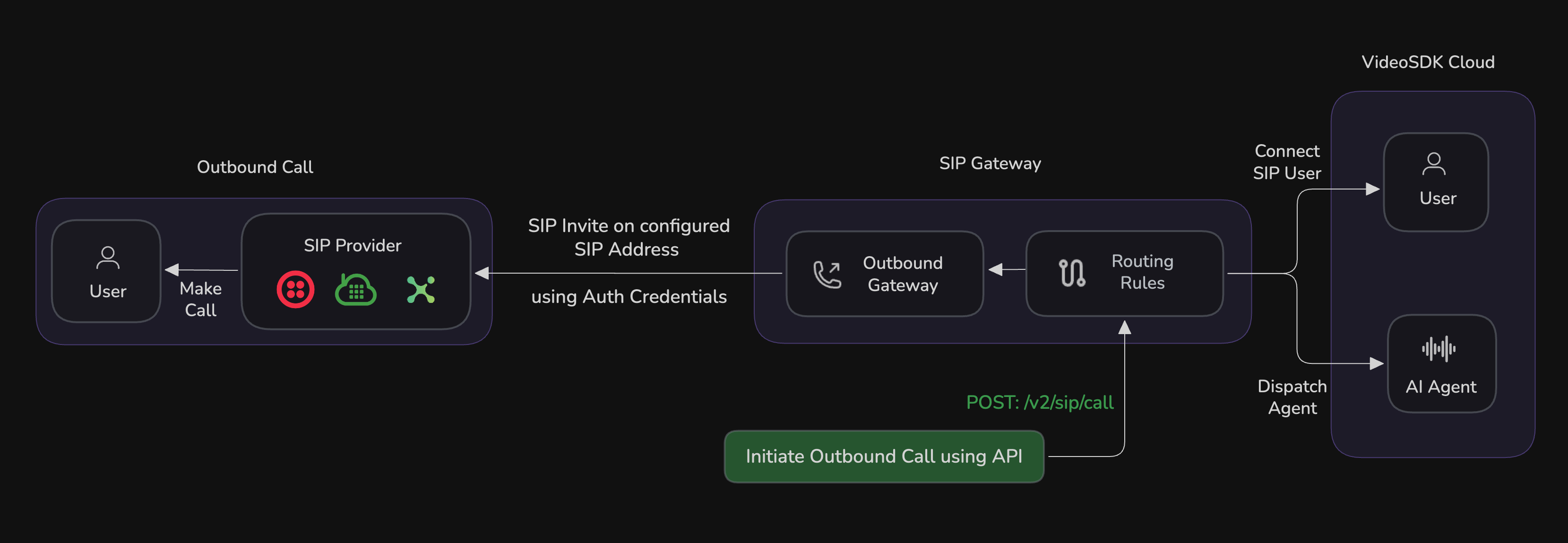
The diagram above illustrates the complete flow for making outbound SIP calls with VideoSDK:
- Initiate Outbound Call via API: An outbound call is triggered from VideoSDK Cloud by making a POST request to
/v2/sip/callusing the API. This can be done programmatically or via the dashboard. - Routing Rules: The call request is processed by the configured Routing Rules, which determine how and where the call should be routed (e.g., to a user or an AI agent) and which outbound gateway to use.
- Outbound Gateway: The call is sent to the Outbound Gateway based on the matched routing rule, which holds the SIP provider configuration (termination address, credentials, etc.).
- SIP Provider: The Outbound Gateway sends a SIP INVITE to the configured SIP provider (such as Twilio, Plivo, Telnyx, or Vonage) using the provided authentication credentials.
- User Receives Call: The SIP provider places the call to the destination user (phone number or SIP endpoint). The user receives the call and can answer it on their device.
- Connect or Dispatch: The SIP user is connected to the VideoSDK meeting room, and an AI Agent is dispatched depending on the routing rule.
Configure Phone Number (Inbound + Outbound)
With VideoSDK's unified flow, creating a phone number provisions both the inbound and outbound gateways for that number. You can do this from the dashboard or via the API.
Configure your provider
For the provider you want to use, you need:
-
The SIP URI to forward inbound calls to VideoSDK:
sip:$YOUR_ORG_ID.sip.videosdk.liveReplace
$YOUR_ORG_IDwith your actual VideoSDK organization ID.noteIf you want to restrict calls to a specific region, you can use:
sip:$YOUR_ORG_ID.<region>.sip.videosdk.liveAvailable regions:
in1→ Indiaus2→ US
-
The termination SIP address and authentication credentials (username/password) of your provider, used for outbound calls.
Create the Phone Number
When creating a phone number in VideoSDK, provide the following:
- Phone Number: The number in E.164 format (e.g.,
+14155552671). - Inbound Gateway: Created automatically when you add a number from your SIP provider — it becomes the entry point for incoming SIP calls.
- Outbound Gateway:
- Gateway Name: A descriptive name for your gateway.
- Termination Address: The SIP URI or IP address where outbound calls should be sent.
- Authentication Credentials: Username and password for your SIP provider.
- Transport: Protocol to use (e.g., UDP, TCP, TLS).
By default, the SIP server region for outbound calls is automatically selected based on the location nearest to the number being dialed. To pin a specific region, update the outbound gateway using the geoRegion property via the API.
Available regions:
us002→ USin001→ India
Setup Routing Rules
Once your phone number is configured, define Routing Rules to determine how calls are dispatched.
-
Routing Rule Configuration:
- Gateway: Select the gateway you created.
- Number: Specify the phone number(s) associated with this rule.
- Dispatch: Choose how calls should be routed.
-
Room Configuration:
- Dynamic: A new room is created for each call. You can customize the room ID using a prefix:
- random: Generates a random room ID for each call.
- participant number: Uses the caller's phone number as part of the room ID.
- SIP number: Uses the SIP number (the number you purchased) as part of the room ID.
- Static: All calls are routed to a fixed, pre-defined room.
- Dynamic: A new room is created for each call. You can customize the room ID using a prefix:
Configure using Dashboard
Configure using APIs
You can create a phone number with both inbound and outbound gateways in a single API call:
import fetch from 'node-fetch';
const options = {
	method: "POST",
	headers: {
		"Authorization": "$YOUR_TOKEN",
		"Content-Type": "application/json",
	},
	body: JSON.stringify({
		"name" : "My SIP Setup",
		"phoneNumbers" : ["+14155551234","+14155555678"],
		"inbound" : {"sipRegion":"us002"},
		"outbound" : {"sipRegion":"us002","address":"sip.telnyx.com:5061","transport":"tls","auth":{"username":"sip-user","password":"sip-pass"}}
	}),
};
const url= `https://api.videosdk.live/v2/sip/phone-numbers`;
const response = await fetch(url, options);
const data = await response.json();
console.log(data);
Initiate an Outbound Call
Once your phone number is configured, you can initiate outbound calls using the VideoSDK API. This allows you to dial out from a meeting to any external phone number or SIP endpoint.
Parameters:
sipCallFrom: The source phone number (E.164 format) to place the call from.sipCallTo: The destination phone number (E.164 format).routingRuleId: ID of the routing rule to use for this call.destinationRoomId: (Optional) The room ID to connect the call to.
The routing rule referenced by routingRuleId must be of type outbound, and the business number provided in sipCallFrom must be associated with that routing rule. The call will be rejected if either condition is not met.
Example Request:
{
  "sipCallFrom": "+14155550100",
  "sipCallTo": "+14155550199",
  "routingRuleId": "rr_2554md"
}
import fetch from 'node-fetch';
const options = {
	method: "POST",
	headers: {
		"Authorization": "$YOUR_TOKEN",
		"Content-Type": "application/json",
	},
	body: JSON.stringify({
		"sipCallFrom" : "+14155550100",
		"sipCallTo" : "+14155550199",
		"routingRuleId" : "rr_2554md"
	}),
};
const url= `https://api.videosdk.live/v2/sip/call`;
const response = await fetch(url, options);
const data = await response.json();
console.log(data);
{
  "message": "Call initiated successfully",
  "data": {
    "callId": "call_123456789",
    "status": "INITIATED",
    "roomId": "room_123456",
    "sipCallTo": "+14155550123",
    "sipCallFrom": "+14155559876",
    "gatewayId": "gw_123456789",
    "metadata": {
      "campaignId": "cmp_123",
      "source": "crm"
    },
    "timelog": [
      {
        "status": "INITIATED",
        "timestamp": "2025-08-21T11:45:00.000Z"
      }
    ]
  }
}
All configurations and calls can be managed via the VideoSDK dashboard or automated using the VideoSDK API. For detailed information on each API endpoint, refer to the VideoSDK API Documentation.
API Reference
Phone Number APIs
- Create Phone Numbers + SIP Gateways API
- List Phone Numbers API
- Get Phone Number by e164 API
- Update SIP Gateway API
- Detach Gateway from Phone Number API
- Release Phone Number API
Routing Rule APIs
- Create Routing Rule API
- Fetch all Routing Rule API
- Fetch a Routing Rule API
- Update Routing Rule API
- Delete Routing Rule API
Outbound Call APIs
Got a Question?  Ask us on discord

